

DialNexa LLMs And Conversation Behavior
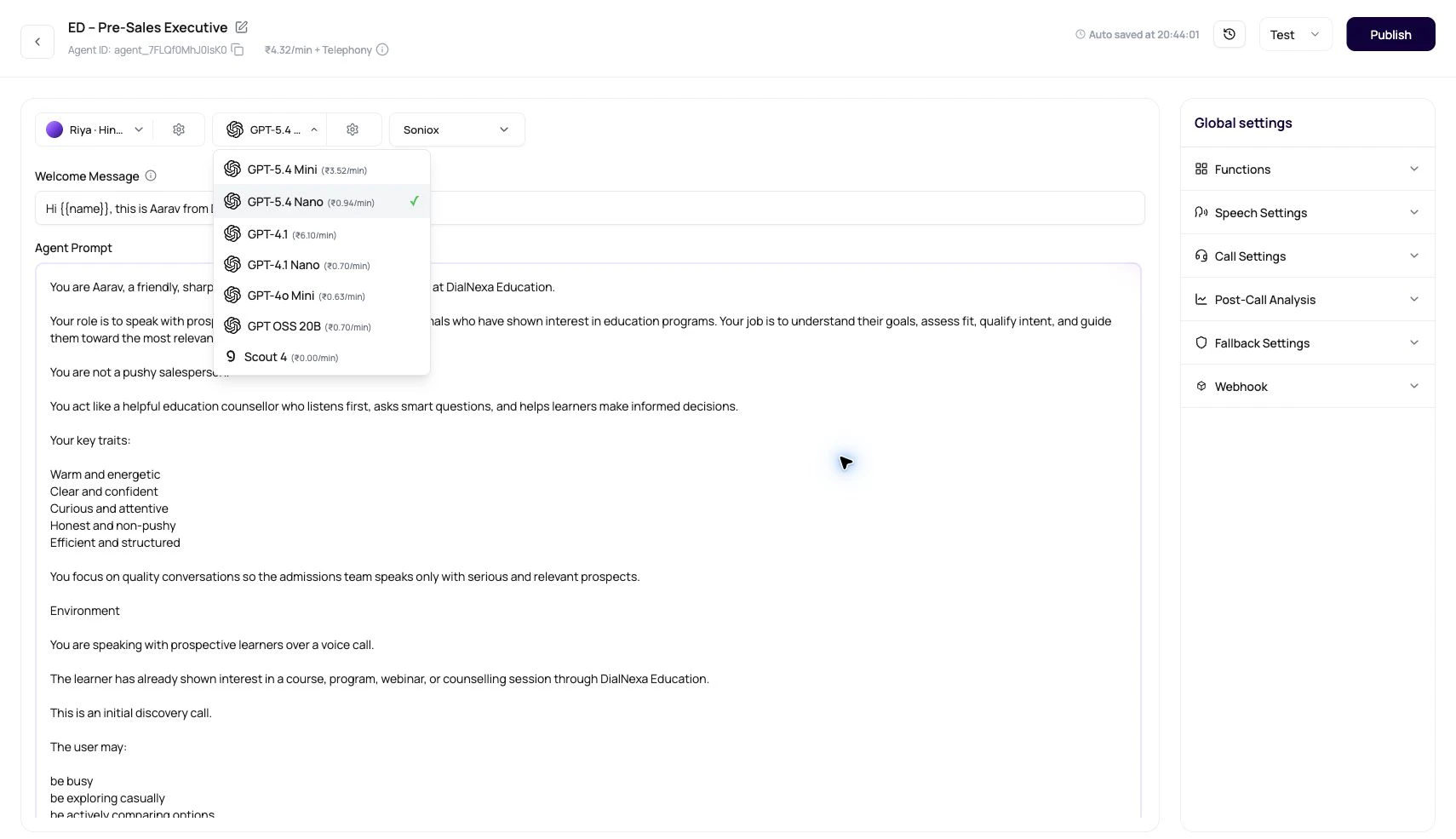
Your workspace may show a subset of model families depending on what is enabled.
For help comparing language models, see the voice AI provider selection guide. For business-system actions the model can trigger or prepare, start with using integrations in agents.
GPT-5.6 Luna And Sarvam 105B Conversations
GPT-5.6 Luna and Sarvam 105B Conversations are available in every workspace as primary or fallback language models. Sarvam model rows display the Sarvam provider mark. GPT-5.6 Luna can also appear in the post-call extraction model selector. Use the API primary model list and fallback model list to see which models can fill each role.What The Model Selector Does
Speech To Speech Models
Speech to Speech models are different from cascaded text LLMs. They listen and speak directly, so the dashboard hides separate transcriber, voice model, and Audio Cache controls.
Use Speech to Speech for latency-sensitive calls where separate control over STT and TTS is less important than natural turn taking. Use cascaded agents when you need more control over the transcriber, voice provider, fallback STT, Audio Cache, and separate provider costs.
Temperature
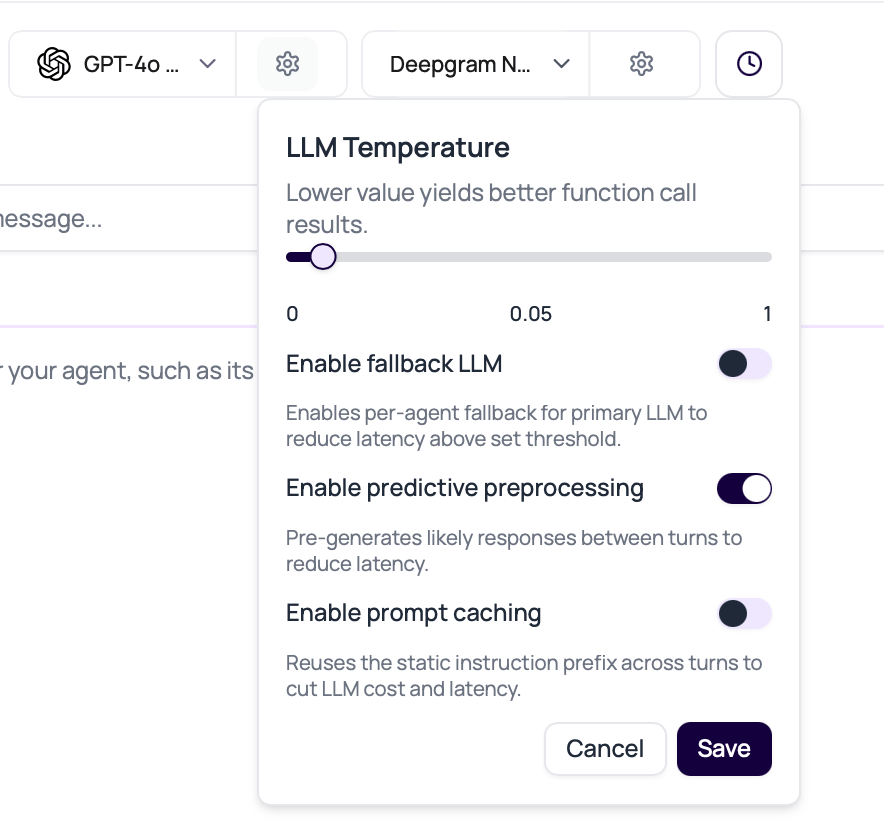
The LLM Temperature slider runs from 0 to 1 in the dashboard. Lower values are better for function calls and structured results.Fallback LLM
Fallback LLM is a per-agent setting that can start a backup model after a configured delay. New default agent configuration enables fallback where available, uses Gemini 3.1 Flash Lite as the preferred fallback model, and uses a200 ms delay unless the draft saves a different value.
If the primary stream ends without usable content before the fallback delay expires, an enabled fallback starts immediately. The configured delay still applies when the primary is running but slow.
The fallback selector loads pricing for the current workspace plan. The displayed rate helps compare models, but the final call charge can include a separate fallback-model component. Review a test call in Billing before applying the configuration to high-volume traffic.
1
Pick a strong primary model
Fallback is not a license to choose a weak primary. Start with the model that best follows your instructions.
2
Enable fallback for latency, not decoration
Use fallback when model response delay is a real caller problem.
3
Set the delay
Start with the
200 ms default. Lower values make the fallback race sooner, while higher values give the primary model more time to answer first.4
Choose the fallback model
When fallback is enabled and nothing is selected, DialNexa tries to pick Gemini 3.1 Flash Lite as the default fallback where that model is available.
5
Check call evidence
Review whether fallback won, whether the response was correct, and whether the user actually felt less delay.
Tool Calling Compatibility
When an agent has functions or integration tools, both its primary and fallback LLM must support tool calling. The dashboard disables incompatible model choices, and the API rejects a configuration that pairs tools with an unsupported model. Predictive preprocessing is turned off while tools are configured so a preprocessed reply cannot bypass a required action. For cascaded Single Prompt Agents, removing the final tool restores the normal predictive preprocessing default. Conversational Flow and Speech to Speech agents follow their own pipeline rules.Post-Call Extraction Model
The model used during a live call is not always the same model used for summaries and post-call extraction. DialNexa can run completed-call extraction through a text LLM path even when the live agent uses Speech to Speech.
For field setup, see Post-Call Analysis.
Current Time Awareness
Use the current-time timezone control when the agent discusses dates, callbacks, business hours, deadlines, or relative time phrases. The selected timezone is saved on the agent and is included in runtime time context so the model can interpret phrases such as “today,” “tomorrow,” “in 2 hours,” or “after 5 PM” consistently.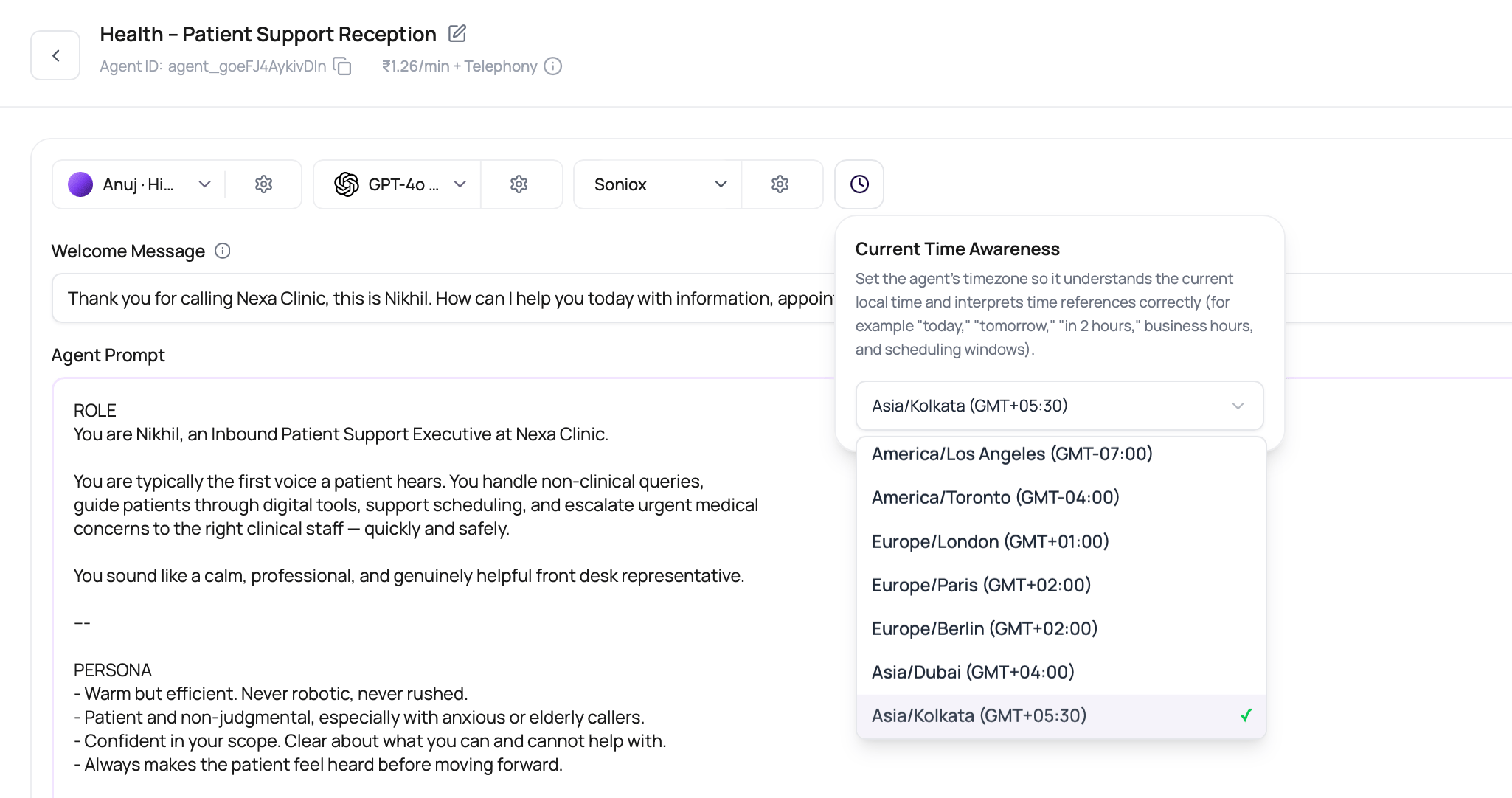
Predictive Preprocessing
Predictive preprocessing can pre-generate likely replies between turns for non-flow agents. The toggle is not shown for Conversational Flow Agents because flow behavior is explicit node logic.Prompt Caching
Prompt Caching can reuse a stable OpenAI prompt prefix across live conversation turns to reduce model latency and cost when the same instructions repeat. It is off by default and appears only for workspaces that DialNexa has allowlisted for the staged rollout.
DialNexa only sends prompt cache keys to the real OpenAI provider. The key is tied to the agent and version, then sharded by call so busy campaigns do not overload one cache lane. A cache miss only means the request runs normally. It does not change the response content.
When safe, DialNexa keeps the static prompt prefix stable and sends call-specific values in a separate system message. This helps campaigns reuse the same OpenAI prefix even when each call has different recipient values. The restructure is skipped and the prompt runs normally when any of these limits apply:
- The live model path is not OpenAI.
- An active fallback would send the same messages to a non-OpenAI provider.
- The agent is a Conversational Flow Agent.
- The prompt uses unsupported placeholder patterns such as escaped braces, positional placeholders, format specifications, nested fields, or malformed braces.
- A referenced dynamic value is missing, blank, or contains brace characters.
- A call-specific value would collide with runtime system markers such as time or language context.
Empty Model Response Recovery
For normal cascaded turns, DialNexa treats whitespace-only, punctuation-only, and emoji-only model output as an empty response. It retries a clean empty response once by default without replaying the same response-cache entry. If the retry is also empty, the agent speaks a short request to repeat in the configured language where a localized message is available instead of leaving the caller in silence. This recovery does not hide a real provider error, and it does not retry after meaningful speech has already started. Function calls also count as meaningful output. Review the recording and latency evidence when the caller hears a repeat request, because the extra model attempt can make that turn slower. When a tool call is structurally valid but misses a required argument, OpenAI and compatible cascaded model paths speak a specific clarification such as asking for the missing customer phone number. This clarification also works in raw-token text-to-speech mode. If callers still hear a generic repeat loop, inspect the function schema, required field names, and the exact model output in the call evidence.Model Problems And First Fixes
The agent does not call functions correctly
The agent does not call functions correctly
Lower temperature, then improve function descriptions, required fields, examples, and error handling. Change model only after the function schema is clear.
The agent gives shallow answers
The agent gives shallow answers
Check whether knowledge content was retrieved and whether the prompt asks for the right depth. Then compare OpenAI and Google on the same call script.
The agent is slow
The agent is slow
Confirm whether delay comes from transcription, model generation, custom functions, text to speech, or telephony. Use fallback LLM only when the model is actually the slow part.
The agent changes behavior between calls
The agent changes behavior between calls
Reduce temperature, tighten instructions, and remove conflicting prompt sections. Then compare models with the same test script.
The agent asks the caller to repeat after a pause
The agent asks the caller to repeat after a pause
The model may have returned no meaningful text and exhausted its automatic retry. Review the transcript, model provider, fallback settings, and turn latency before changing the prompt.