

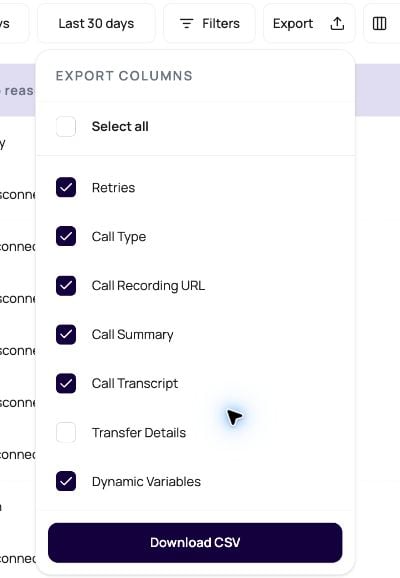
Export DialNexa Call Data
The exported rows reflect the selected view or batch helper.Export DialNexa Transfer Details
Transfer Details is an optional export choice. It expands into four CSV columns:Transfer OutcomeTransfer DurationTransfer Agents DialedTransfer Winner
NA in all four fields. Leaving Transfer Details unselected avoids loading transfer data when it is not needed.
Export Row Limits And Selected Columns
DialNexa uses the selected export columns to avoid loading conversation text that the CSV does not need. A single export supports up to5,000 matching calls when Call Transcript or Call Summary is selected, and up to 10,000 calls when both are left out.
If an export exceeds its limit, the dashboard shows the server’s exact row count and asks you to narrow the date range or add filters. When a heavy conversation column is selected, the message also explains that clearing both transcript and summary raises the limit to 10,000 rows.
The API accepts an export-only columns query value containing comma-separated column keys. Older clients can omit it and continue receiving the complete export shape under the 5,000 row limit. See List Calls for the request parameter.
Good Export Uses
Exports should support a clear operational process.Campaign reporting
Sales handoff
QA review
Billing review
Export Hygiene
Filters were too broad
Filters were too broad
Narrow by date, campaign, status, or call id before export. If you do not need transcript or summary text, clear both columns to use the higher row limit.
Columns are missing
Columns are missing
Check whether post-call fields existed on the agent version used by those calls.
Values look inconsistent
Values look inconsistent
Review field definitions and transcript quality.
Transfer Details contains NA
Transfer Details contains NA
NA means the call has no stored transfer result for that field. Compare the call with its agent configuration and open the transfer tab on the call detail page before treating it as an export problem.Sensitive data risk
Sensitive data risk
Treat exported rows as production data outside the dashboard boundary.