

Where Spend Context Appears
Billing signals are split between account context and call evidence.Wallet balance
Transactions
Call details
Phone number rentals
Rate previews
Integration actions
Current Billing Wallet Behavior
For organizations on the current billing system, Workspace Settings > Billing shows the active organization’s INR balance, recharge controls, transaction history, and billing contact details.
Use the Billing Balance & usage tab for self-serve top-ups, or contact DialNexa support for bank-transfer credits and billing corrections.
DialNexa Billing And Wallet Credit Expiry
Open Workspace Settings > Billing > Balance & usage and review Your credits before planning a campaign. Standard credits are valid for six months from the day they are added. The table shows each recharge’s original amount, remaining amount, and expiry date. Credits are spent in expiry order, with the soonest-expiring credits used first.
- Expires shows a date for active credit, Fully used for consumed credit, or Expired for expired credit. A credit without an expiry shows No expiry.
- When credit is due within 30 days, the balance card shows the total due during that window and the first expiry date. The total can cover multiple recharges with different dates; it does not all expire on the first date.
- Where credit expiry is active for your workspace, expiry removes only unused credit. Check Transactions for the credit-expiry debit; it is not call usage and does not count toward monthly usage spending.
- If your wallet was negative before a recharge, part of the payment settles that deficit. The remaining spendable amount can therefore be lower than the recharge amount.
Recharge And Billing Settings
1
Open Billing
Go to Workspace Settings > Billing and choose the Balance & usage, Transactions, or Billing details tab.
2
Check wallet status
Confirm whether the balance is Active, Overdue, or No balance before launching outbound traffic.
3
Add credits
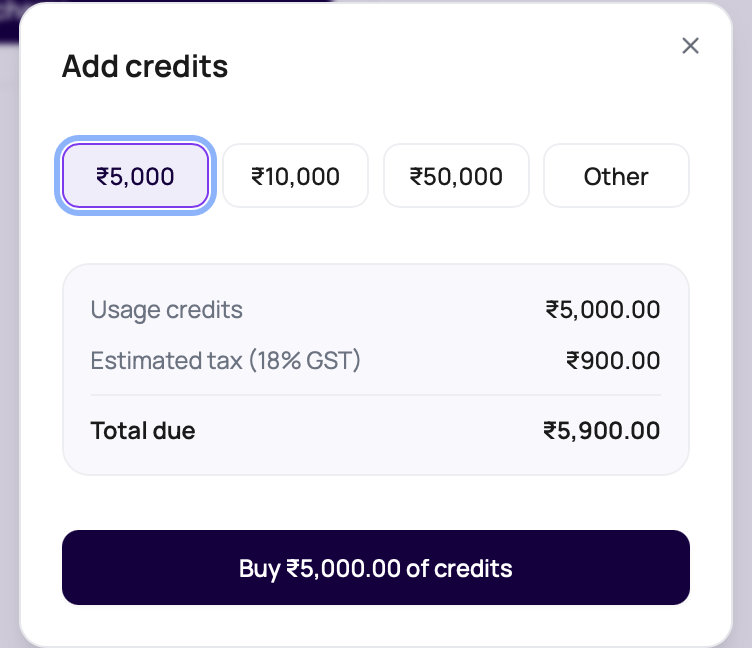
Choose a preset amount or Other, review the 18% GST estimate, and complete the INR payment through Razorpay.
4
Configure balance alerts
Set a low balance alert, optionally add an early warning threshold, and choose up to five email recipients for alert delivery.
5
Download transactions
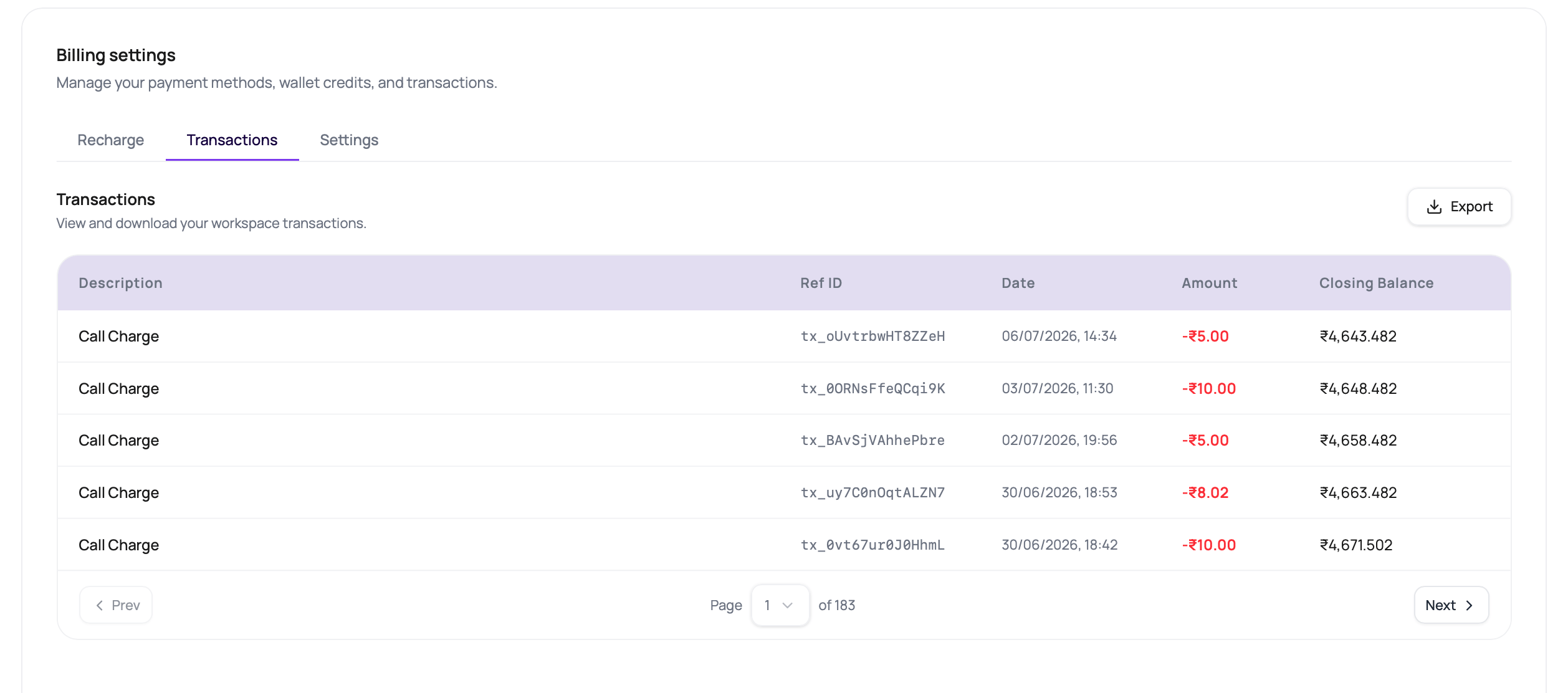
Use the Transactions tab export when finance or operations needs an offline reconciliation file.
6
Keep billing details current
Save the legal billing name, billing address, and GST Number from the Billing details tab.
Set Up Auto-Recharge
Auto-recharge is available across workspaces below Recharge wallet. A saved payment mandate authorizes future card charges when the balance falls below your rule’s threshold. Before enabling it, choose a threshold that covers your expected calling spend while a bank debit settles. The dashboard advises allowing about two days of calling and displays a settlement estimate of up to 36 hours. Check the actual wallet credit before relying on a pending top-up to fund calls.- Open Workspace Settings > Billing > Balance & usage, then open Auto-recharge.
- Enter the balance threshold and the amount of credits to add. Use whole rupees. The amount must be at least the threshold and between ₹1,000 and ₹12,000.
- Review Credits added, Tax (18% GST), and Charged each time. The automatic recharge charge includes GST; the wallet receives the credit amount.
- Choose Verify card with ₹1 and complete the card authorization. This verification charge is credited to your wallet; it does not purchase the full recharge amount.
- Reopen the details and confirm that the mandate is active and auto-recharge is on. If bank confirmation is still pending, use Check again before starting another setup.
Check Automatic Top-Ups
The balance is checked every 15 minutes. A top-up can be held while another debit is pending, the rolling 24-hour attempt cap is reached, or the one-hour cooldown after a successful recharge is still active. Failed attempts count toward the cap. Three consecutive failures switch auto-recharge off. Open Auto-recharge to review the rule, mandate state, blocking or pause reason, and Top-up history. A row marked With your bank is still pending. Confirm Succeeded, the wallet balance, and the transaction before treating a recharge as complete. If calling needs credits sooner, use manual Recharge wallet.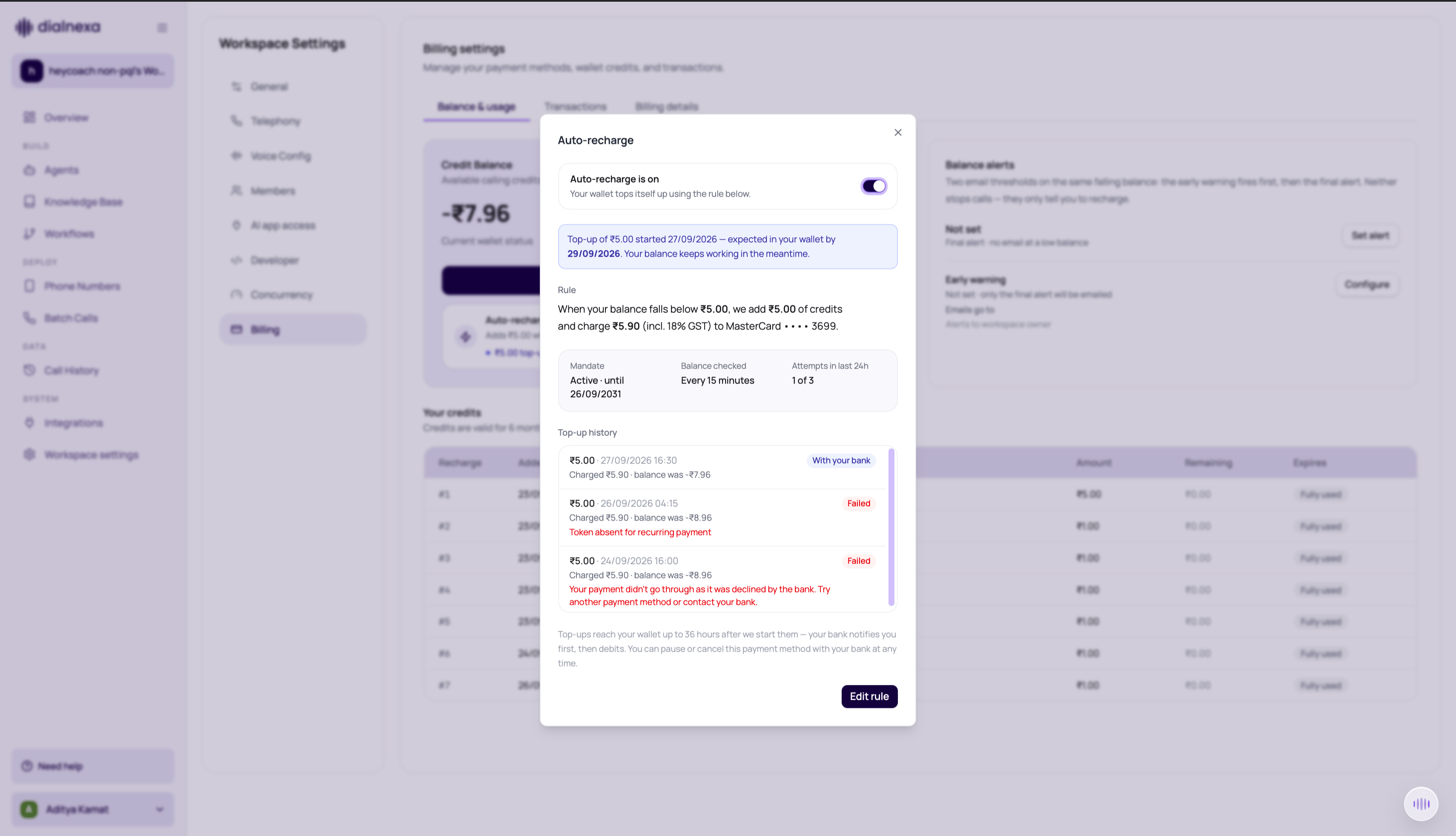
Change Or Stop Auto-Recharge
Use Edit rule to change the threshold or amount, then Save changes and reopen the details to verify. Use the on/off switch to stop future automatic top-ups while retaining the saved method. Turning it back on requires an active mandate. Remove payment method requires a second confirmation and cancels the mandate. A debit already with the bank may still complete and add credits. Review pending attempts before removing the method, and check transaction history before repeating an uncertain payment.Account emails and optional reminders
Payment confirmations and account notices help you check credits, calling problems, and phone-number renewals. Verify any payment against the wallet and transaction history before relying on the email alone. To stop setup tips, reminders, and weekly summaries, use the unsubscribe link in one of those emails and confirm Unsubscribe. Opening the link alone does not change the preference. The confirmation page offers Subscribe again if you change your mind. Account emails about payments, failing calls, and phone numbers still arrive. Batch-completion reports have a separate unsubscribe preference. Stopping those emails leaves batch results available in Call History.Spend Planning Checks
Use these checks before campaign launch.Review Costs After Calls
1
Open Call History
Filter to the campaign, workflow, number, or date range you need.
2
Open sample calls
Inspect duration, status, credits, and recording.
3
Expand call charges
In the Transactions tab, expand call-charge rows to review telephony, LLM, fallback LLM, transcriber, fallback transcriber, synthesizer, or bridge components when line items are present.
4
Export when needed
Use exports for offline reconciliation and reporting.
5
Adjust launch settings
Tune retries, duration, and recipient list before the next run.
6
Review workflow automation
For workflows with cloud Application nodes, reconcile integration invocation counts with wallet transactions.