

The caller does not hear your provider architecture. They hear a voice saying their name, amount, date, and next step. Test those words.
Choose DialNexa Text To Speech And Voice Providers
For provider selection guidance, use the voice AI provider selection guide. Cartesia voices are selected from the DialNexa voice selector.
- Choose ElevenLabs
- Choose Cartesia
- Compare providers
Choose ElevenLabs when the voice personality matters and you want to audition a wider library. In the current dashboard path, ElevenLabs agent versions are standardized on Flash v2.5 (
eleven_flash_v2_5) where supported, so treat that as the main model to test.How The Voice Selector Works
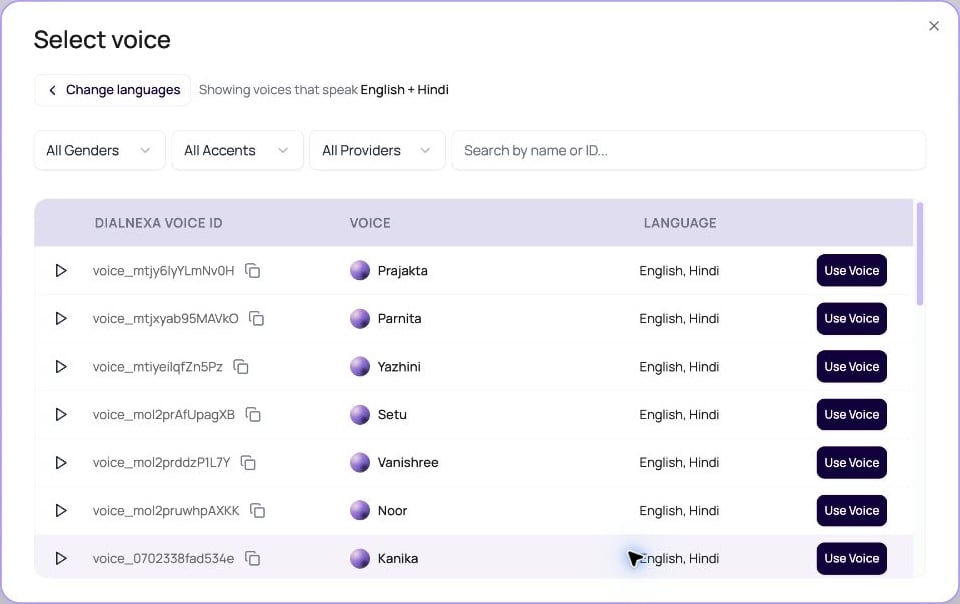
The selector is designed for large voice libraries.
The voice picker loads the library in pages. Use its search and filters when a voice is not in the currently loaded results. Sample playback shows a loading state while the audio is fetched; wait for it to finish before comparing voices.
For a step-by-step walkthrough, see agent language and voice selection. To add ElevenLabs, Cartesia, Sarvam, or Soniox voices to the current workspace, use Voices.
Voice Settings In The Popover
The voice settings shown depend on the selected provider. Sarvam voices expose the available model and speed controls; changing providers can clamp a saved speed to the new provider’s supported range. Speech to Speech agents use the realtime model’s voice controls and do not use these separate synthesis settings.
The dashboard no longer offers a Voice Volume slider. Provider-specific settings appear only when the selected provider has adjustable controls.
Soniox text to speech voices
Soniox voices are available across workspaces in the voice picker and Voices. Preview a voice, import it into the workspace if needed, and choose one that supports the agent’s selected languages. When you change providers, the dashboard keeps the saved speed if it is in range and otherwise adjusts it to the nearest allowed value. Soniox uses 0.7 to 1.3, Sarvam 0.3 to 3, and the other cascaded voice providers 0.7 to 1.2. Saving a changed voice or speed through the API also clamps recognized cascaded providers to these ranges. Read the saved value and test the resulting speech before publishing.Sarvam Text To Speech Voices
Sarvam voices are available across workspaces and can be added through Voices. Select a voice that supports every configured agent language, then review its model and speed in the voice settings. Hinglish uses the Hindi voice path; test English names and numbers within the same conversation before publishing.Audio Cache And Repeated Speech
Audio Cache stores synthesized audio for repeated phrases. It works best when the generated text, voice provider, voice id, voice settings, and output format repeat. DialNexa also reuses a pre-generated welcome message across calls by default when the audible configuration matches. The first call can synthesize and store the greeting. Later calls can reuse the same telephony-ready audio, which reduces greeting delay and avoids synthesizing the same line again. If the greeting text, voice, provider settings, or audio format changes, DialNexa creates a different cache entry.A greeting containing dynamic variables is rendered with that call’s values and is kept out of the shared welcome-audio cache. A cache miss or cache outage falls back to normal synthesis.
DialNexa does not store incomplete interrupted segments as reusable cache entries. A segment must finish cleanly and match the text that was sent for synthesis before it can become future cached audio.
Streaming Speech Continuity
For streamed voices, DialNexa buffers and plays synthesized segments in order so callers hear the response as a coherent sentence. This is especially important for fast Cartesia paths and multi-part ElevenLabs output, where chunks can finish at different times. Hindi punctuation is also treated as a sentence boundary for supported TTS segmentation, so Hindi and Hinglish responses can flush at natural pause points instead of waiting for only English punctuation. For ElevenLabs streaming, a semicolon stays inside the current speech context instead of ending it as a separate context. Timeout handling also keeps an unfinished trailing word buffered until more text arrives or the bounded wait is exhausted. These safeguards reduce replies that stop after a semicolon or pronounce one word as two fragments. For Sarvam streaming, speech from an interrupted reply is discarded while arriving audio stays paired with its original sentence. Incomplete audio from a replaced provider connection is not stored as a reusable cache entry. Test interruptions and language changes on a draft call before publishing a multilingual agent.Where Voice Quality Shows Up Outside The Call
Voice quality is not only a caller comfort issue. It changes whether downstream work is trusted.Voice Review Checklist
1
Test the first sentence
The welcome line sets trust. Check pace, pronunciation, greeting tone, and whether the voice fits the use case.
2
Test difficult words
Include brand terms, product names, locality names, acronyms, medicine names, plan names, and agent names.
3
Test numbers and dates
Amounts, due dates, order IDs, phone numbers, and appointment slots reveal speech issues quickly.
4
Test interruption recovery
Interrupt the agent during the greeting and check how naturally it resumes.
5
Review recording and transcript together
The transcript shows content. The recording shows delivery.