

Before You Begin
Collect the API key and instance endpoint from the Wati account’s API Docs page, prepare a consented test number, and confirm the template is approved with the expected parameters.DialNexa WhatsApp With Wati Actions
Wati Fields Users Encounter
When To Use Wati
Appointment reminder
Payment or renewal nudge
Support handoff
Workflow branch
Use Wati In A Workflow
1
Connect Wati
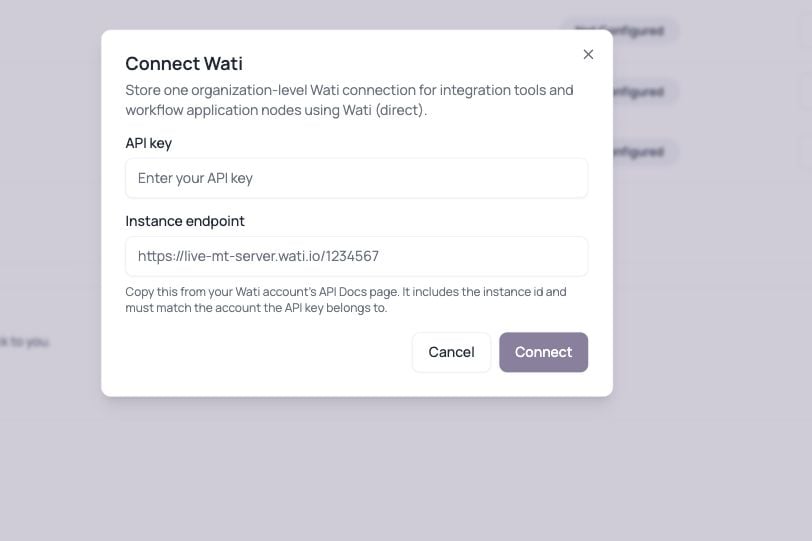
Open Integrations, select Configure on Wati, enter the API key and matching instance endpoint, then connect the organization-level account.
2
Sync approved templates
After Wati is connected, select Sync from Wati. The dashboard imports the approved templates available to that Wati account. Sync again after templates change in Wati.
3
Choose a Native Application node
Add an Application node to the workflow, select Native, then confirm WhatsApp (Wati). Wati is not listed in the Cloud integration picker.
4
Select the template
Search the synced template picker and select the exact approved template. A template with no parameters clears any values left from the previously selected template.
5
Map recipient and content
Map template parameters in order. The native Wati node sends to the workflow lead’s phone number.
6
Connect the continuation path
Native Wati uses one output path. Connect it to the next workflow step, then use lead history and invocation evidence to investigate provider failures.
7
Test with one lead
Confirm Wati accepts the template and parameters before launching a large workflow.
Wati Troubleshooting
Template name is wrong
Template name is wrong
Sync templates from the Integrations page, then select the template from the workflow picker. Case, spelling, and approval status still matter in Wati.
Parameter count mismatch
Parameter count mismatch
The template expects a specific number of parameters. Map every required value in the correct order.
Phone number is missing
Phone number is missing
Check uploaded lead variables, call attributes, and Application node mapping.
Credential invalid
Credential invalid
Confirm the API key and instance endpoint come from the same Wati account, then reconnect before rerunning the workflow.
No templates appear in the workflow
No templates appear in the workflow
Confirm Wati is connected, return to Integrations, and select Sync from Wati. Templates must already exist and be approved in Wati.
Wati is missing from Cloud mode
Wati is missing from Cloud mode
This is expected. Workflow Wati templates use the Native adapter mode and appear as WhatsApp (Wati).