
How to Dial a Number With an Extension: 2026 Guide
A surprising amount of revenue leakage starts with a tiny operational failure. In India, 68% of customer support calls in BFSI and EdTech use extensions for agent routing, and IVR systems handle 1.2 billion extension-dialled sessions annually according to Vitel Global's extension dialing overview. When extension handling is inconsistent, teams don't just lose seconds. They lose connects, handoffs, agent time, and qualified opportunities.
Leaders often treat extension dialing as a user habit problem. It isn't. It's a process design problem. If your teams still rely on memory, ad hoc pauses, and trial-and-error call flows, you're leaving a core communication workflow unstandardised.
Table of Contents
- Why Mastering Extension Dialing Is a Strategic Imperative
- The Core Mechanics of Extension Dialing Pauses and Waits
- Executing Extension Calls on Mobile and Softphones
- Navigating Corporate PBX and VoIP Desk Phone Systems
- Advanced Strategies for Dialing Efficiency and Accuracy
- The Future of Extension Dialing Automation with Voice AI
Why Mastering Extension Dialing Is a Strategic Imperative
Extension dialing affects revenue, labour cost, and reporting accuracy far more than its simplicity suggests. In high-volume teams, a small failure at the handoff stage can turn into missed leads, longer handle times, duplicate calls, and bad disposition data within days.

The operational pattern is consistent. Support agents miskey an extension and restart the call. Admissions teams reach the main line but miss the transfer window. Sales reps save incomplete dial strings in CRM records, then log the outcome as unreachable. Front-desk staff compensate manually, which hides the underlying process defect instead of fixing it.
That is why extension dialing belongs to operations, not only telecom administration.
A business does not get reliable connection rates because staff "know how to dial." It gets reliable connection rates because the dialing method is standard, documented, built into contact records, and tested across the devices people use. Where that discipline is missing, call failure looks random even though the root causes are usually predictable.
Small dialing mistakes become measurable operational waste
One weak point in the workflow is enough to create downstream cost. An external caller receives the correct main number but not the right extension format. An internal team uses different conventions for mobile and desk phones. A vendor or outsourced call team follows a separate process entirely. Each variation adds friction, and the cost shows up in repeat attempts, avoidable transfers, longer queue times, and lower first-call resolution.
I have seen this create reporting errors that leaders misread as staffing or lead-quality issues. The call did not fail because demand was weak. It failed because the route from main number to destination was poorly controlled.
Practical rule: If staff or customers have to guess when or how to enter extension digits, the process has not been standardised well enough.
Teams that treat extension handling as part of a broader call routing workflow and routing logic usually get cleaner handoffs and fewer manual interventions. That matters in any environment where one missed connection can delay collections, frustrate a patient, or stall a qualified sale.
Standardisation beats device-by-device training
Mobile phones, softphones, and desk phones can all reach the same endpoint. The operational question is whether they do it consistently under real conditions. Strong teams define approved dial-string formats by use case, save them centrally where possible, and stop relying on memory or improvised workarounds.
This also changes how businesses should think about telephony investment. The phone system is not just infrastructure. It shapes everyday execution in sales, support, and administration. For teams reviewing that broader decision, this VoIP guide for Dorset accountants is a useful example of how phone-system choices affect day-to-day business performance.
Manual dialing standards improve results. Automation improves them further. Once extension handling is codified, AI voice systems can execute it consistently at scale, remove timing errors, and reduce the need for staff to manage repetitive call-routing steps by hand.
The Core Mechanics of Extension Dialing Pauses and Waits
If you want people to dial extensions correctly, teach them two controls and nothing else first. Pause and wait drive nearly every reliable extension workflow on mobile devices and many software diallers.
A common error is treating them as interchangeable. They aren't.
What a pause actually does
A pause, shown as a comma (,), tells the phone to dial the main number, hold briefly, then send the extension digits automatically. This works best when the IVR timing is predictable.
Example:
1800XXXXXXX,10102212345678,,1234
That second version matters because too little delay is one of the most common causes of extension failure. In practice, one comma can be too short for a slow greeting, while two commas create a more forgiving delay.
For anyone reviewing tone-based routing behaviour, it helps to understand the underlying signalling. This primer on DTMF and how keypad tones are interpreted gives the right foundation for why timing matters so much in extension entry.
When wait is the safer choice
A wait, shown as a semicolon (;), holds the extension digits until the user confirms the send action. Use it when the IVR prompt varies, when agents answer manually before transfer, or when the recorded menu changes by time of day.
Example:
1800XXXXXXX;101
This method is slower than auto-pause, but it's safer in less predictable environments. If the system says, "Please listen carefully as our options have changed," a wait command prevents your extension from firing too early.
When the phone tree isn't consistent, speed hurts more than it helps.
Pause and wait compared
| Feature | Pause (, ) | Wait ( ; ) | Best Use Case |
|---|---|---|---|
| How it behaves | Sends extension digits automatically after a short delay | Holds extension digits until you manually send them | Choose based on whether IVR timing is fixed or variable |
| User effort | Low after setup | Slightly higher because user must confirm | Pause for routine numbers, wait for unpredictable menus |
| Reliability | Strong on stable IVRs | Strong on inconsistent IVRs | Wait is safer if greetings change |
| Example dial string | 02212345678,1234 |
02212345678;1234 |
Save both formats for repeated contacts |
| Common failure | Delay too short | User forgets to tap send | Build team-specific standards |
A practical operating rule works well here:
- Use pause for vendor lines, branch offices, and helpdesks with fixed menu timing.
- Use wait for hospitals, banks, and service desks where prompts often vary.
- Use multiple commas when one pause consistently fires early.
- Don't append extra symbols by habit if the PBX hasn't been tested for them.
Executing Extension Calls on Mobile and Softphones
A large share of extension-related call failures now starts on mobile devices and softphones, not desk phones. For operations teams, that turns a basic dialing task into a workflow control issue. Every failed extension attempt adds handle time, increases repeat calls, and creates avoidable drop-off before a rep reaches the right person.
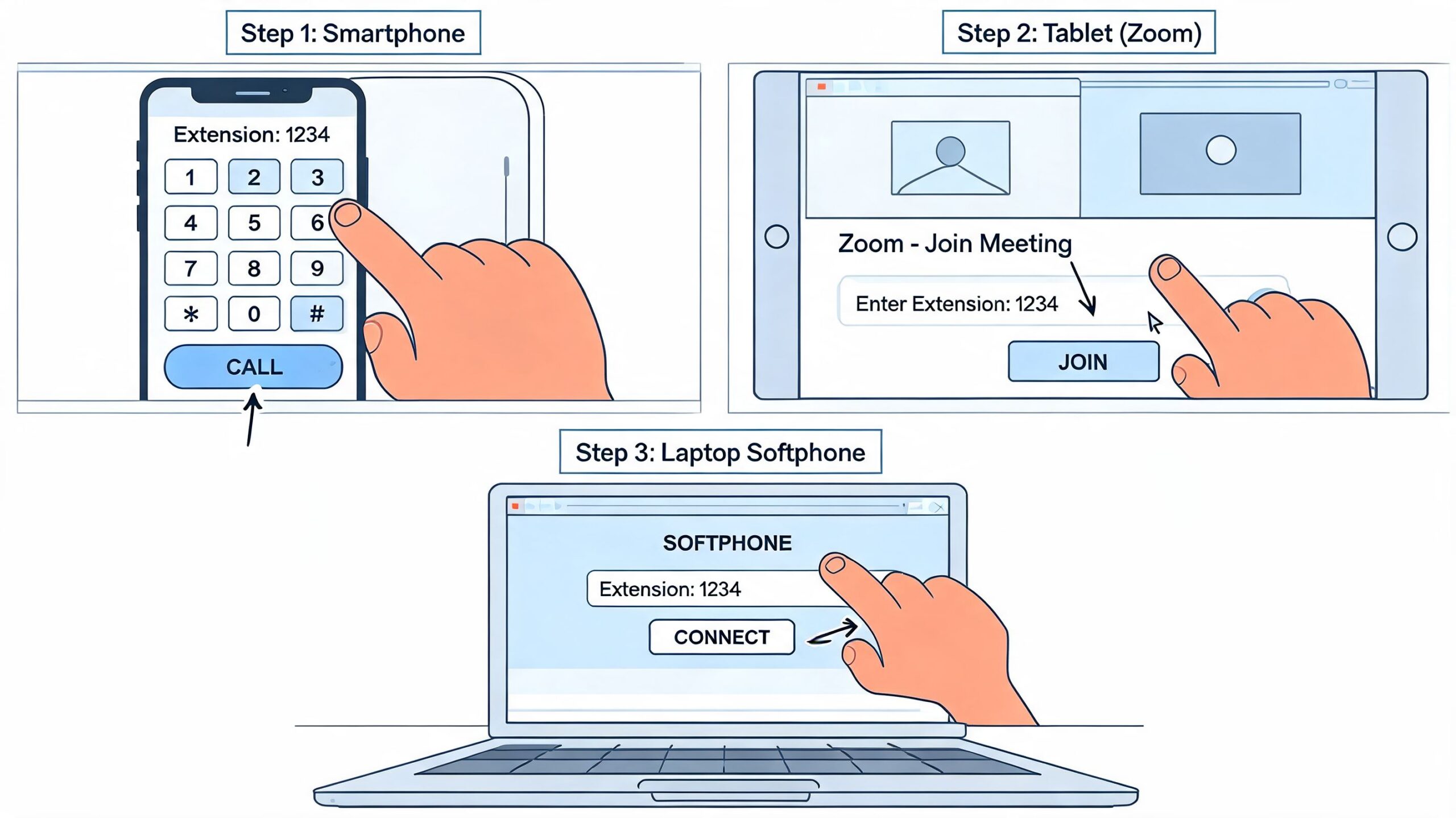
The technical steps are easy. Standardising them across devices is harder.
Android phones, iPhones, laptops, CRM dialers, and SIP softphones all treat pauses, waits, and pasted dial strings a little differently. That variation is where teams lose consistency. A rep saves one format in contacts, another enters the extension manually, and a third depends on a browser dialer that strips punctuation. The result is predictable. More misroutes, more retries, and weaker reporting because failed extension attempts often look like ordinary no-answers.
Android and iPhone methods that work in practice
On most smartphones, the base workflow stays the same:
- Open the dialer.
- Enter the main business number.
- Insert a pause or wait.
- Add the extension.
- Save the completed string if the number will be used again.
On Android, the pause or wait option may appear in the dialer menu or through a long-press, depending on the manufacturer and OS version. On iPhone, both options are usually available from the keypad controls. That is why SOPs should be built from the device models your team carries, not from generic screenshots.
Example working formats:
1800XXXXXXX,2041800XXXXXXX,,2041800XXXXXXX;204
Reliable habits:
- Save the full dial string in contacts or inside the CRM record.
- Test one comma versus two commas on live numbers before rollout.
- Use wait for lines with variable prompts.
- Keep a shared reference list for high-volume vendors and partner numbers.
Common failure points:
- Reps keying in the extension from memory on each call.
- Assuming one timing pattern fits every vendor or department.
- Training by verbal instruction without a saved example.
- Copying numbers into apps that remove punctuation or reformat the string.
For teams that handle frequent supplier or branch-office calling, the best process is simple. Publish one approved format per destination and distribute it through shared contacts, CRM records, or click-to-call lists. Manual entry should be the exception.
Softphone workflows for remote teams
Softphones introduce a second layer of failure. Some platforms accept commas and semicolons in the dial field. Others process them only when the number is stored in contacts. Browser-based widgets are often the least predictable because they can sanitize punctuation before the call is handed off.
Zoom Phone, Microsoft Teams, Google Voice, and SIP softphones all need their own validation pass. Teams that rely on SIP addressing should also understand how SIP URI formats affect calling behavior before they standardise click-to-call rules across apps. The right answer is rarely “one string for every tool.” It is usually “one tested standard per app class.”
This matters even more for distributed teams working across office Wi-Fi, home broadband, and mobile data. In our experience, adding a second comma often fixes early-fired extensions on slower IVRs. It is not a universal rule, which is why testing beats assumption every time.
This short walkthrough is worth watching before you roll out a policy across mixed devices.
Field note: If calls consistently reach the main line but miss the extension, increase the pause length before changing routing, carrier, or device settings.
A practical testing pattern for ops teams
For distributed teams, use a controlled test that can be repeated and audited.
- Pick three live numbers: Include one stable IVR, one slow IVR, and one line with variable prompts.
- Test three strings: Main number with one comma, with two commas, and with a semicolon.
- Record outcomes: Connected correctly, fired too early, waited too long, or failed entirely.
- Publish the standard: Once one pattern is reliable, store it in shared contact libraries and CRM records.
- Review exceptions monthly: Vendor IVRs change more often than teams expect.
This process does more than reduce dialing friction. It creates a clean operating standard that can later be handed to workflow automation, AI voice agents, or managed telephony teams responsible for setting up managed small business telephony. That is the larger goal. Standardize the human process first, then remove manual dialing from high-volume call paths wherever possible.
Navigating Corporate PBX and VoIP Desk Phone Systems
Corporate extension dialing succeeds or fails at the system level. Staff can follow instructions perfectly and still hit the wrong destination if the PBX has inconsistent numbering, unclear prefix rules, or weak inter-branch routing.
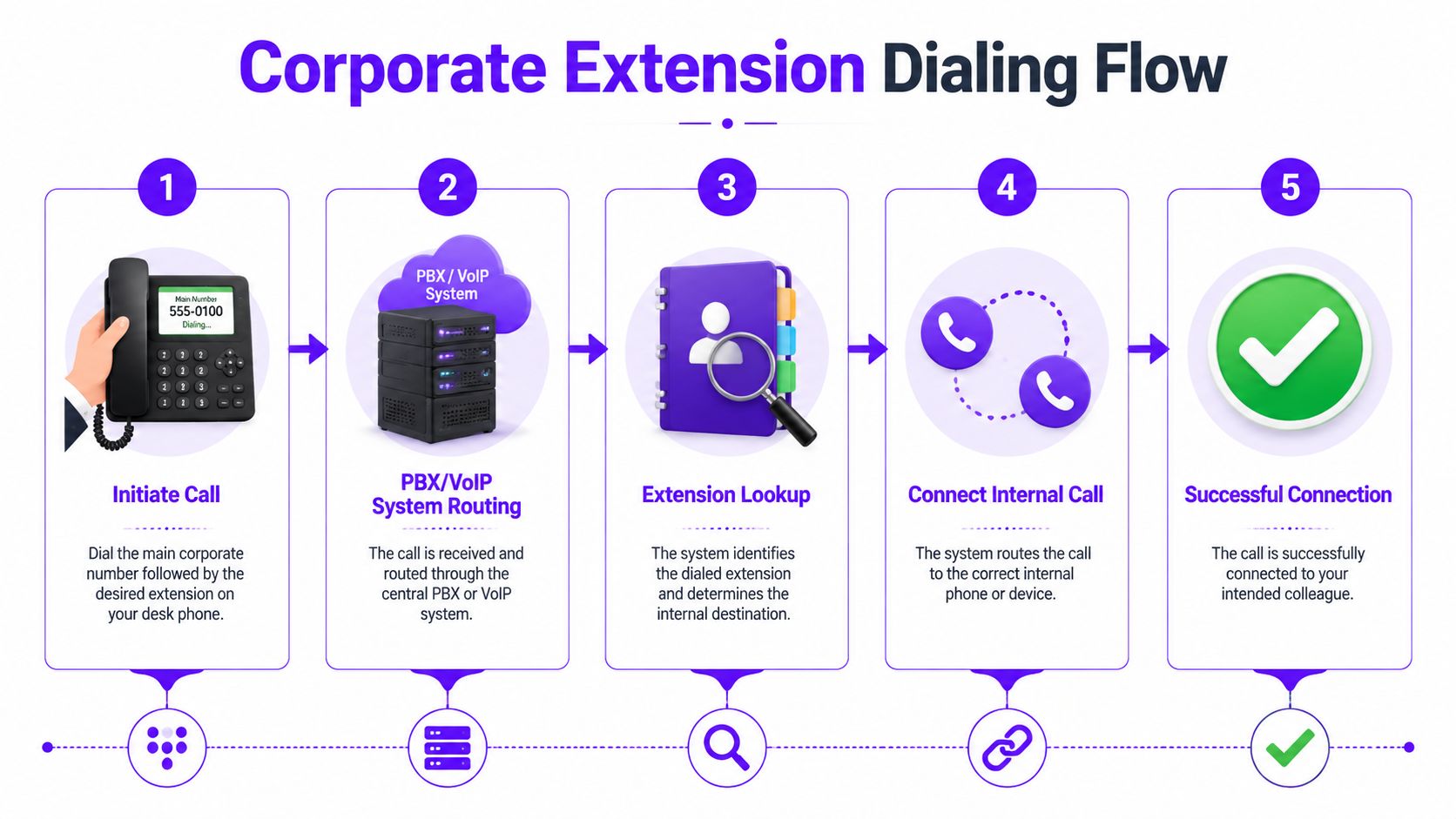
On corporate IP-PBX systems, it is common for misroutes to start with variable-length extensions, inherited branch rules, and inconsistent dial plans across desk phones and softphones. Internal calls inside one office usually perform well. Problems tend to appear when a call crosses sites, trunks, SBCs, or older routing logic that was never cleaned up after growth, relocation, or acquisition.
Why internal numbering plans break down
The pattern is familiar. One office keeps three-digit extensions. Another adds a location prefix. A newly acquired team stays on a separate PBX. Then VoIP apps, remote users, and SIP trunks are added on top of that structure.
Operations pays for that complexity in small but expensive ways:
- Staff memorize exceptions instead of using a standard.
- Reception and support teams transfer more calls than they should.
- Failed routes get logged as no-answer calls, which distorts reporting.
- New hires take longer to become productive on the phone system.
A clean numbering plan improves more than user experience. It reduces routing ambiguity, shortens training, makes receptionist workflows more predictable, and gives CRM click-to-call setups a stable target.
If your team is formalising a new phone setup or cleaning up an inherited one, this operational walkthrough on setting up managed small business telephony is useful as a planning reference because it treats telephony as an operating system for the business, not just a handset purchase.
What a stable PBX standard looks like
The best internal phone standards are simple enough that nobody has to interpret them.
Use one extension length where possible. Keep one documented prefix rule for internal and inter-branch calls. Define one approved dialing format across desk phones, mobile clients, and softphones. Assign one owner for changes so numbering, routing, and directory updates stay aligned.
That last point matters more than many teams expect.
Without clear ownership, the directory says one thing, the PBX routes another way, and the training guide falls out of date. That is how a basic internal call becomes a help desk ticket.
For teams working with SIP-based systems, administrators also need to understand how endpoints and identities are formatted. This guide to SIP URI format and structure helps when extensions need to map correctly across branches, devices, and soft clients.
If employees need tribal knowledge to place an internal call, the PBX needs restructuring.
Operational checks worth enforcing
Use a short audit standard and review it on a schedule:
- Standardize extension length: Mixed formats create avoidable routing and training errors.
- Test branch-to-branch dialing separately: A healthy HQ system can hide failures between remote offices.
- Register every active endpoint: Desk phones may work while unregistered soft clients fail without warning.
- Document access prefixes clearly: Hidden trunk selectors create preventable call errors.
- Review post-merger exceptions: Legacy ranges and old hunt groups often remain long after the org chart changes.
This work looks administrative, but the business effect is concrete. Fewer misroutes mean less wasted labor, fewer dropped customer interactions, and cleaner call data for forecasting. Once the dialing rules are standardized, automation becomes realistic. Voice AI, click-to-call workflows, and intelligent routing perform far better when the underlying extension structure is consistent.
Advanced Strategies for Dialing Efficiency and Accuracy
If a team calls the same extensions every day, extension dialing should be treated as a configuration problem, not a memory test.
The highest-yield fix is to save the full dial string in the format staff need to use. That removes variation between agents, cuts wasted time at the start of each call, and gives supervisors something concrete to audit when call attempts fail.
Save dial strings instead of retraining people
Store the number exactly as it should be dialled, including pauses or waits where needed.
Examples:
- Admissions desk:
1800XXXXXXX,,203 - Branch support:
022XXXXXXX;411 - Finance desk:
1860XXXXXXX,,1254
This turns extension dialing into a one-tap task. It also standardizes execution across teams, vendors, and shifts. In practice, that matters more than another round of coaching, because saved strings hold up better than verbal instructions when IVRs change and staff turnover rises.
Contact naming should follow a rule, not personal preference:
- Use the function first: “Admissions Mumbai Ext 203”
- Keep location visible: Useful when branches share similar menus
- Avoid personal nicknames: Contacts should survive staff turnover
A troubleshooting playbook teams can use
Failed extension calls usually come from a small set of issues. Diagnose them fast and correct the saved string or system rule.
| Problem | Likely cause | Action |
|---|---|---|
| Main line connects but extension fails | Pause too short | Add another comma and retest |
| Wrong department answers | Incorrect extension saved | Verify the latest directory entry |
| Digits send too early | IVR greeting changed | Replace pause with wait |
| Softphone ignores punctuation | App limitation | Save contact differently or route through approved dialler |
| Branch transfer fails | PBX or trunk rule issue | Escalate to telephony admin |
Store the working dial string once. Don't ask fifty people to remember the same timing pattern.
Team habits that improve results
- Build a shared contact set: Reception, admissions, support, and sales should all use the same stored entries.
- Review top-called numbers monthly: IVRs and department routing change more often than teams document.
- Separate external and internal formats: One contact for the public line with extension, another for pure internal extension dialing.
- Assign ownership for cleanup: Broken contacts stay in circulation until one team is responsible for fixing and retiring them.
Teams that standardize these details see the operational payoff quickly. Fewer failed attempts mean less handle time, fewer transfers, cleaner reporting, and less revenue lost before the conversation even starts.
This is also the point where manual process improvement reaches its limit. Once the contact list, timing logic, and exception handling are stable, automation becomes the better answer for high-volume calling.
The Future of Extension Dialing Automation with Voice AI
Every failed call path has a cost. In high-volume teams, even small routing errors add up fast as wasted agent time, missed contacts, duplicated follow-up, and reporting that hides the actual point of failure.

Manual extension dialing is manageable for one person with a short call list. It becomes an operations problem once a business runs thousands of calls across sales, admissions, support, or outsourced vendors. At that point, extension handling is no longer just a dialing skill. It is part of call throughput, conversion performance, and labor cost control.
Front-desk and reception teams handling this same routing burden at scale increasingly turn to conversational automation; DialNexa’s AI phone receptionist guide covers how an AI-driven front door handles call routing and lead qualification without the extension-dialing friction described above.
The limit is consistency.
A strong rep can learn the right pause timing, remember which IVRs changed, and recover when a directory entry is wrong. A scaled team cannot depend on individual memory or workarounds passed around in chat. One group uses commas. Another waits too long. A softphone update changes behavior. Supervisors spend time fixing call entry issues that should have been standardized upstream.
Voice AI changes that operating model. Instead of asking every caller to remember the correct sequence, the system handles prompt detection, DTMF input, and routing logic the same way every time. That improves process control in ways manual training cannot:
Call setup becomes standardized
Approved routing logic is applied consistently across teams, shifts, and vendors.Failure reasons become easier to diagnose
Operations teams can separate bad numbers, IVR changes, extension errors, and true no-answer outcomes.Human time shifts to higher-value work
Managers spend less time correcting call mechanics and more time improving qualification, service quality, and booked outcomes.
Based on performance data from the DialNexa platform, its Voice AI agents handle extension-based call flows through API-controlled DTMF and IVR interaction at scale. The practical advantage is not novelty. It is repeatability. The system does not forget timing rules, skip steps, or improvise a different process on the hundredth call of the day.
That matters most in businesses where speed-to-contact affects revenue. If a prospect requests a callback, a patient needs routing, or a parent is trying to reach admissions, the extension layer should not be the reason the interaction stalls. Clean call entry increases the odds that the right conversation happens on the first attempt.
Teams should still know the manual method for testing, exceptions, and backup scenarios. But once call volume is high and routing logic is stable, automation is usually the better long-term decision. It reduces avoidable variance, protects agent capacity, and turns extension dialing from a brittle manual habit into a controlled part of the communications stack.
If your team is handling large volumes of support, qualification, admissions, or presales calls, DialNexa Labs Private Limited offers a practical path beyond manual extension workflows. Its human-like Voice AI agents are built to interact with IVRs, standardise call routing, and handle repetitive conversations at scale so your teams can spend less time fighting phone trees and more time moving real opportunities forward.

This is a highly practical and insightful piece that reframes extension dialing as an operational discipline rather than a simple telecom task. The emphasis on standardization, process control, and Voice AI automation offers valuable guidance for improving efficiency, reducing call failures, and scaling business communications effectively.
[…] a Spanish office and then need to reach a person inside that company, it helps to understand managing calls with extensions before you […]
[…] more practical point. If you reach an automated menu and need help handling customer support calls with extensions, prepare for the call before you dial. Utah's main assistance lines are useful, but they are […]