

Before You Begin
Collect the SIP phone number, termination URI, authentication method, expected caller ID behavior, and one published agent version for testing. For IP-based authentication, ask DialNexa support for the signaling IP used in your region and have the SIP provider allow it before saving the trunk.DialNexa SIP Trunking Versus Number Purchase
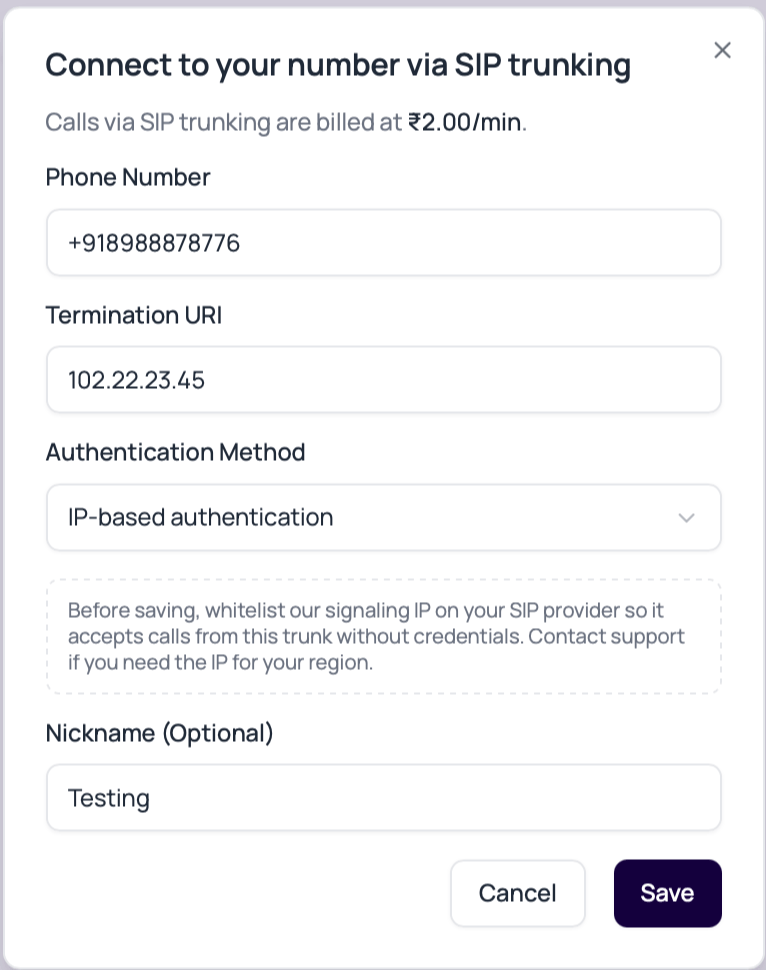
Fields In The SIP Trunk Modal
IP-based authentication sends no SIP username or password. The provider authorizes outbound calls by the DialNexa signaling source IP. If provider IPs are not configured for inbound matching, outbound calls can work while inbound INVITEs cannot be mapped to the trunk.
Link And Validate A SIP Number
1
Open Phone Numbers
Use the Phone Numbers page to start the SIP linking flow.
2
Choose the authentication method
Use Username & Password when the provider issued SIP credentials. Use IP-based authentication only after the provider has allowlisted the DialNexa signaling IP.
3
Enter the SIP details
Provide the phone number and termination URI. Enter both credentials for username and password authentication. Leave both absent for IP authentication.
4
Assign published versions
The number still needs inbound or outbound published agent versions. SIP decides the route, not the conversation behavior.
5
Place an inbound test
Confirm the correct agent answers, the caller hears audio, and Call History stores the call.
6
Place an outbound test
Confirm caller ID, audio quality, transcript quality, status, duration, and end reason.
Validate And Save A SIP Trunk
After entering the trunk details, choose Validate & save to save the number and open Validate your SIP trunk. Saving the record does not prove the route works. Skip keeps the saved number without running the test.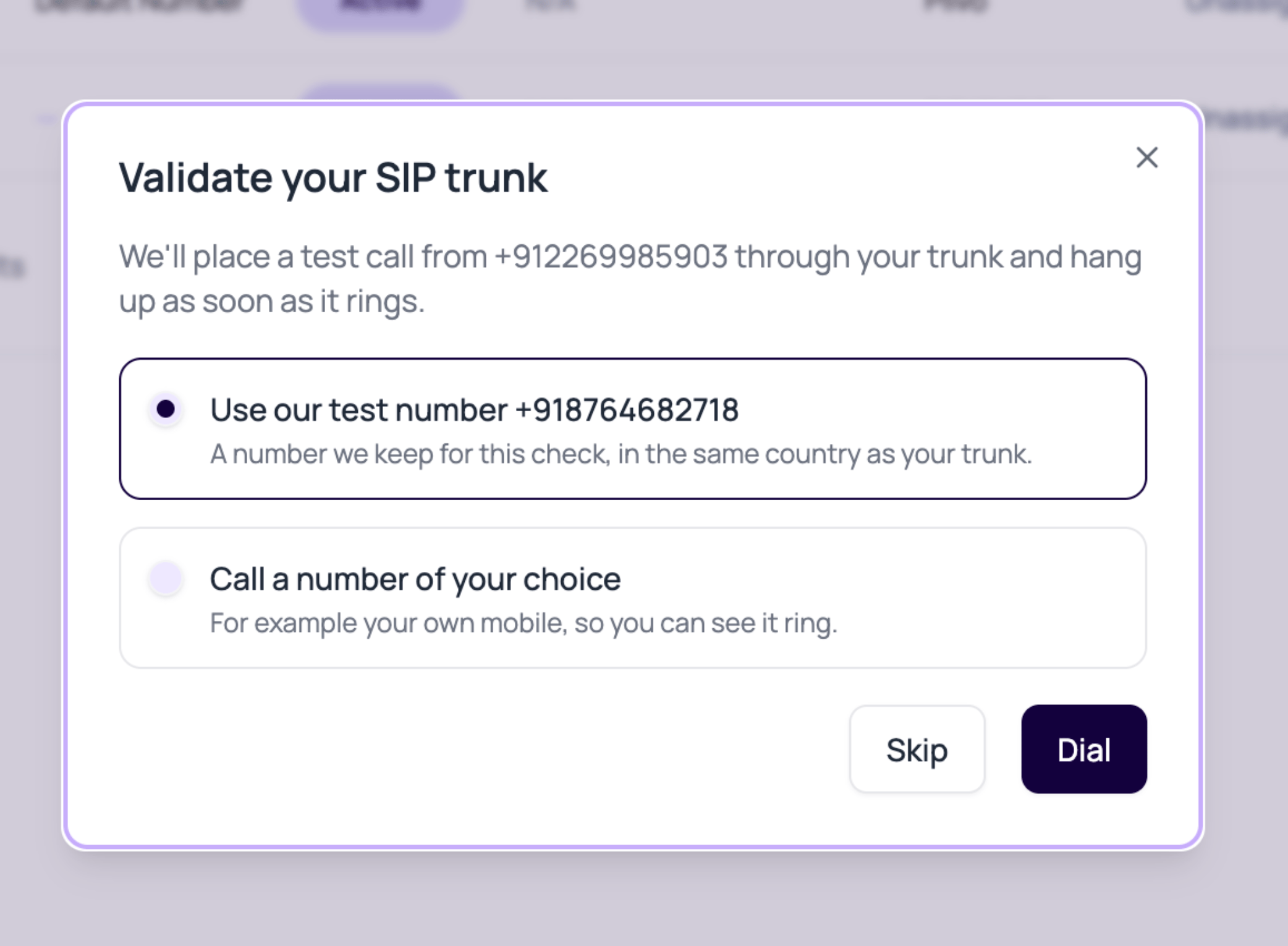
- Select DialNexa’s test number when one is offered for the trunk’s country, or enter a number you are authorized to call in E.164 format.
- Choose Dial. This places a real outbound probe through your trunk and hangs up when ringing is detected.
- On success, choose Save to close the result. The probe checks reachability, not agent conversation quality or two-way audio.
- If validation fails, read the provider response. Check credentials for authentication errors, the termination URI for reachability errors, and carrier destination permissions for blocked calls. A cross-country destination can fail even when the trunk configuration is correct.
SIP Audio Review
SIP-routed calls use phone-grade audio. The exact quality depends on your carrier and trunk configuration.SIP Failures Before Ringing
Both reasons produce a failed call before a useful conversation starts. Correct the route, then place a new test call. Repeated retries without a configuration change are unlikely to help.
Troubleshooting
Calls fail immediately
Calls fail immediately
Check phone number format, termination URI, authentication method, and whether the linked number is active. Username and password mode requires both credentials. IP mode rejects credentials and requires provider allowlisting.
Outbound works but inbound calls do not arrive
Outbound works but inbound calls do not arrive
For IP-authenticated trunks, confirm the provider’s signaling IPs are configured for inbound endpoint matching and that the provider sends traffic to the expected DialNexa route.
Audio is one-way or distorted
Audio is one-way or distorted
Review trunk media settings, recording, and transcript. Compare against a Plivo or web call if you need a baseline.
Wrong agent answers
Wrong agent answers
Phone number assignment controls the agent. Check the inbound and outbound agents on the number and their latest published versions.
Transfers behave differently
Transfers behave differently
Test transfer behavior through the exact trunk before production use.