

Before You Begin
List the variables used by the published agent and collect one valid recipient row for each important scenario. Use consented test numbers before preparing a production file.Prepare DialNexa Batch Call Recipient Files
Keep recipient files boring and predictable.Notes column
A column namednotes is reserved. Its value is stored on the call rather than passed to the agent as a dynamic variable, and it comes back in payload.call.notes on every webhook event for that call. Use it to carry your own record IDs through a batch.
The malformed-JSON case fails deliberately rather than falling back to text, so a broken object is never silently stored as a string.
Retries do not inherit notes. If a recipient is retried, the retry’s webhook events report
notes: null even though the first attempt carried them.notes or other structured values.
Upload Wizard Steps
The batch upload wizard keeps each review step explicit before the recipient table is accepted.
If a new upload is cancelled during review, DialNexa restores the previous recipient state instead of leaving a partial file attached to the campaign.
While a wizard step is processing, the close button is disabled and clicking outside the dialog does not close it. Wait for the active step to finish. At other times, use the explicit close button or the step action so the wizard can restore the previous recipient state correctly.
Template Behavior
The download template changes with the selected agent and version.Agent defaults first
Fallback placeholders
Recipient preview
File upload checks
Match Uploaded Columns
After upload, the Match CSV Columns modal lets you align the file with the selected agent version before the table is created.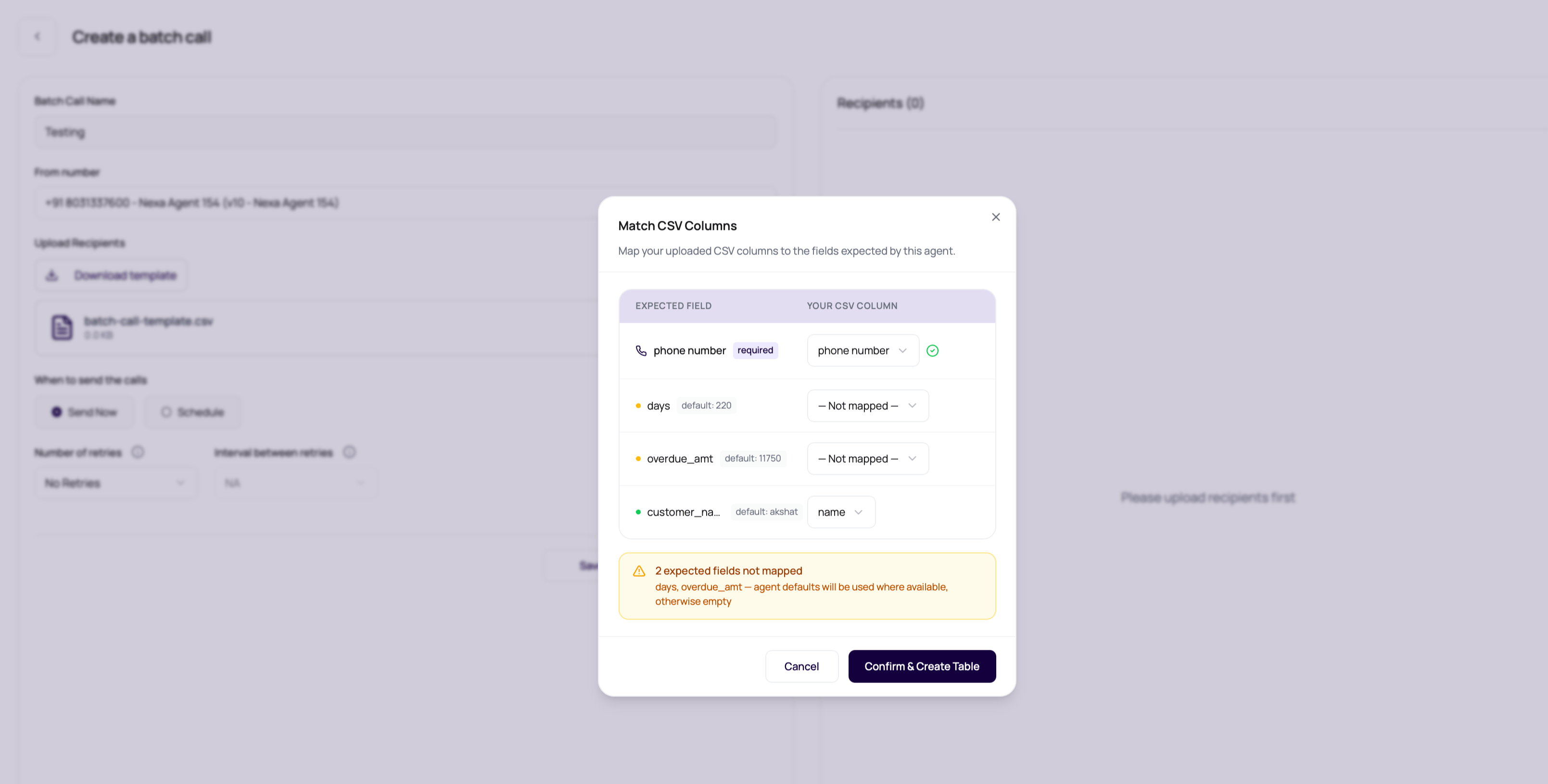
When you confirm the mapping, DialNexa normalizes the selected phone column to
phonenumber and renames mapped variable columns to the expected agent variable keys. This lets operators upload files with readable business headers without editing the source spreadsheet first.
The CSV parser keeps quoted multiline fields together and reports physical file row numbers, so row notices match the lines users see in a spreadsheet. It can automatically rejoin an unquoted JSON object or array that was split by its own comma or line break when the reconstructed value parses as valid JSON. The create page shows an informational notice for those repaired rows and rewrites the accepted file with correct quoting.
Short rows are padded with empty trailing values. Extra empty cells caused only by a trailing comma are ignored. A malformed row with unresolved extra data blocks the upload and reports up to the first affected row numbers.
Review AI Name Suggestions
After column mapping, the wizard opens an optional AI Name Cleanup step. The dashboard can auto-select a likely name column, but the operator can choose a different column or skip the step. If a column is selected and the file has up to2,100 leads, Claude checks the names for cleanup suggestions before the recipient table is built. If name cleanup fails, DialNexa shows an empty review state and continues with the original names.
The Review AI Name Suggestions modal shows the original value, the suggested value, and row-level controls.
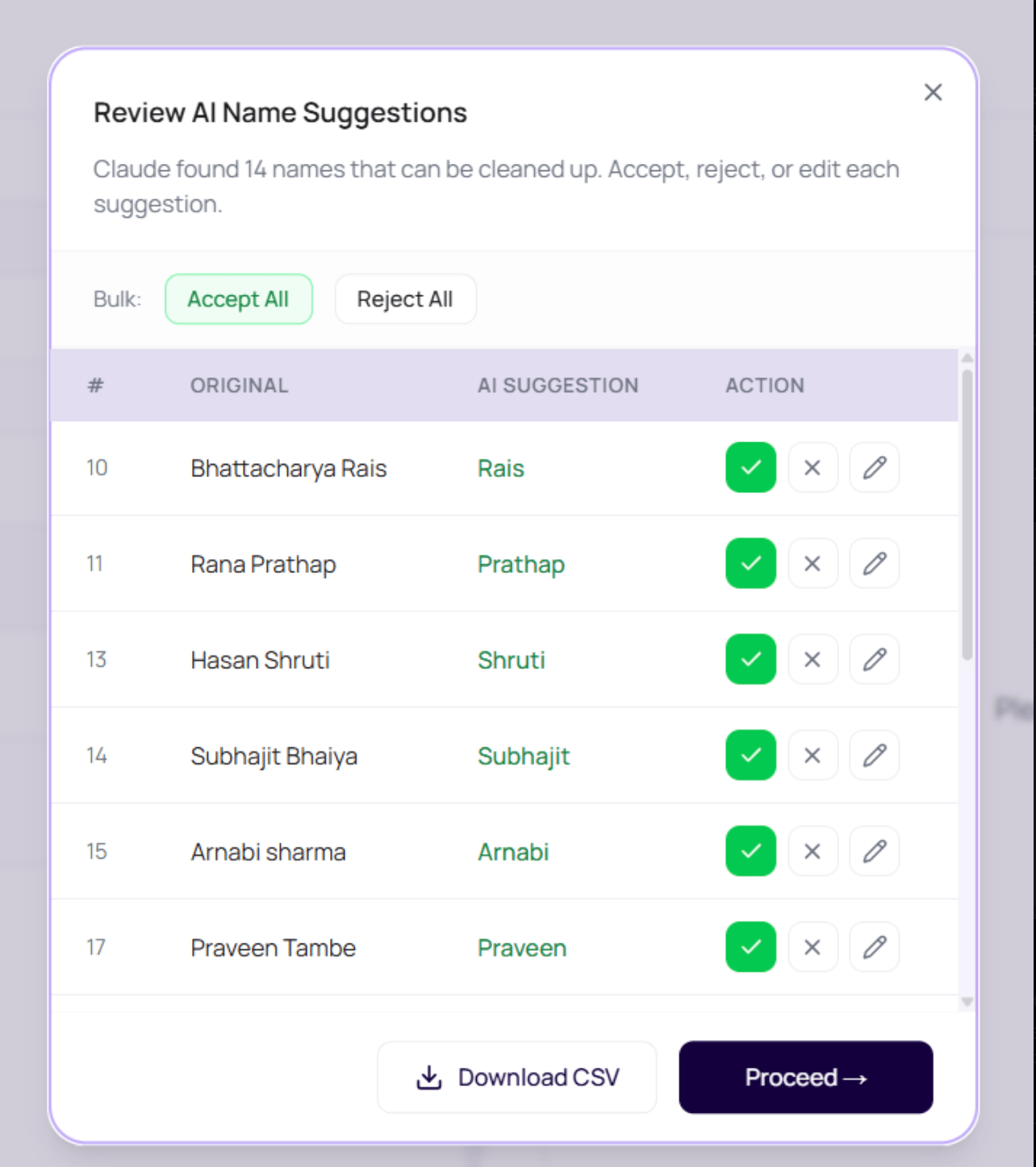
For batches over
2,100 contacts, the dashboard skips AI name cleanup and shows a warning. Review names in the source file before upload when large campaigns need standardized salutations.
Convert Names To Devanagari
For a Hindi-speaking agent, the name-cleanup step offers Convert to Devanagari after you select a name column. Use it when the agent should pronounce names from Hindi-script values rather than Latin-script spellings.- Select the name column and enable Convert to Devanagari.
- Review the original name, cleaned suggestion, and Devanagari value together.
- Accept a suggestion to use its converted value, or reject it to keep the original uploaded name. Review every name whose pronunciation matters.
- If you edit a cleaned name, choose Re-check N edited names to regenerate its conversion before proceeding. Download is unavailable while edited names still need rechecking.
- Continue with Proceed after resolving the pending rows.
Review Invalid Phone Numbers
After mapping and name review, the dashboard validates the selected phone column against the outbound route. Invalid rows open the Review Invalid Phone Numbers step.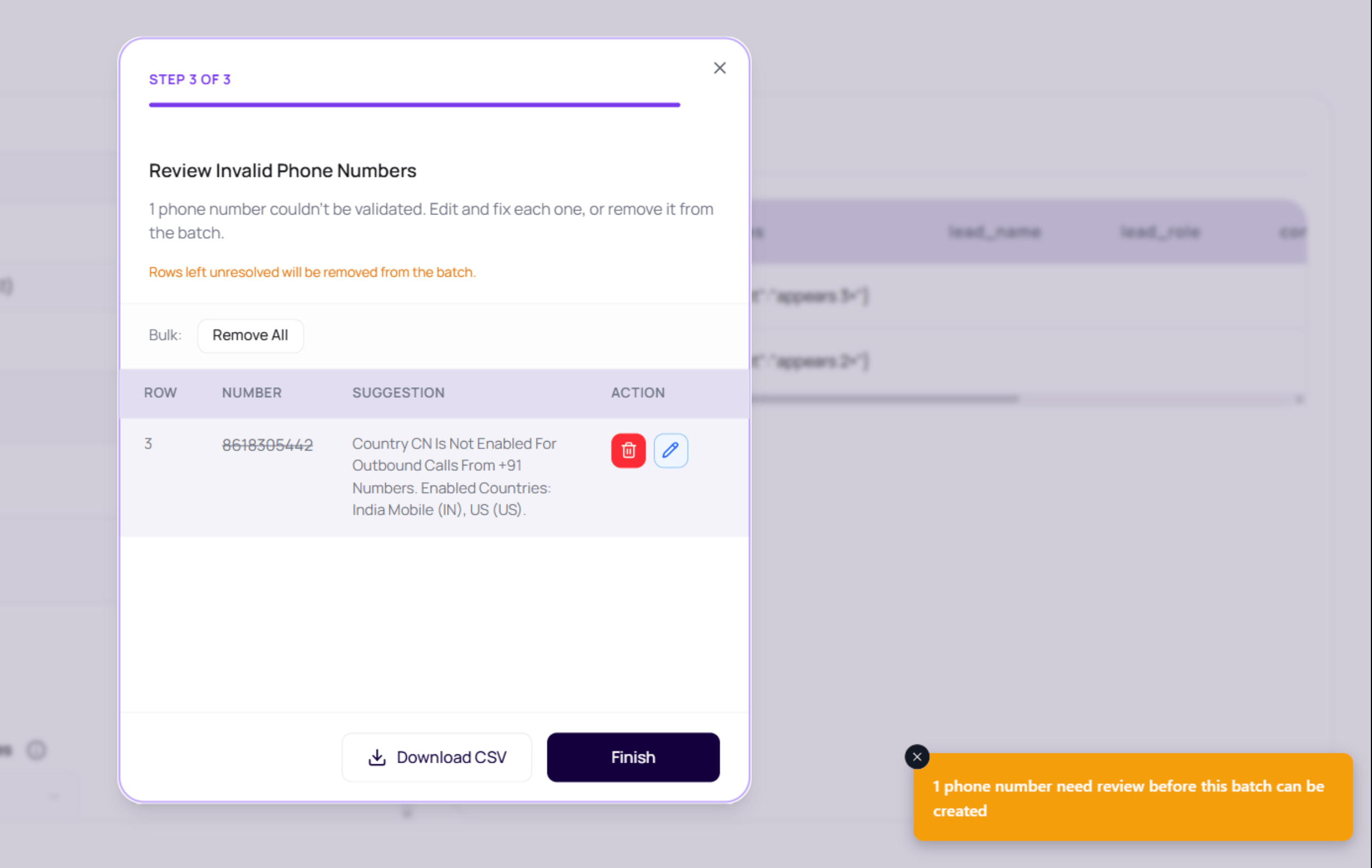
Each invalid row keeps its original source row number, mapped phone value, validation message, and current decision. This matters when a spreadsheet owner needs to repair the source file later, because the operator can point to the exact row instead of describing a general upload failure.
DialNexa can normalize Indian numbers that explicitly include the
91, +91, or 0091 country code. It does not guess that a bare 10 digit number is Indian, because that could rewrite a real number from another country. Use full international format when possible.
Add A Country Code To Multiple Rows
In Review Invalid Phone Numbers, Add country code appears when rows are eligible for a bulk correction. Use it only when you know those local numbers belong to the selected country.- Select the country code.
- Check the number of eligible rows shown by Apply to N rows, then apply it.
- Review the corrected values and the result summary. Already international numbers, empty or unreadable values, and rows you edited manually are excluded from the bulk change.
- Choose Finish to submit the current corrections for validation. Correct any remaining invalid numbers before accepting the file.
Duplicate Phone Number Handling
The create page skips duplicate phone numbers by default before the recipient table is built. When the same non-empty phone number appears more than once, DialNexa keeps the first mapped row and removes later rows with that number. After upload, the page shows how many duplicate phone numbers were skipped.
Turn duplicate skipping off only when repeated calls to the same phone number are intentional for that campaign.
Prepare A Clean File
1
Enter a short campaign title
Keep the title at
35 characters or fewer. Longer titles are rejected before launch.2
Select the outbound number first
This lets the page know which agent version variables to use.
3
Download the template
Start with headers that match the selected agent.
4
Fill realistic values
Use production-ready names, dates, amounts, and transfer destinations.
5
Upload and inspect rows
Check the preview table before saving or starting.
6
Fix errors before launch
Do not launch a file whose preview already looks wrong.
File Requirements
When Rows Fail Validation
The upload parser checks recipient phone numbers against the same destination validation rules used by single outbound calls. Duplicate removal happens before this validation when Skip duplicate phone numbers is enabled. Failed rows appear in the phone-number review step, grouped with the validation reason. See Common Upload Errors for each error type, what it means, and how to fix the file.Download The Errors CSV
When an upload is rejected because more than three rows fail validation, the file is not accepted and the upload area shows Some rows could not be used with a Download errors CSV button. With three or fewer failures, the reasons appear in the error message instead. The download,batch-call-errors.csv, has one row per failed recipient:
The button works once. After one download it disappears, and it is also cleared when you choose another file or remove the current one, so save the report before you retry. Fix the listed rows in the source file, then upload it again.
Avoid Column Mapping Collisions
Two mapped columns cannot share the same final field name. If a mapped field collides with an unmapped source column, the mapped column wins and the extra column is dropped. Review the resulting recipient table before launch. Duplicate removal uses the phone column you selected, including in Excel files. A raw column with a similar name does not override your selection. Numeric Excel phone cells are converted to strings before validation; use text cells with complete international numbers to preserve leading digits.Verify The Recipient File
After upload, confirm the phone-number column, variable mappings, row count, duplicate handling, and validation results. Run a small batch and verify that spoken values match the intended CSV row.When AI Name Cleanup Cannot Check Every Name
Name cleanup is optional. If the service cannot check some names, the dashboard warns how many were left unchanged while keeping usable suggestions for the others. Review those unchanged names yourself before proceeding. If cleanup is unavailable or the response cannot be matched safely to the uploaded rows, the review reports the failure and keeps the original names. You can continue with them or correct the source file and try again. An unavailable check does not mean that every name is already correct.Download the selected version template
Select the agent and published version before downloading the CSV template. The template combines variable names used in that version’s prompt, welcome message, voicemail message, and default variables. It retainsagent_transfer_destinations for Conversational Flow transfer routing. Helper expressions are not column names. After switching versions, download a fresh template and review the mappings again.