

completed, did_not_pick, busy, no_answer, failed, cancelled, and retry_expired.

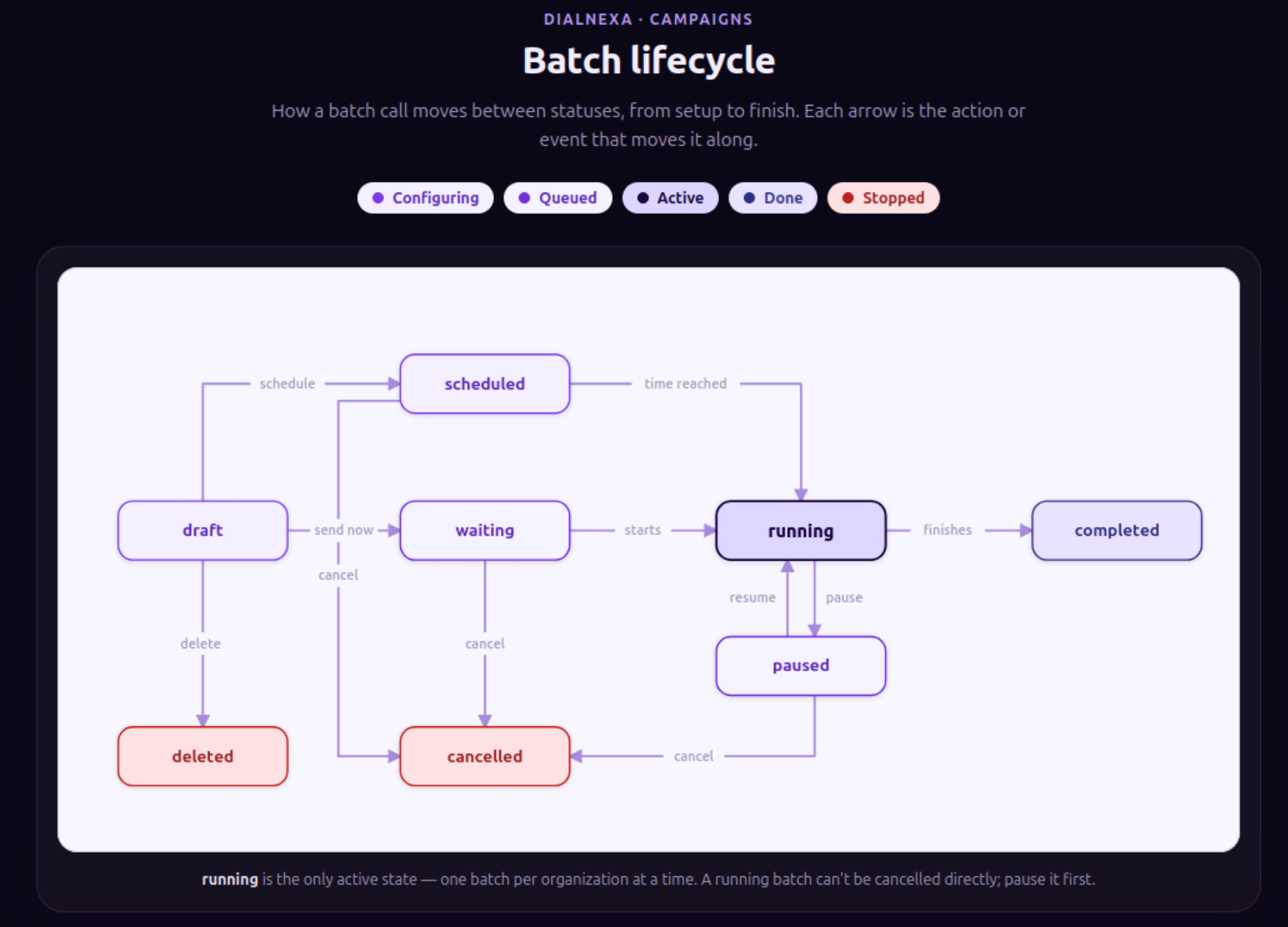
Batch Lifecycle State Machine
The current batch lifecycle is a state machine.draft, scheduled, and waiting prepare the campaign, running is the only active sending state, and final states such as completed, cancelled, and deleted stop normal batch movement. Multiple batches can be running in one workspace at the same time and share available calling capacity. A batch can be cancelled from any state except completed or cancelled, including while it is running; cancelling removes its queued calls.
DialNexa Batch Call Retry And Status Values
These statuses apply to the campaign container.Batch Queue Conflicts
A batch can enterwaiting while the scheduler prepares it. Other running batches do not prevent it from starting. Concurrent batches share workspace concurrency and call-start capacity, so running does not mean every recipient is dialed immediately.
Publishing an agent leaves existing batches on their pinned version. The dashboard names running batches that will keep their version. To move an outbound number to another agent, first change the number on unfinished batches or cancel them, then wait for live calls to finish.
Recipient Call Statuses
Each recipient attempt becomes a call log. These statuses are the ones you filter and export from Call History.Retrigger A Completed Or Cancelled Batch
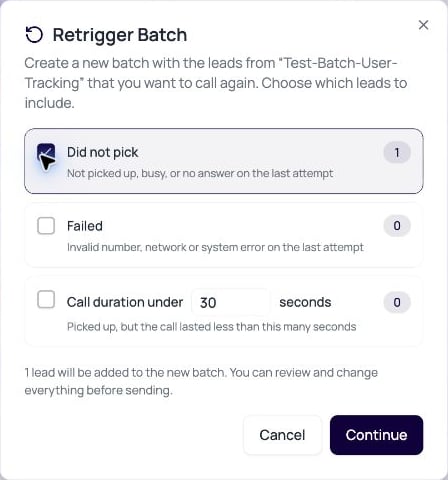
Use Retrigger Batch when you want a new campaign containing selected outcomes from a finished batch. This is separate from the automatic retries configured before a batch starts. The original batch remains unchanged.- Open Batch Calls, find a Completed or Cancelled batch, and choose Retrigger Batch from its action menu.
- Select one or more outcome filters. The dialog counts matching leads using their last attempt.
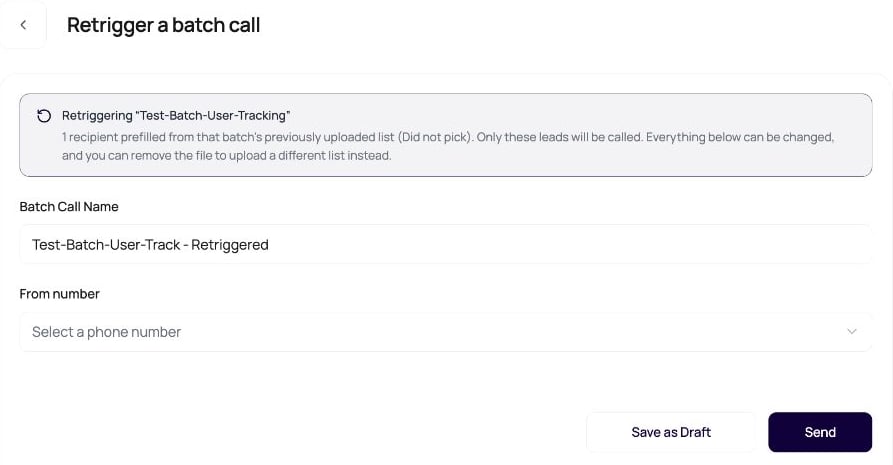
- Review the count and choose Continue. This opens a new batch form; it does not start calls.
- Check the source-batch banner, prefilled recipients, From number, agent version, schedule, and retry settings. If the old number is unavailable, select a current outbound number.
- Review the recipient list before saving a draft or choosing Send. If changing the agent requires another recipient review, complete that review before continuing.
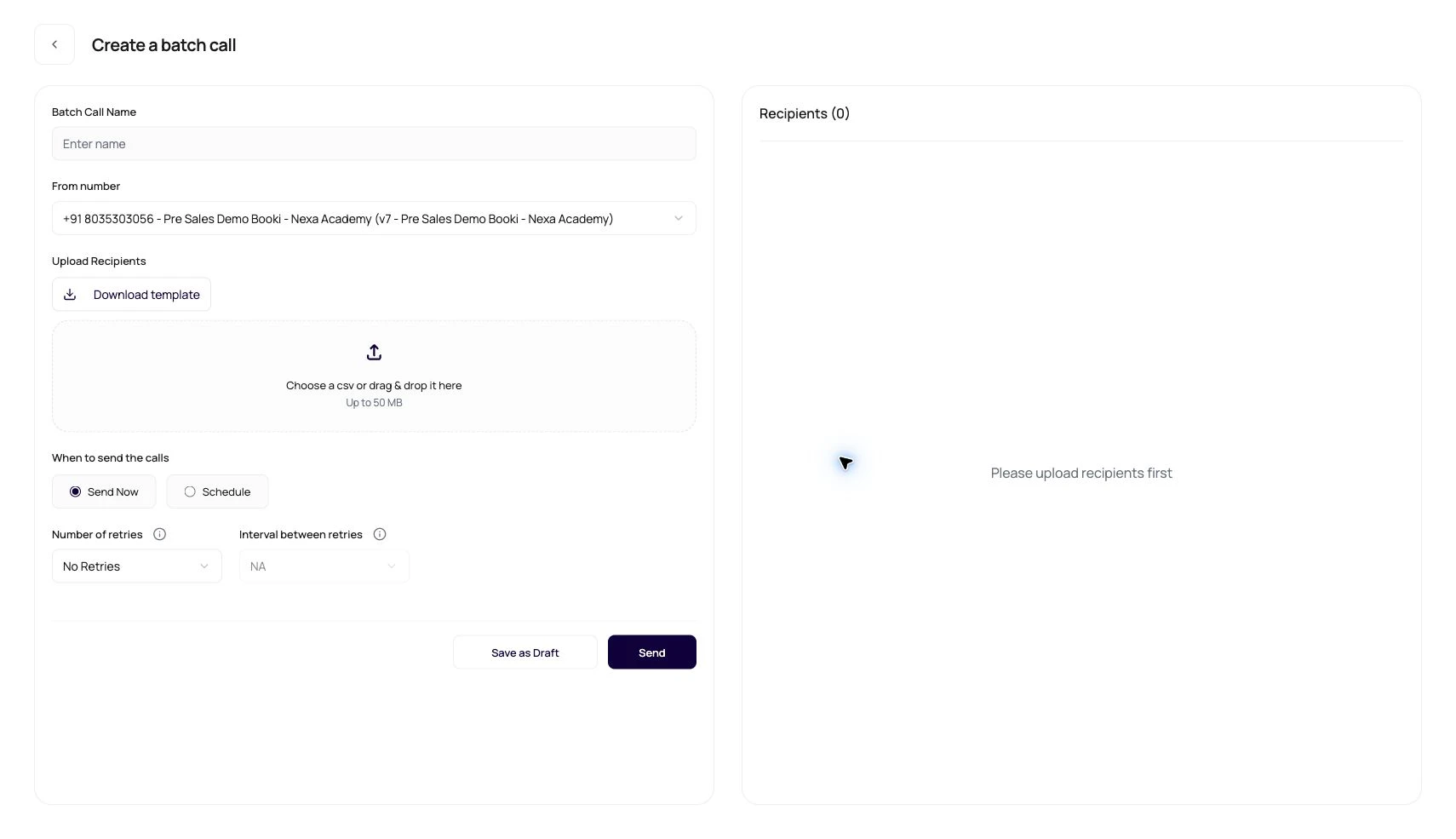
Retry Controls
Retry settings are configured before launch.Campaign Counters And Attempts
Use counters to understand campaign progress, but use Call History for exact recipient evidence.
Attempt totals are stage-based. The initial stage uses the campaign recipient count. Retry stages use the retries that were scheduled for that depth. A queued, expired, or cancelled retry is still part of the stage total, but it is not counted as attempted until it leaves the queued state.
The Picked Up label is based on completed call logs, not only the first call placed for each recipient. A recipient with a completed retry can therefore increase Picked Up after the initial attempt failed or went unanswered.
How Statuses Affect Exports
1
Filter by campaign
Open Call History through the batch campaign or use the batch call id filter.
2
Separate final statuses
Export completed, failed, cancelled, did-not-pick, busy, no-answer, and retry-expired groups separately when operations needs different follow-up.
3
Keep in-progress rows out of final reporting
created, initiated, sent, and received are not final outcomes.4
Review end reasons
Use
end_reason to separate invalid numbers, busy lines, destination blocks, voicemail, capacity, and balance problems.Tune Retries For A Campaign
1
Start with a small run
Estimate answer rate, busy rate, and invalid-number rate before scaling.
2
Use a realistic interval
Avoid retrying so quickly that recipients experience duplicate calls.
3
Check final status distribution
Compare completed, did not pick, busy, no answer, failed, cancelled, and retry expired rows.
4
Clean the next list
Remove invalid numbers, update preferred timing, and adjust the message before the next campaign.
Troubleshooting Batch Statuses
Campaign is waiting or scheduled but no calls are going out
Campaign is waiting or scheduled but no calls are going out
Check start time, workspace readiness, outbound number assignment, wallet balance, and whether another campaign is already running for the organization.
Campaign is running but recipient rows are still created
Campaign is running but recipient rows are still created
Give the scheduler and provider updates time to progress. If rows stay stale, inspect route readiness and queue processing.
Campaign was cancelled but some calls completed
Campaign was cancelled but some calls completed
Calls already initiated before cancellation can still finish. Cancellation stops queued and future work.
Campaign is paused but retries still appear pending
Campaign is paused but retries still appear pending
That is expected. Pending retries stay as outstanding work while paused, then resume from a fresh retry time when the campaign is resumed.
Retry count looks higher than expected
Retry count looks higher than expected
Count the first attempt plus additional retries. Retry count controls extra attempts, not total attempts.