> ## Documentation Index
> Fetch the complete documentation index at: https://dialnexa.com/docs/llms.txt
> Use this file to discover all available pages before exploring further.
# DialNexa Workflow Condition Nodes
> Configure DialNexa workflow condition nodes with fields, operators, values, AND or OR logic, true and false outputs, and lead routing.
DialNexa workflow Condition nodes route leads based on configured conditions. A condition can inspect a field, compare it with an operator and value, combine multiple conditions with AND or OR logic, and send the lead to true or false output paths.
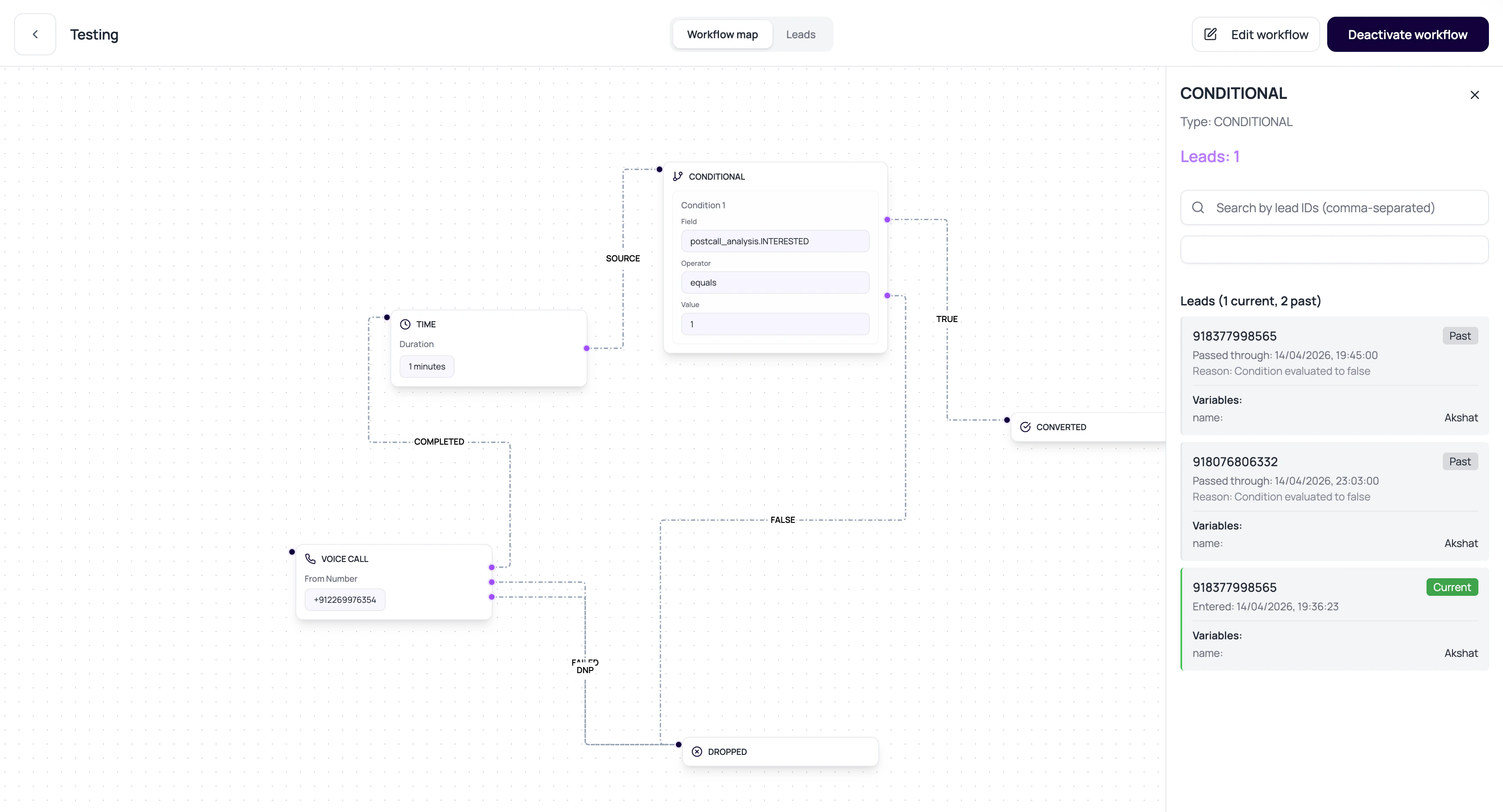 A condition node is a fork in the road. Label both roads like someone will be tired when reading them.
## Condition Node Operators
Condition configs support common comparison operators.
| Operator | Use case |
| ------------- | ------------------------------------------- |
| equals | Route when a value matches exactly. |
| not\_equals | Route when a value differs. |
| exists | Route when the field is present. |
| contains | Route when text contains a phrase or value. |
| greater\_than | Route numeric values above a threshold. |
| less\_than | Route numeric values below a threshold. |
## Good Fields To Branch On
Conditions work best on values that are consistently available.
Values uploaded or created for the workflow lead.
Values captured from call outcomes and analysis.
Success, failure, or response data from an application node.
Execution status or call outcome values when available.
## Condition Review Questions
Use exists checks or defaults when a field may be missing.
AND requires all conditions. OR requires any one condition.
Both outcomes should lead somewhere intentional.
Use contains or normalized selector fields when exact text is unreliable.
## Related Reading
Understand fields used in conditions.
Create reliable call attributes.
Debug actual branch choices.
A condition node is a fork in the road. Label both roads like someone will be tired when reading them.
## Condition Node Operators
Condition configs support common comparison operators.
| Operator | Use case |
| ------------- | ------------------------------------------- |
| equals | Route when a value matches exactly. |
| not\_equals | Route when a value differs. |
| exists | Route when the field is present. |
| contains | Route when text contains a phrase or value. |
| greater\_than | Route numeric values above a threshold. |
| less\_than | Route numeric values below a threshold. |
## Good Fields To Branch On
Conditions work best on values that are consistently available.
Values uploaded or created for the workflow lead.
Values captured from call outcomes and analysis.
Success, failure, or response data from an application node.
Execution status or call outcome values when available.
## Condition Review Questions
Use exists checks or defaults when a field may be missing.
AND requires all conditions. OR requires any one condition.
Both outcomes should lead somewhere intentional.
Use contains or normalized selector fields when exact text is unreliable.
## Related Reading
Understand fields used in conditions.
Create reliable call attributes.
Debug actual branch choices.