> ## Documentation Index
> Fetch the complete documentation index at: https://dialnexa.com/docs/llms.txt
> Use this file to discover all available pages before exploring further.
# DialNexa Workflow Call Nodes
> Configure DialNexa workflow Voice Call nodes with phone numbers, outbound agent assignment, completed failed and did-not-pick outputs, and call log evidence.
A DialNexa workflow Voice Call node places an outbound call to a workflow lead through a configured phone number. The phone number must be active and must have an outbound agent id and version number assigned, or the workflow cannot create the call correctly.
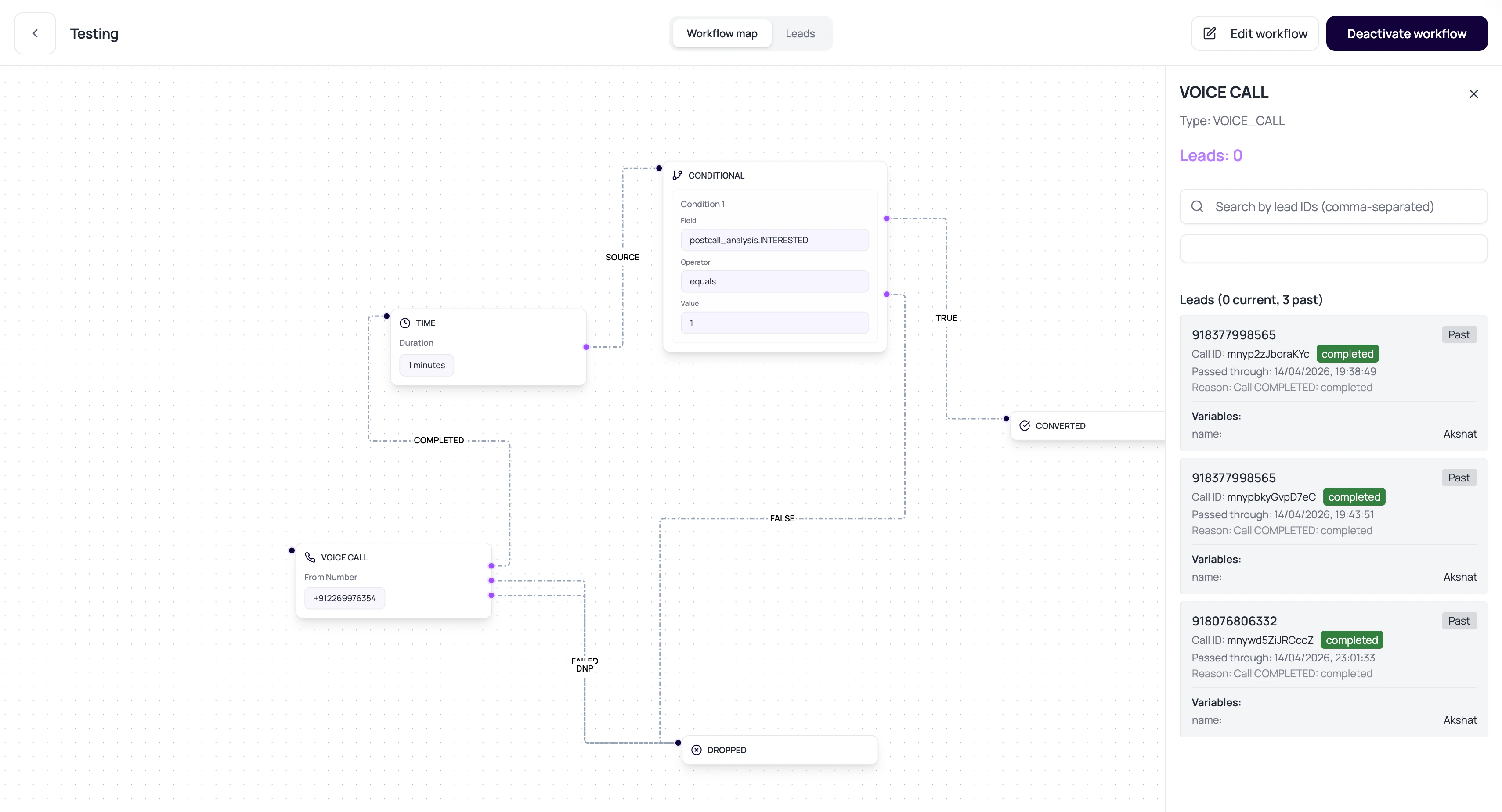 A Voice Call node must use an active phone number with an outbound agent assignment. Without that route, the workflow cannot place the call correctly.
## Voice Call Node Config
These fields decide how the call runs and where the lead goes afterward. `phone_number_id` is the stored form of the **Phone number** dropdown in the builder; the outputs are the edges you connect on the canvas.
| Field | Purpose |
| ----------------- | -------------------------------------------------------------------------------------------------- |
| phone\_number\_id | The active organization phone number used to place the call (the builder's Phone number dropdown). |
| COMPLETED output | Next node when the call completes successfully. |
| FAILED output | Next node when the call fails. |
| DNP output | Next node when the recipient did not pick up. |
| Call log id | Stored in history metadata so the lead path can link to the exact call. |
## Voice Call Status Routing
The Voice Call node waits for the linked call log to reach a final status before routing the lead.
| Call status | Output followed | Meaning |
| ---------------------------------------------------------- | --------------- | ------------------------------------------------------------------------------------------------------------------------------------------- |
| `created`, `initiated`, `received`, `connected`, `waiting` | No output yet | The call is still in progress or waiting for a final update. |
| `completed` | `COMPLETED` | The call connected and ended. |
| `did_not_pick`, `busy` | `DNP` | The recipient did not complete a live conversation. |
| `failed`, `no_answer` | `FAILED` | The call failed or the provider returned no answer. |
| `cancelled`, `retry_expired` | Review required | These are final call statuses, but they are not default Voice Call node outputs. Inspect lead history if the lead remains at the call node. |
## Prepare A Call Node
The phone number must exist, be active, and not deleted.
The number needs outbound agent id and outbound version number.
Route completed, failed, and did-not-pick outcomes intentionally.
Open lead history and the linked call detail after execution.
## Call Node Failure Reasons
Use an active number in the selected workspace.
Configure a valid outbound agent version for the selected phone number before activating the workflow.
If the node has no configured output for a final call status, the lead can get stuck.
Workflow execution avoids restarting a pending or active call for the same lead-node combination.
## Related Reading
Review active numbers and outbound routing context.
Open the linked call.
Understand call outcomes.
A Voice Call node must use an active phone number with an outbound agent assignment. Without that route, the workflow cannot place the call correctly.
## Voice Call Node Config
These fields decide how the call runs and where the lead goes afterward. `phone_number_id` is the stored form of the **Phone number** dropdown in the builder; the outputs are the edges you connect on the canvas.
| Field | Purpose |
| ----------------- | -------------------------------------------------------------------------------------------------- |
| phone\_number\_id | The active organization phone number used to place the call (the builder's Phone number dropdown). |
| COMPLETED output | Next node when the call completes successfully. |
| FAILED output | Next node when the call fails. |
| DNP output | Next node when the recipient did not pick up. |
| Call log id | Stored in history metadata so the lead path can link to the exact call. |
## Voice Call Status Routing
The Voice Call node waits for the linked call log to reach a final status before routing the lead.
| Call status | Output followed | Meaning |
| ---------------------------------------------------------- | --------------- | ------------------------------------------------------------------------------------------------------------------------------------------- |
| `created`, `initiated`, `received`, `connected`, `waiting` | No output yet | The call is still in progress or waiting for a final update. |
| `completed` | `COMPLETED` | The call connected and ended. |
| `did_not_pick`, `busy` | `DNP` | The recipient did not complete a live conversation. |
| `failed`, `no_answer` | `FAILED` | The call failed or the provider returned no answer. |
| `cancelled`, `retry_expired` | Review required | These are final call statuses, but they are not default Voice Call node outputs. Inspect lead history if the lead remains at the call node. |
## Prepare A Call Node
The phone number must exist, be active, and not deleted.
The number needs outbound agent id and outbound version number.
Route completed, failed, and did-not-pick outcomes intentionally.
Open lead history and the linked call detail after execution.
## Call Node Failure Reasons
Use an active number in the selected workspace.
Configure a valid outbound agent version for the selected phone number before activating the workflow.
If the node has no configured output for a final call status, the lead can get stuck.
Workflow execution avoids restarting a pending or active call for the same lead-node combination.
## Related Reading
Review active numbers and outbound routing context.
Open the linked call.
Understand call outcomes.