> ## Documentation Index
> Fetch the complete documentation index at: https://dialnexa.com/docs/llms.txt
> Use this file to discover all available pages before exploring further.
# DialNexa Workflow Builder Concepts
> Understand DialNexa workflow builder concepts such as nodes, edges, node positions, configs, outputs, leads, and execution history.
DialNexa workflow builder concepts describe how visual automation becomes executable data. Nodes store type, label, position, and config. Edges connect nodes. Leads carry phone numbers, variables, and call attributes. Executions and history show what actually happened.
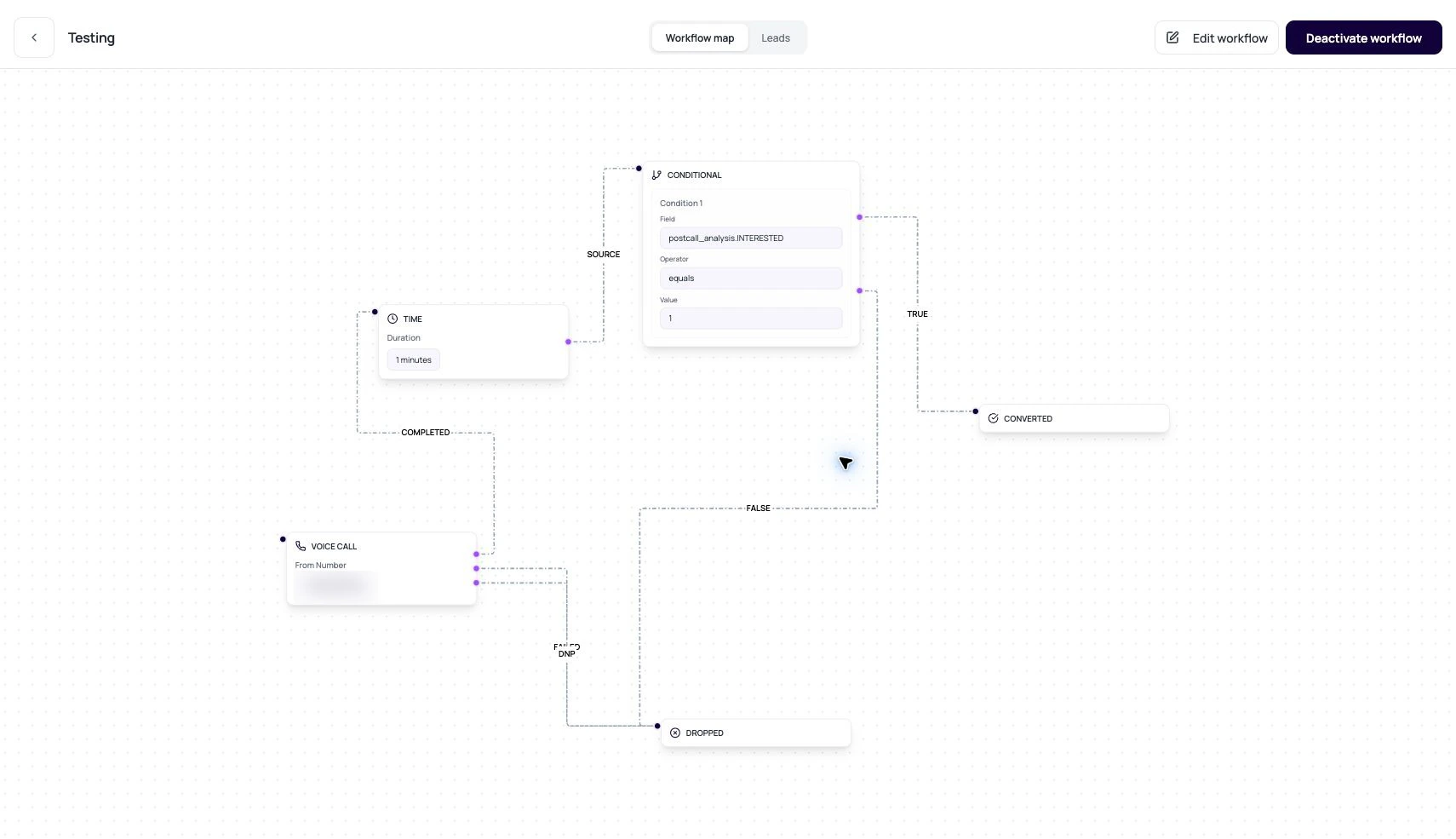 The canvas is the drawing. The config is the contract. Review both.
## Builder Data Model
These fields explain what the builder stores.
| Piece | Stored data |
| --------- | -------------------------------------------------------------------------------------------------- |
| Node id | Unique node identifier. |
| Node type | VOICE\_CALL, CONDITIONAL, TIME, APPLICATION, CONVERTED, or DROPPED. |
| Label | Readable node name shown in the builder and history. |
| Position | Canvas x and y location. |
| Config | Node-specific settings such as phone number, outputs, conditions, duration, or integration action. |
| Edge | From node, to node, and label. |
## Outputs Are The Important Part
Outputs decide where a lead moves next.
COMPLETED, FAILED, and DNP route different call outcomes.
true and false route evaluated conditions.
A wait node has one next path after the hold expires.
success and failure route integration action results.
## Review A Builder Graph
Every path should be able to end in converted, dropped, or another intentional final path.
Open each node and read settings, not just labels.
A completed call should not route to the failed path by accident.
Use workflow validation and small lead samples before activating.
## Related Reading
Configure call outputs.
Configure branch logic.
Run connected actions.
The canvas is the drawing. The config is the contract. Review both.
## Builder Data Model
These fields explain what the builder stores.
| Piece | Stored data |
| --------- | -------------------------------------------------------------------------------------------------- |
| Node id | Unique node identifier. |
| Node type | VOICE\_CALL, CONDITIONAL, TIME, APPLICATION, CONVERTED, or DROPPED. |
| Label | Readable node name shown in the builder and history. |
| Position | Canvas x and y location. |
| Config | Node-specific settings such as phone number, outputs, conditions, duration, or integration action. |
| Edge | From node, to node, and label. |
## Outputs Are The Important Part
Outputs decide where a lead moves next.
COMPLETED, FAILED, and DNP route different call outcomes.
true and false route evaluated conditions.
A wait node has one next path after the hold expires.
success and failure route integration action results.
## Review A Builder Graph
Every path should be able to end in converted, dropped, or another intentional final path.
Open each node and read settings, not just labels.
A completed call should not route to the failed path by accident.
Use workflow validation and small lead samples before activating.
## Related Reading
Configure call outputs.
Configure branch logic.
Run connected actions.