> ## Documentation Index
> Fetch the complete documentation index at: https://dialnexa.com/docs/llms.txt
> Use this file to discover all available pages before exploring further.
# Text To Speech And Voices In DialNexa
> Compare DialNexa text to speech providers - ElevenLabs and Cartesia - and understand voice selection, voice models, language filters, speed, stability, volume, and Audio Cache.
Text to speech in DialNexa is what the caller actually hears. It turns the model's reply into audio through a selected voice, language, voice model, speed, stability, volume, and provider path. A voice can make a correct answer feel helpful, rushed, unclear, or strangely formal.
 The caller does not hear your provider architecture. They hear a voice saying their name, amount, date, and next step. Test those words.
## Choosing A Provider
| Provider | Use it when | Test before publishing |
| ---------- | ----------------------------------------------------------------------------------------------------------- | --------------------------------------------------------------------------------- |
| ElevenLabs | You want broad voice auditioning, strong speaker personality, and a familiar provider for brand voice work. | Flash v2.5 behavior, names, numbers, speed, stability, and long compliance lines. |
| Cartesia | You want fast streamed speech, clean call audio, and language-aware voice output. | Language fit, volume, speed, and repeated short phrases. |
For provider background, use the [ElevenLabs integration catalog page](/integrations/elevenlabs). Cartesia voices are selected from the DialNexa voice selector.
Choose ElevenLabs when the voice personality matters and you want to audition a wider library. In the current dashboard path, ElevenLabs agent versions are standardized on Flash v2.5 (`eleven_flash_v2_5`) where supported, so treat that as the main model to test.
Choose Cartesia when fast, clean streamed speech matters more than a highly dramatic voice. Test through the actual phone path, not only through sample playback. Model: `sonic-2`.
Use the same greeting, objection response, compliance line, date, amount, and goodbye. A voice can win the sample and lose the call.
## How The Voice Selector Works
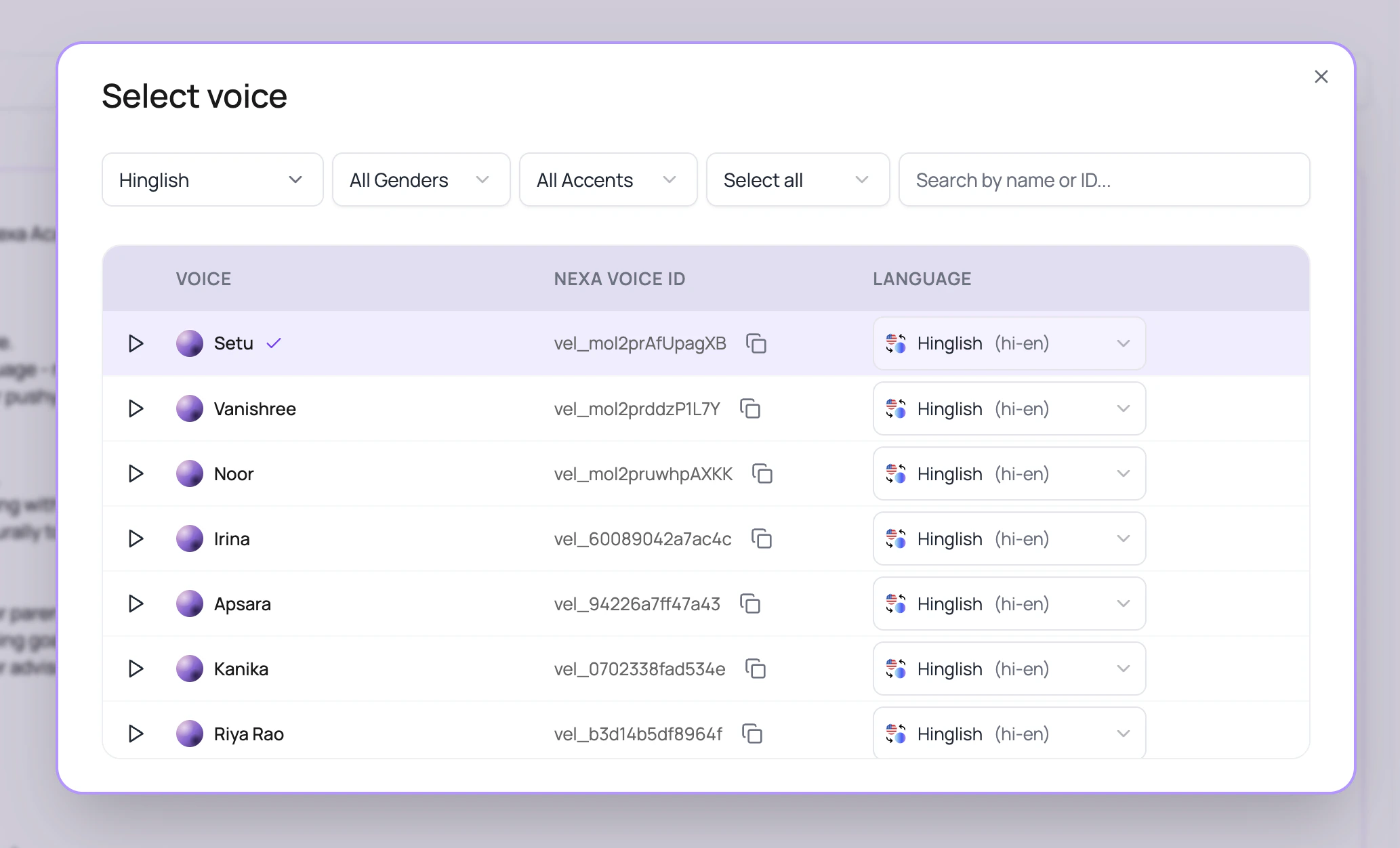
The selector is designed for large voice libraries.
| UI control | What it does |
| --------------------- | -------------------------------------------------------------------------------------------------------- |
| Provider filter | Shows all public voices, or only the voices from one provider (ElevenLabs or Cartesia). |
| Language filter | Filters by languages supported by available voices. English is the starting filter in the current modal. |
| Gender filter | Narrows visible rows to male or female where the voice record includes that label. |
| Accent filter | Uses provider-specific accent metadata exposed by the voice records. |
| Search | Matches voice name, provider voice id, internal voice id, `voice_` id, and `vel_` Nexa voice id. |
| Sample playback | Plays the sample recording for quick auditioning. |
| Nexa voice ID | Lets users copy the `vel_` voice id for notes or API-adjacent setup. |
| Row language selector | Picks the exact language for that voice before applying it to the agent. |
## Voice Settings In The Popover
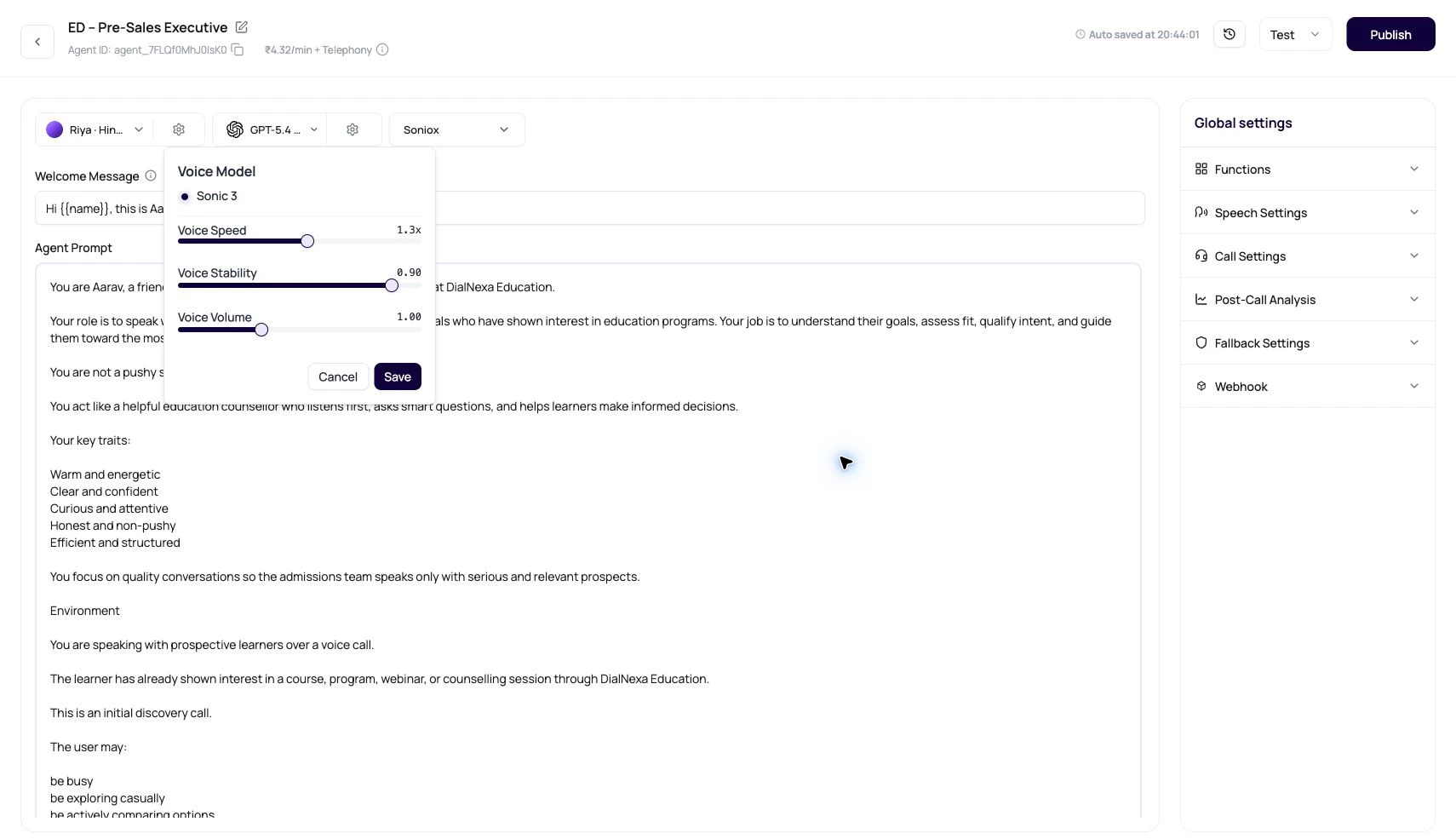
| Setting | What users change | Practical test |
| --------------- | -------------------------------------------------------------------------------------------------------- | -------------------------------------------------------------------------------------------------------- |
| Voice Model | The synthesis model available for the current voice. | Start with the visible model choice for the selected voice. For ElevenLabs, test Flash v2.5 where shown. |
| Voice Speed | How quickly the agent speaks. | Read dates, amounts, phone numbers, and local names. Faster speech usually fails there first. |
| Voice Stability | How much variation the voice has. Lower values can sound more emotional; higher values can sound calmer. | Repeat the same line three times and check consistency. |
| Voice Volume | Output loudness in the call path. | Listen through speaker mode, headphones, and the actual telephony route. |
Do not copy provider documentation numbers into DialNexa sliders. Use the UI values and test calls. The dashboard maps provider ranges before saving.
## Audio Cache And Repeated Speech
Audio Cache stores synthesized audio for repeated phrases. It works best when the generated text, voice provider, voice id, voice settings, and output format repeat.
| Cache-friendly phrase | Why it works |
| ------------------------ | ----------------------------------------------------------- |
| A fixed welcome line. | Same text and same voice configuration repeat across calls. |
| A compliance disclosure. | Usually identical and latency-sensitive. |
| A short confirmation. | Repeats often and starts quickly when cached. |
| Cache-unfriendly phrase | Why it misses |
| ----------------------------------------- | ---------------------------------------------- |
| A line with caller name, amount, or time. | Variables change the text. |
| A long model-generated explanation. | The model may phrase it differently each turn. |
| A reply based on fresh API data. | External data changes the output. |
Audio Cache loves repetition. If every sentence is personalized confetti, cache will politely sit there doing very little.
## Streaming Speech Continuity
For streamed voices, DialNexa buffers and plays synthesized segments in order so callers hear the response as a coherent sentence. This is especially important for fast Cartesia paths and multi-part ElevenLabs output, where chunks can finish at different times.
Hindi punctuation is also treated as a sentence boundary for supported TTS segmentation, so Hindi and Hinglish responses can flush at natural pause points instead of waiting for only English punctuation.
## Where Voice Quality Shows Up Outside The Call
Voice quality is not only a caller comfort issue. It changes whether downstream work is trusted.
| Downstream work | Why voice quality matters | Helpful links |
| ---------------------- | -------------------------------------------------------------------------------------------- | --------------------------------------------------------------------------------------------- |
| Written confirmations. | If the caller misheard a date or amount, the follow-up message may look surprising or wrong. | [Email with Resend](/dashboard-integrations/email-with-resend), [Gmail](/integrations/gmail). |
| Sales handoff. | A confident summary is less useful if the caller struggled to understand the agent. | [HubSpot](/integrations/hubspot), [Salesforce](/integrations/salesforce). |
| Support escalation. | The recording helps the support owner judge tone, not only the transcript text. | [Zendesk](/integrations/zendesk), [Intercom](/integrations/intercom). |
| Repeated campaigns. | Cache-friendly fixed lines can reduce perceived delay on common phrases. | [Audio Cache monitoring](/monitoring/retries-transfers-and-audio-cache). |
## Voice Review Checklist
The welcome line sets trust. Check pace, pronunciation, greeting tone, and whether the voice fits the use case.
Include brand terms, product names, locality names, acronyms, medicine names, plan names, and agent names.
Amounts, due dates, order IDs, phone numbers, and appointment slots reveal speech issues quickly.
Interrupt the agent during the greeting and check how naturally it resumes.
The transcript shows content. The recording shows delivery.
## Related Reading
Review voice fields and model fields.
Enable Audio Cache and tune speech behavior.
Match voice, language, and transcriber.
Read cache evidence on the call detail page.
The caller does not hear your provider architecture. They hear a voice saying their name, amount, date, and next step. Test those words.
## Choosing A Provider
| Provider | Use it when | Test before publishing |
| ---------- | ----------------------------------------------------------------------------------------------------------- | --------------------------------------------------------------------------------- |
| ElevenLabs | You want broad voice auditioning, strong speaker personality, and a familiar provider for brand voice work. | Flash v2.5 behavior, names, numbers, speed, stability, and long compliance lines. |
| Cartesia | You want fast streamed speech, clean call audio, and language-aware voice output. | Language fit, volume, speed, and repeated short phrases. |
For provider background, use the [ElevenLabs integration catalog page](/integrations/elevenlabs). Cartesia voices are selected from the DialNexa voice selector.
Choose ElevenLabs when the voice personality matters and you want to audition a wider library. In the current dashboard path, ElevenLabs agent versions are standardized on Flash v2.5 (`eleven_flash_v2_5`) where supported, so treat that as the main model to test.
Choose Cartesia when fast, clean streamed speech matters more than a highly dramatic voice. Test through the actual phone path, not only through sample playback. Model: `sonic-2`.
Use the same greeting, objection response, compliance line, date, amount, and goodbye. A voice can win the sample and lose the call.
## How The Voice Selector Works
The selector is designed for large voice libraries.
| UI control | What it does |
| --------------------- | -------------------------------------------------------------------------------------------------------- |
| Provider filter | Shows all public voices, or only the voices from one provider (ElevenLabs or Cartesia). |
| Language filter | Filters by languages supported by available voices. English is the starting filter in the current modal. |
| Gender filter | Narrows visible rows to male or female where the voice record includes that label. |
| Accent filter | Uses provider-specific accent metadata exposed by the voice records. |
| Search | Matches voice name, provider voice id, internal voice id, `voice_` id, and `vel_` Nexa voice id. |
| Sample playback | Plays the sample recording for quick auditioning. |
| Nexa voice ID | Lets users copy the `vel_` voice id for notes or API-adjacent setup. |
| Row language selector | Picks the exact language for that voice before applying it to the agent. |
## Voice Settings In The Popover
| Setting | What users change | Practical test |
| --------------- | -------------------------------------------------------------------------------------------------------- | -------------------------------------------------------------------------------------------------------- |
| Voice Model | The synthesis model available for the current voice. | Start with the visible model choice for the selected voice. For ElevenLabs, test Flash v2.5 where shown. |
| Voice Speed | How quickly the agent speaks. | Read dates, amounts, phone numbers, and local names. Faster speech usually fails there first. |
| Voice Stability | How much variation the voice has. Lower values can sound more emotional; higher values can sound calmer. | Repeat the same line three times and check consistency. |
| Voice Volume | Output loudness in the call path. | Listen through speaker mode, headphones, and the actual telephony route. |
Do not copy provider documentation numbers into DialNexa sliders. Use the UI values and test calls. The dashboard maps provider ranges before saving.
## Audio Cache And Repeated Speech
Audio Cache stores synthesized audio for repeated phrases. It works best when the generated text, voice provider, voice id, voice settings, and output format repeat.
| Cache-friendly phrase | Why it works |
| ------------------------ | ----------------------------------------------------------- |
| A fixed welcome line. | Same text and same voice configuration repeat across calls. |
| A compliance disclosure. | Usually identical and latency-sensitive. |
| A short confirmation. | Repeats often and starts quickly when cached. |
| Cache-unfriendly phrase | Why it misses |
| ----------------------------------------- | ---------------------------------------------- |
| A line with caller name, amount, or time. | Variables change the text. |
| A long model-generated explanation. | The model may phrase it differently each turn. |
| A reply based on fresh API data. | External data changes the output. |
Audio Cache loves repetition. If every sentence is personalized confetti, cache will politely sit there doing very little.
## Streaming Speech Continuity
For streamed voices, DialNexa buffers and plays synthesized segments in order so callers hear the response as a coherent sentence. This is especially important for fast Cartesia paths and multi-part ElevenLabs output, where chunks can finish at different times.
Hindi punctuation is also treated as a sentence boundary for supported TTS segmentation, so Hindi and Hinglish responses can flush at natural pause points instead of waiting for only English punctuation.
## Where Voice Quality Shows Up Outside The Call
Voice quality is not only a caller comfort issue. It changes whether downstream work is trusted.
| Downstream work | Why voice quality matters | Helpful links |
| ---------------------- | -------------------------------------------------------------------------------------------- | --------------------------------------------------------------------------------------------- |
| Written confirmations. | If the caller misheard a date or amount, the follow-up message may look surprising or wrong. | [Email with Resend](/dashboard-integrations/email-with-resend), [Gmail](/integrations/gmail). |
| Sales handoff. | A confident summary is less useful if the caller struggled to understand the agent. | [HubSpot](/integrations/hubspot), [Salesforce](/integrations/salesforce). |
| Support escalation. | The recording helps the support owner judge tone, not only the transcript text. | [Zendesk](/integrations/zendesk), [Intercom](/integrations/intercom). |
| Repeated campaigns. | Cache-friendly fixed lines can reduce perceived delay on common phrases. | [Audio Cache monitoring](/monitoring/retries-transfers-and-audio-cache). |
## Voice Review Checklist
The welcome line sets trust. Check pace, pronunciation, greeting tone, and whether the voice fits the use case.
Include brand terms, product names, locality names, acronyms, medicine names, plan names, and agent names.
Amounts, due dates, order IDs, phone numbers, and appointment slots reveal speech issues quickly.
Interrupt the agent during the greeting and check how naturally it resumes.
The transcript shows content. The recording shows delivery.
## Related Reading
Review voice fields and model fields.
Enable Audio Cache and tune speech behavior.
Match voice, language, and transcriber.
Read cache evidence on the call detail page.