> ## Documentation Index
> Fetch the complete documentation index at: https://dialnexa.com/docs/llms.txt
> Use this file to discover all available pages before exploring further.
# Choose Voice AI Providers For Your Call Type
> Choose Voice AI providers in DialNexa by caller language, call goal, latency, cost, integrations, speech quality, transcription accuracy, and production evidence.
Choosing Voice AI providers in DialNexa means picking the listening, reasoning, speaking, and routing layers that fit the caller's job. The best stack for a fast English sales call may be the wrong stack for a Hindi-English support call, a payment reminder, or a workflow that has to update a CRM after the call.
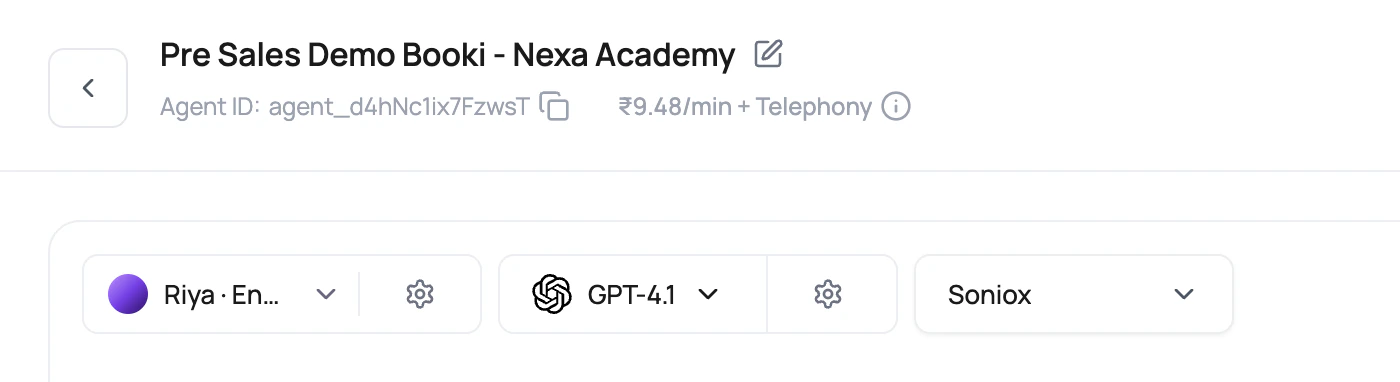 Provider selection is not a beauty contest. It is a job interview for your exact caller, your exact script, and your exact follow-up action.
## Start With The Call, Not The Provider
| Caller reality | Start with this stack | Why | Useful integration path |
| ----------------------------------------- | ---------------------------------------------------------------------------------------------------- | ------------------------------------------------------------------------------------------------------------------------------------------- | ----------------------------------------------------------------------------------------------------------- |
| Mostly English support or sales calls. | Deepgram Flux, OpenAI, ElevenLabs or Cartesia after voice tests. | Balanced recognition, reasoning, and speech quality for first production tests. | [HubSpot](/integrations/hubspot), [Salesforce](/integrations/salesforce), [Zendesk](/integrations/zendesk). |
| English calls where interruptions matter. | Deepgram Flux (English only), short prompt, low temperature, optional Groq fallback. | Flux is useful for sharper English turn boundaries. Short prompts reduce waiting. | [Slack](/integrations/slack) for urgent owner alerts. |
| Hindi-English or Hinglish callers. | Soniox, Hindi-English language, Hinglish Map, tested SmallestAI or ElevenLabs voice. | Soniox receives Hindi and English hints, and Hinglish Map helps the agent avoid stiff wording. SmallestAI has native Indian voice personas. | [Google Sheets](/integrations/googlesheets) for review queues before scaling. |
| Indian English callers. | Soniox or Deepgram Flux, OpenAI, Sarvam AI (`en-IN`). | Sarvam AI provides natural Indian English voice output; Soniox handles Indian-accented speech well. | [HubSpot](/integrations/hubspot), [Salesforce](/integrations/salesforce). |
| Strict booking or payment flow. | Deepgram Flux (English) or Soniox based on language, OpenAI, low temperature, clear functions. | Structured work needs stable function calls and predictable extraction. | [Google Calendar](/integrations/googlecalendar), [Stripe](/integrations/stripe). |
| Repeated outbound campaign script. | Stable transcriber, low-temperature model, Audio Cache on, short repeated lines. | Repeated phrases are cache-friendly, and short lines reduce speech delay. | [Wati](/dashboard-integrations/whatsapp-with-wati), [Resend](/integrations/resend). |
| Ecommerce order calls. | Language-matched transcriber, clear voice for numbers, low-temperature model, order lookup function. | Order IDs, addresses, and amounts punish vague speech and vague prompts. | [Shopify](/integrations/shopify), [Gmail](/integrations/gmail). |
| Latency-sensitive English calls. | Speech to Speech with OpenAI realtime or Gemini 3.1 Flash Live after side-by-side tests. | Direct speech models reduce separate STT and TTS steps, but you must test interruptions, tool calls, and voice fit. | [Call History](/monitoring/call-history), [Testing agents](/agents/testing-agents). |
## Compare Providers By Layer
Do not compare all providers in one pile. Each provider owns a different failure mode.
| Layer | Public choices to compare | Good evidence | Bad comparison method |
| ---------------- | -------------------------------------------------------------------------- | ---------------------------------------------------------------------------------------------- | -------------------------------------------------------------------------- |
| Speech to text | Deepgram Flux (English only) and Soniox in the current dashboard selector. | Recording plus live transcript plus accurate transcript. | Reading only the summary and blaming the model. |
| LLM | OpenAI, Google, Groq. | Function arguments, first token delay, response correctness, post-call fields. | Testing with different prompts for each model. |
| Speech to Speech | OpenAI realtime and Gemini 3.1 Flash Live where enabled. | First audio timing, barge-in handling, tool calls, voicemail handling, and long-call behavior. | Comparing against a cascaded stack without noting the pipeline difference. |
| Text to speech | ElevenLabs, Cartesia. | Recording, first audio delay, pronunciation, volume, caller comfort. | Choosing only from sample audio in the modal. |
| Telephony | Plivo number, SIP trunk, web call. | Same agent tested through each path. | Comparing a clean browser mic against a noisy mobile call. |
## Provider Pages And Integration Pages
Some provider pages in the integration catalog are useful background reading. Use them as supporting context, not as a replacement for testing the provider inside a real DialNexa call.
Useful when you are evaluating speech recognition tradeoffs.
Useful when voice identity and voice model choice matter.
Useful when comparing model behavior, function calling, and extraction.
Use this for Wati, Resend, and dashboard-managed action setup.
Use this when the call result should trigger a workflow action.
Use this when the agent should act during the live call.
## Provider Recipes You Can Start With
Use Deepgram Flux for English transcription, OpenAI for primary reasoning, and either ElevenLabs or Cartesia after listening tests. Keep temperature low when the agent calls functions or extracts structured results. This is a plain starting point, which is a compliment in production.
Use Deepgram Flux for English when callers interrupt often or answer in short bursts. Keep the welcome message short. Avoid long model replies. Test with callers who interrupt during the greeting, because they will.
Use Soniox with the Hindi-English language option. Turn on Hinglish Map when the agent sounds too formal. Test names, locality names, numbers, and casual mixed-language replies before publishing.
Choose a strong primary model first, then enable fallback LLM with a delay such as 500 ms as a starting point. Use Call History to confirm which model won the race and whether the winning response was still correct.
Keep greetings, disclosures, confirmations, and closing lines short and consistent. Audio Cache works best when the generated text and voice configuration repeat. Variables are useful, but they also make cache hits less likely.
## Pricing Signals In The Builder
The dashboard shows rate previews so provider choice is not guesswork.
Provider selection is not a beauty contest. It is a job interview for your exact caller, your exact script, and your exact follow-up action.
## Start With The Call, Not The Provider
| Caller reality | Start with this stack | Why | Useful integration path |
| ----------------------------------------- | ---------------------------------------------------------------------------------------------------- | ------------------------------------------------------------------------------------------------------------------------------------------- | ----------------------------------------------------------------------------------------------------------- |
| Mostly English support or sales calls. | Deepgram Flux, OpenAI, ElevenLabs or Cartesia after voice tests. | Balanced recognition, reasoning, and speech quality for first production tests. | [HubSpot](/integrations/hubspot), [Salesforce](/integrations/salesforce), [Zendesk](/integrations/zendesk). |
| English calls where interruptions matter. | Deepgram Flux (English only), short prompt, low temperature, optional Groq fallback. | Flux is useful for sharper English turn boundaries. Short prompts reduce waiting. | [Slack](/integrations/slack) for urgent owner alerts. |
| Hindi-English or Hinglish callers. | Soniox, Hindi-English language, Hinglish Map, tested SmallestAI or ElevenLabs voice. | Soniox receives Hindi and English hints, and Hinglish Map helps the agent avoid stiff wording. SmallestAI has native Indian voice personas. | [Google Sheets](/integrations/googlesheets) for review queues before scaling. |
| Indian English callers. | Soniox or Deepgram Flux, OpenAI, Sarvam AI (`en-IN`). | Sarvam AI provides natural Indian English voice output; Soniox handles Indian-accented speech well. | [HubSpot](/integrations/hubspot), [Salesforce](/integrations/salesforce). |
| Strict booking or payment flow. | Deepgram Flux (English) or Soniox based on language, OpenAI, low temperature, clear functions. | Structured work needs stable function calls and predictable extraction. | [Google Calendar](/integrations/googlecalendar), [Stripe](/integrations/stripe). |
| Repeated outbound campaign script. | Stable transcriber, low-temperature model, Audio Cache on, short repeated lines. | Repeated phrases are cache-friendly, and short lines reduce speech delay. | [Wati](/dashboard-integrations/whatsapp-with-wati), [Resend](/integrations/resend). |
| Ecommerce order calls. | Language-matched transcriber, clear voice for numbers, low-temperature model, order lookup function. | Order IDs, addresses, and amounts punish vague speech and vague prompts. | [Shopify](/integrations/shopify), [Gmail](/integrations/gmail). |
| Latency-sensitive English calls. | Speech to Speech with OpenAI realtime or Gemini 3.1 Flash Live after side-by-side tests. | Direct speech models reduce separate STT and TTS steps, but you must test interruptions, tool calls, and voice fit. | [Call History](/monitoring/call-history), [Testing agents](/agents/testing-agents). |
## Compare Providers By Layer
Do not compare all providers in one pile. Each provider owns a different failure mode.
| Layer | Public choices to compare | Good evidence | Bad comparison method |
| ---------------- | -------------------------------------------------------------------------- | ---------------------------------------------------------------------------------------------- | -------------------------------------------------------------------------- |
| Speech to text | Deepgram Flux (English only) and Soniox in the current dashboard selector. | Recording plus live transcript plus accurate transcript. | Reading only the summary and blaming the model. |
| LLM | OpenAI, Google, Groq. | Function arguments, first token delay, response correctness, post-call fields. | Testing with different prompts for each model. |
| Speech to Speech | OpenAI realtime and Gemini 3.1 Flash Live where enabled. | First audio timing, barge-in handling, tool calls, voicemail handling, and long-call behavior. | Comparing against a cascaded stack without noting the pipeline difference. |
| Text to speech | ElevenLabs, Cartesia. | Recording, first audio delay, pronunciation, volume, caller comfort. | Choosing only from sample audio in the modal. |
| Telephony | Plivo number, SIP trunk, web call. | Same agent tested through each path. | Comparing a clean browser mic against a noisy mobile call. |
## Provider Pages And Integration Pages
Some provider pages in the integration catalog are useful background reading. Use them as supporting context, not as a replacement for testing the provider inside a real DialNexa call.
Useful when you are evaluating speech recognition tradeoffs.
Useful when voice identity and voice model choice matter.
Useful when comparing model behavior, function calling, and extraction.
Use this for Wati, Resend, and dashboard-managed action setup.
Use this when the call result should trigger a workflow action.
Use this when the agent should act during the live call.
## Provider Recipes You Can Start With
Use Deepgram Flux for English transcription, OpenAI for primary reasoning, and either ElevenLabs or Cartesia after listening tests. Keep temperature low when the agent calls functions or extracts structured results. This is a plain starting point, which is a compliment in production.
Use Deepgram Flux for English when callers interrupt often or answer in short bursts. Keep the welcome message short. Avoid long model replies. Test with callers who interrupt during the greeting, because they will.
Use Soniox with the Hindi-English language option. Turn on Hinglish Map when the agent sounds too formal. Test names, locality names, numbers, and casual mixed-language replies before publishing.
Choose a strong primary model first, then enable fallback LLM with a delay such as 500 ms as a starting point. Use Call History to confirm which model won the race and whether the winning response was still correct.
Keep greetings, disclosures, confirmations, and closing lines short and consistent. Audio Cache works best when the generated text and voice configuration repeat. Variables are useful, but they also make cache hits less likely.
## Pricing Signals In The Builder
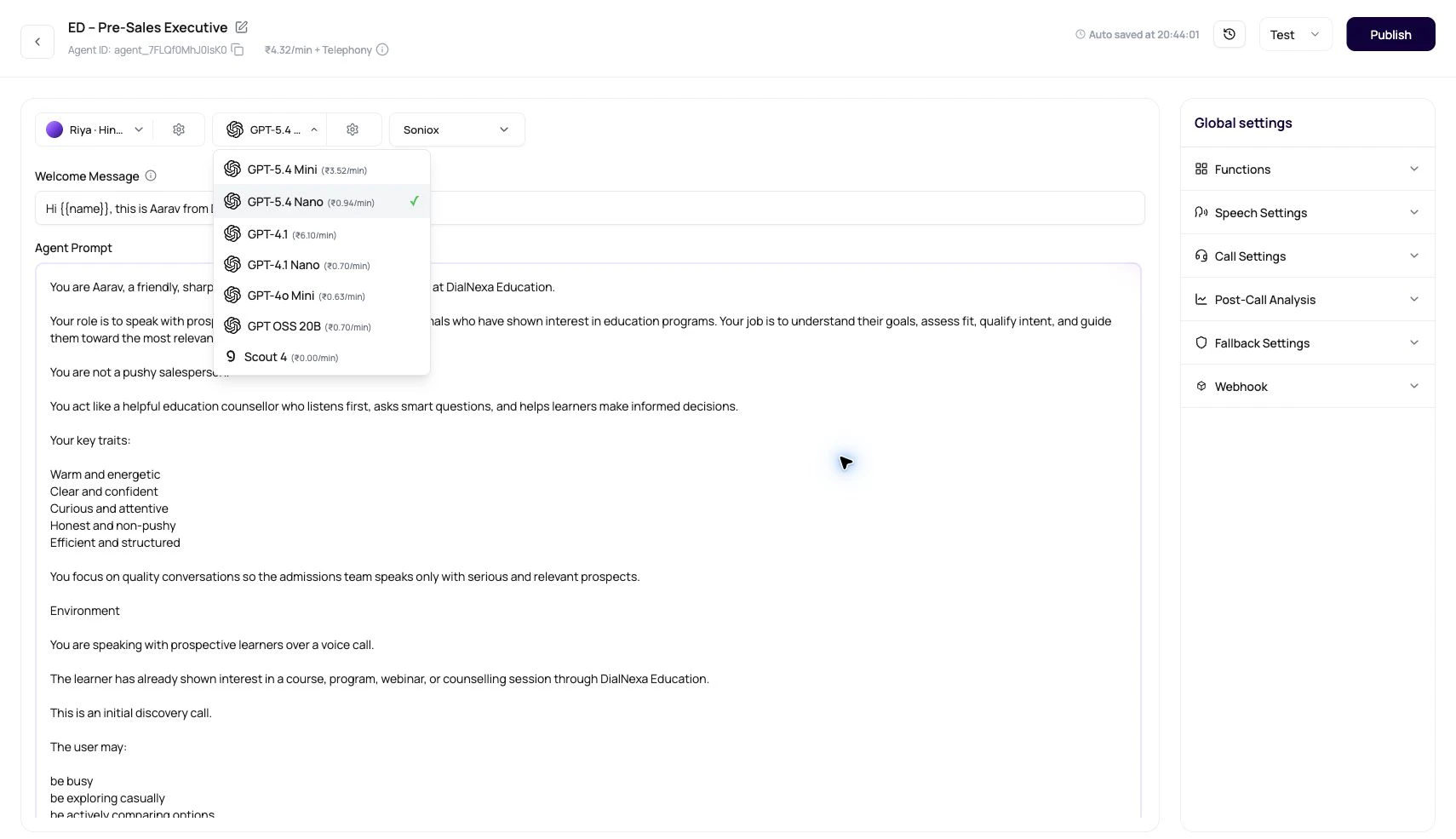
The dashboard shows rate previews so provider choice is not guesswork.
 | UI area | What users can see |
| ------------------------------- | -------------------------------------------------------------------------------------------------------------------------------------- |
| Model selector | INR per minute for available LLM models when the workspace uses the current billing preview path. |
| Speech to Speech model selector | INR per minute for realtime speech models such as OpenAI realtime and Gemini 3.1 Flash Live, plus separate telephony where applicable. |
| Transcriber selector | INR per minute beside transcriber options when pricing is available. |
| Pricing tooltip | Voice engine, LLM, transcriber, and telephony note in the agent builder. |
| SIP trunk modal | SIP trunking per-minute rate before saving a linked number. |
| Voice model data | Voice models can include per-minute pricing metadata when available. |
Telephony cost is separate from the voice, LLM, and transcriber stack. For Plivo-style routing, destination matching is based on the called number. For SIP trunking, DialNexa displays a flat SIP rate when it is configured.
## Run A Fair Provider Test
Use the same greeting, caller name, number, objection, pause, and final outcome for every test.
Compare providers through the same phone path. Do not compare one provider on web call and another on a mobile network call.
Change only the transcriber, only the model, or only the voice.
Review recording, live transcript, accurate transcript, summary, post-call fields, transfer data, Audio Cache, and cost.
Live numbers, batch calls, and workflows should point to the version that passed the test.
## Decision Shortcuts
| If the problem is | First place to look | Likely setting |
| ---------------------------------------- | --------------------------------------- | ------------------------------------------------------------ |
| Caller words are wrong in transcript. | Speech to text page and call recording. | Transcriber, language, noise, phone path. |
| Transcript is right but answer is wrong. | LLM page, prompt, functions, variables. | Model, temperature, prompt, function schema. |
| Agent takes too long to answer. | Latency page and model settings. | Endpointing, fallback LLM delay, function time, Audio Cache. |
| Agent sounds unnatural. | Text to speech page and recording. | Voice, voice model, speed, stability, volume, language. |
| Extracted fields are wrong. | Call detail and post-call analysis. | Transcript quality, field definitions, model behavior. |
## Related Reading
Compare Deepgram and Soniox behavior.
Tune model choice, temperature, fallback, and preprocessing.
Compare ElevenLabs and Cartesia.
Choose the complete agent stack.
Connect call outcomes to WhatsApp, email, workflows, and external systems.
Browse provider and business-system pages for connected workflows.
| UI area | What users can see |
| ------------------------------- | -------------------------------------------------------------------------------------------------------------------------------------- |
| Model selector | INR per minute for available LLM models when the workspace uses the current billing preview path. |
| Speech to Speech model selector | INR per minute for realtime speech models such as OpenAI realtime and Gemini 3.1 Flash Live, plus separate telephony where applicable. |
| Transcriber selector | INR per minute beside transcriber options when pricing is available. |
| Pricing tooltip | Voice engine, LLM, transcriber, and telephony note in the agent builder. |
| SIP trunk modal | SIP trunking per-minute rate before saving a linked number. |
| Voice model data | Voice models can include per-minute pricing metadata when available. |
Telephony cost is separate from the voice, LLM, and transcriber stack. For Plivo-style routing, destination matching is based on the called number. For SIP trunking, DialNexa displays a flat SIP rate when it is configured.
## Run A Fair Provider Test
Use the same greeting, caller name, number, objection, pause, and final outcome for every test.
Compare providers through the same phone path. Do not compare one provider on web call and another on a mobile network call.
Change only the transcriber, only the model, or only the voice.
Review recording, live transcript, accurate transcript, summary, post-call fields, transfer data, Audio Cache, and cost.
Live numbers, batch calls, and workflows should point to the version that passed the test.
## Decision Shortcuts
| If the problem is | First place to look | Likely setting |
| ---------------------------------------- | --------------------------------------- | ------------------------------------------------------------ |
| Caller words are wrong in transcript. | Speech to text page and call recording. | Transcriber, language, noise, phone path. |
| Transcript is right but answer is wrong. | LLM page, prompt, functions, variables. | Model, temperature, prompt, function schema. |
| Agent takes too long to answer. | Latency page and model settings. | Endpointing, fallback LLM delay, function time, Audio Cache. |
| Agent sounds unnatural. | Text to speech page and recording. | Voice, voice model, speed, stability, volume, language. |
| Extracted fields are wrong. | Call detail and post-call analysis. | Transcript quality, field definitions, model behavior. |
## Related Reading
Compare Deepgram and Soniox behavior.
Tune model choice, temperature, fallback, and preprocessing.
Compare ElevenLabs and Cartesia.
Choose the complete agent stack.
Connect call outcomes to WhatsApp, email, workflows, and external systems.
Browse provider and business-system pages for connected workflows.