> ## Documentation Index
> Fetch the complete documentation index at: https://dialnexa.com/docs/llms.txt
> Use this file to discover all available pages before exploring further.
# Multilingual And Hinglish Calls In DialNexa
> Configure DialNexa multilingual and Hinglish calls with language selection, Soniox, Deepgram, Hinglish Map, voice choice, prompts, and transcript review.
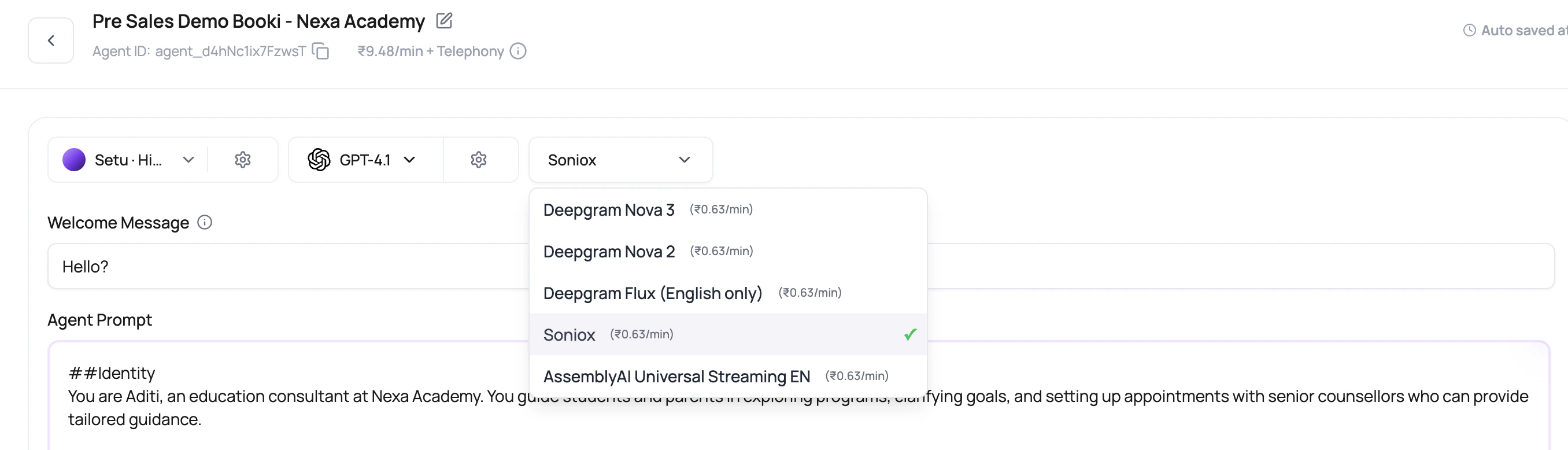
Multilingual and Hinglish calls in DialNexa work best when language, transcriber, voice, prompt examples, and test data are chosen together. For Hindi-English calls, use Soniox and Hinglish Map when the caller base naturally switches between Hindi and English.
 Mixed-language callers do not wait for your architecture diagram. They switch languages because that is how they speak. The agent should keep up.
## The Hindi-English Stack
| Layer | Recommended starting point | Why |
| ----------- | ------------------------------------------------------------------ | -------------------------------------------------------------------------------------- |
| Language | Hindi-English where available. | This exposes the right language-specific controls, including Hinglish Map. |
| Transcriber | Soniox STT RT v5. | DialNexa sends English and Hindi hints so the transcriber expects code switching. |
| Voice | Cartesia or an ElevenLabs voice tested on your phrases. | The right text can still fail if the voice sounds formal or mispronounces local terms. |
| LLM model | A model that follows language instructions and functions reliably. | The model must know when to answer in English, Hindi, or Hinglish. |
| Prompt | Include real mixed-language examples. | The model learns the expected style from the examples you provide. |
## Language Selection Details
The dashboard sorts English first, Hindi second, Indian languages next, and then other languages alphabetically. That ordering keeps common India-focused Voice AI setups close to the top without hiding other supported languages.
| Detail | Why it matters |
| ------------------------------------------------------- | ------------------------------------------------------------------------- |
| Voice-specific languages are preferred where available. | The language list reflects what the selected voice can actually speak. |
| Voice model language lookup is used as a fallback. | Older voice metadata can still produce a useful language list. |
| Some unavailable languages are hidden. | Users should not be offered languages that are not ready for selection. |
| Flux is English only. | Switching to Flux can force the language back to English where available. |
## Soniox Versus Deepgram For Multilingual Calls
| Need | Start with |
| ----------------------------------------------------- | ------------------------------------------------------------------- |
| Hinglish or Hindi-English code switching | Soniox STT RT v5. |
| Mostly English with occasional Indian names or places | Deepgram Flux (English only) or Soniox. Compare on real recordings. |
| English-only fast turn-taking | Deepgram Flux (English only). |
| Non-English calls with a stable single language | Soniox. Test with real caller audio before scaling. |
Do not select an English-only turn-taking transcriber for Hinglish just because it felt fast in an English demo. Fast and wrong is still wrong.
For Hindi-English agents, DialNexa sends Soniox the valid language hints `en` and `hi`. It does not send combined hint codes such as `hi-en`.
## Hinglish Map
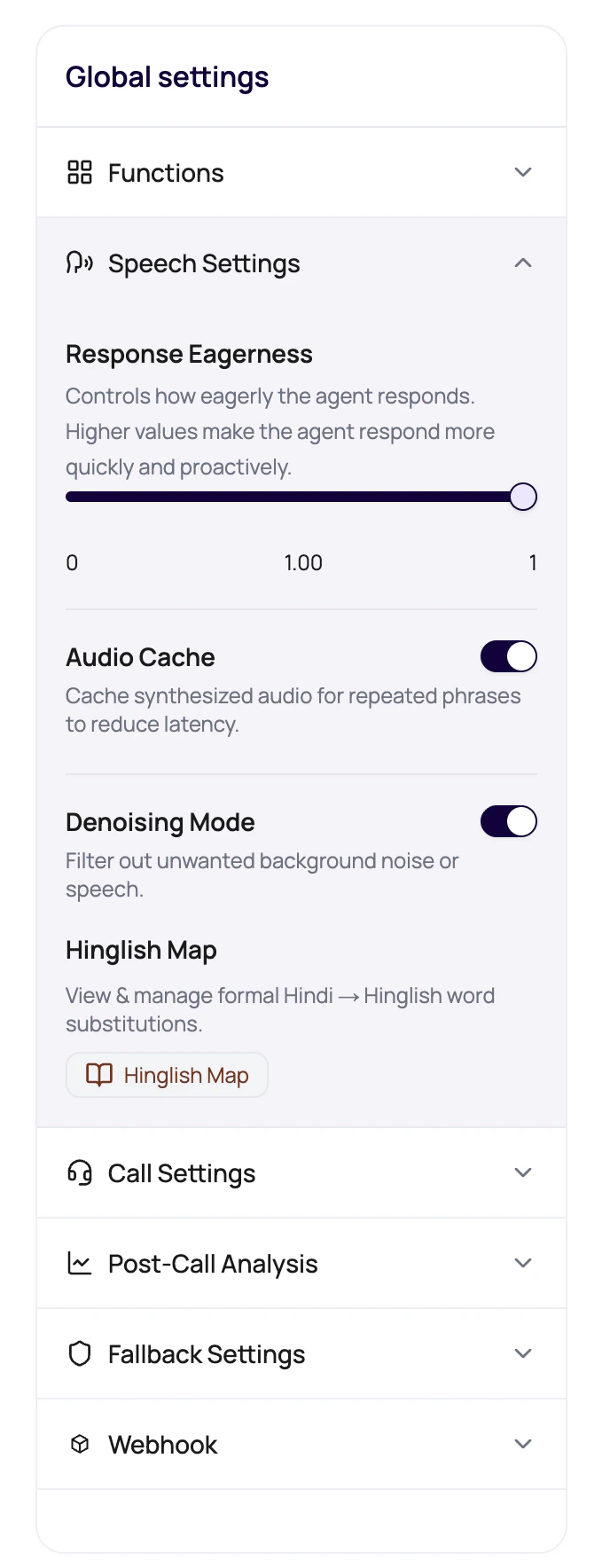
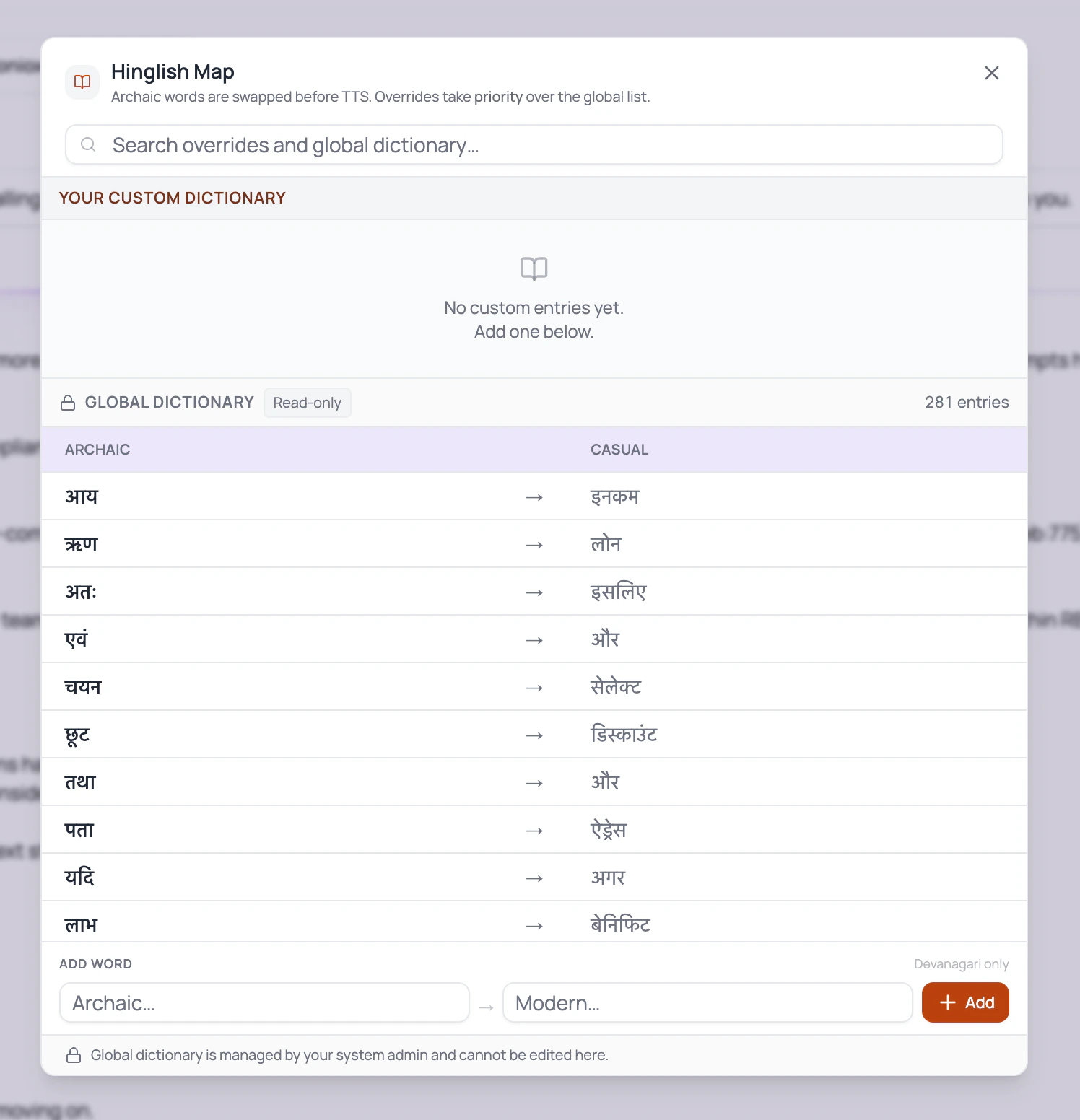
Hinglish Map is for phrasing, not translation of the whole agent. Use it to replace formal Hindi terms with natural mixed-language words that your callers actually use.
When Hinglish Map entries are configured, the runtime tracks the caller's current language style on each turn. It can identify English, Devanagari Hindi, Romanized Hindi, and mixed Hinglish, then adds a language instruction before the LLM responds. After the LLM responds, DialNexa can soften formal Hindi terms with the built-in casual Hindi map plus your workspace entries before audio is synthesized.
| Formal phrase problem | Better approach |
| ------------------------------------------------------------------- | ----------------------------------------------------------------------- |
| Agent sounds too official for a casual reminder call. | Map repeated formal terms to conversational Hinglish. |
| Caller uses English nouns inside Hindi sentences. | Add prompt examples that show the same mixed style. |
| Voice over-pronounces English product names inside Hindi sentences. | Test another voice or voice model before adding confusing prompt hacks. |
Language tracking helps the agent choose the response style. It does not change the selected TTS voice. Use a voice that can speak the language and script you expect callers to use.
## Write Prompts For Mixed Language
Tell the agent whether it should start in Hinglish, mirror the caller, or stay mostly English with Hindi support.
Add phrases that callers actually say, including short replies, local terms, city names, and English product words.
Show the tone you want. One good example can prevent twenty awkward formal sentences.
Keep legal, medical, financial, or compliance terms precise. Natural language is good. Sloppy meaning is not.
## Review Checklist
| Check | What to inspect |
| ------------------- | ------------------------------------------------------------------------ |
| Greeting | Does the first sentence sound natural in the expected Hindi-English mix? |
| Names and places | Do Indian names, cities, and localities transcribe correctly? |
| Numbers and amounts | Can the voice read rupees, dates, times, and phone numbers clearly? |
| Turn-taking | Does the agent wait through mixed-language pauses? |
| Transcript | Does post-call analysis receive the same facts the caller said? |
| Voice tone | Does the selected voice sound conversational rather than translated? |
## Common Multilingual Mistakes
The model may answer in English even when the caller expects Hinglish. Add explicit language instructions and examples.
Use Hinglish Map and test another voice or model. The selected speaker matters as much as the text.
A city, plan, date, or payment amount injected through variables may need wording around it so it sounds natural.
Field descriptions should describe the business meaning, not the exact language used during the call.
## Related Reading
Compare Soniox and Deepgram options.
Use Hinglish Map and Response Eagerness.
Choose a voice that fits mixed-language calls.
Audit mixed-language evidence.
Mixed-language callers do not wait for your architecture diagram. They switch languages because that is how they speak. The agent should keep up.
## The Hindi-English Stack
| Layer | Recommended starting point | Why |
| ----------- | ------------------------------------------------------------------ | -------------------------------------------------------------------------------------- |
| Language | Hindi-English where available. | This exposes the right language-specific controls, including Hinglish Map. |
| Transcriber | Soniox STT RT v5. | DialNexa sends English and Hindi hints so the transcriber expects code switching. |
| Voice | Cartesia or an ElevenLabs voice tested on your phrases. | The right text can still fail if the voice sounds formal or mispronounces local terms. |
| LLM model | A model that follows language instructions and functions reliably. | The model must know when to answer in English, Hindi, or Hinglish. |
| Prompt | Include real mixed-language examples. | The model learns the expected style from the examples you provide. |
## Language Selection Details
The dashboard sorts English first, Hindi second, Indian languages next, and then other languages alphabetically. That ordering keeps common India-focused Voice AI setups close to the top without hiding other supported languages.
| Detail | Why it matters |
| ------------------------------------------------------- | ------------------------------------------------------------------------- |
| Voice-specific languages are preferred where available. | The language list reflects what the selected voice can actually speak. |
| Voice model language lookup is used as a fallback. | Older voice metadata can still produce a useful language list. |
| Some unavailable languages are hidden. | Users should not be offered languages that are not ready for selection. |
| Flux is English only. | Switching to Flux can force the language back to English where available. |
## Soniox Versus Deepgram For Multilingual Calls
| Need | Start with |
| ----------------------------------------------------- | ------------------------------------------------------------------- |
| Hinglish or Hindi-English code switching | Soniox STT RT v5. |
| Mostly English with occasional Indian names or places | Deepgram Flux (English only) or Soniox. Compare on real recordings. |
| English-only fast turn-taking | Deepgram Flux (English only). |
| Non-English calls with a stable single language | Soniox. Test with real caller audio before scaling. |
Do not select an English-only turn-taking transcriber for Hinglish just because it felt fast in an English demo. Fast and wrong is still wrong.
For Hindi-English agents, DialNexa sends Soniox the valid language hints `en` and `hi`. It does not send combined hint codes such as `hi-en`.
## Hinglish Map
Hinglish Map is for phrasing, not translation of the whole agent. Use it to replace formal Hindi terms with natural mixed-language words that your callers actually use.
When Hinglish Map entries are configured, the runtime tracks the caller's current language style on each turn. It can identify English, Devanagari Hindi, Romanized Hindi, and mixed Hinglish, then adds a language instruction before the LLM responds. After the LLM responds, DialNexa can soften formal Hindi terms with the built-in casual Hindi map plus your workspace entries before audio is synthesized.
| Formal phrase problem | Better approach |
| ------------------------------------------------------------------- | ----------------------------------------------------------------------- |
| Agent sounds too official for a casual reminder call. | Map repeated formal terms to conversational Hinglish. |
| Caller uses English nouns inside Hindi sentences. | Add prompt examples that show the same mixed style. |
| Voice over-pronounces English product names inside Hindi sentences. | Test another voice or voice model before adding confusing prompt hacks. |
Language tracking helps the agent choose the response style. It does not change the selected TTS voice. Use a voice that can speak the language and script you expect callers to use.
## Write Prompts For Mixed Language
Tell the agent whether it should start in Hinglish, mirror the caller, or stay mostly English with Hindi support.
Add phrases that callers actually say, including short replies, local terms, city names, and English product words.
Show the tone you want. One good example can prevent twenty awkward formal sentences.
Keep legal, medical, financial, or compliance terms precise. Natural language is good. Sloppy meaning is not.
## Review Checklist
| Check | What to inspect |
| ------------------- | ------------------------------------------------------------------------ |
| Greeting | Does the first sentence sound natural in the expected Hindi-English mix? |
| Names and places | Do Indian names, cities, and localities transcribe correctly? |
| Numbers and amounts | Can the voice read rupees, dates, times, and phone numbers clearly? |
| Turn-taking | Does the agent wait through mixed-language pauses? |
| Transcript | Does post-call analysis receive the same facts the caller said? |
| Voice tone | Does the selected voice sound conversational rather than translated? |
## Common Multilingual Mistakes
The model may answer in English even when the caller expects Hinglish. Add explicit language instructions and examples.
Use Hinglish Map and test another voice or model. The selected speaker matters as much as the text.
A city, plan, date, or payment amount injected through variables may need wording around it so it sounds natural.
Field descriptions should describe the business meaning, not the exact language used during the call.
## Related Reading
Compare Soniox and Deepgram options.
Use Hinglish Map and Response Eagerness.
Choose a voice that fits mixed-language calls.
Audit mixed-language evidence.