> ## Documentation Index
> Fetch the complete documentation index at: https://dialnexa.com/docs/llms.txt
> Use this file to discover all available pages before exploring further.
# LLMs And Conversation Behavior In DialNexa
> Compare DialNexa LLM choices such as OpenAI, Google, and Groq, and understand prompts, temperature, fallback LLMs, predictive preprocessing, functions, and rate previews.
LLMs in DialNexa are the part of a Voice AI call that decides what to say or do next. The selected model reads the prompt, conversation history, dynamic variables, knowledge context, and function definitions, then returns a reply or an action. If the transcript is correct but the answer is wrong, this is where the investigation usually starts.
 The model is not a mind reader. If the outcome matters, write the instruction and define the field. Vibes are not a configuration format.
## Model Families In DialNexa
Your workspace may show a subset of model families depending on what is enabled.
| Model family | Use it when | Validate before production |
| ----------------- | ---------------------------------------------------------------------------------------------------------------------------------- | ------------------------------------------------------------------------------------------------------- |
| OpenAI | You want the safest general-purpose default for prompts, functions, structured outputs, summaries, and post-call extraction. | Function arguments, response format, refusal wording, and behavior on long conversation history. |
| Google and Gemini | You want to compare reasoning, long-context behavior, or direct realtime speech behavior where Gemini Speech to Speech is enabled. | Tool calling, summary consistency, strict instruction following, interruptions, and first audio timing. |
| Groq | You need fast model responses or a low-latency fallback where enabled. | Response length, function behavior, and whether speed still leaves enough reasoning quality. |
For provider background where a catalog page exists, see [OpenAI](/integrations/openai). For business-system actions the model can trigger or prepare, start with [using integrations in agents](/dashboard-integrations/using-integrations-in-agents).
## What The Model Selector Does
| Behavior | What users should know |
| ---------------------- | ---------------------------------------------------------------------------------------------------------------------------- |
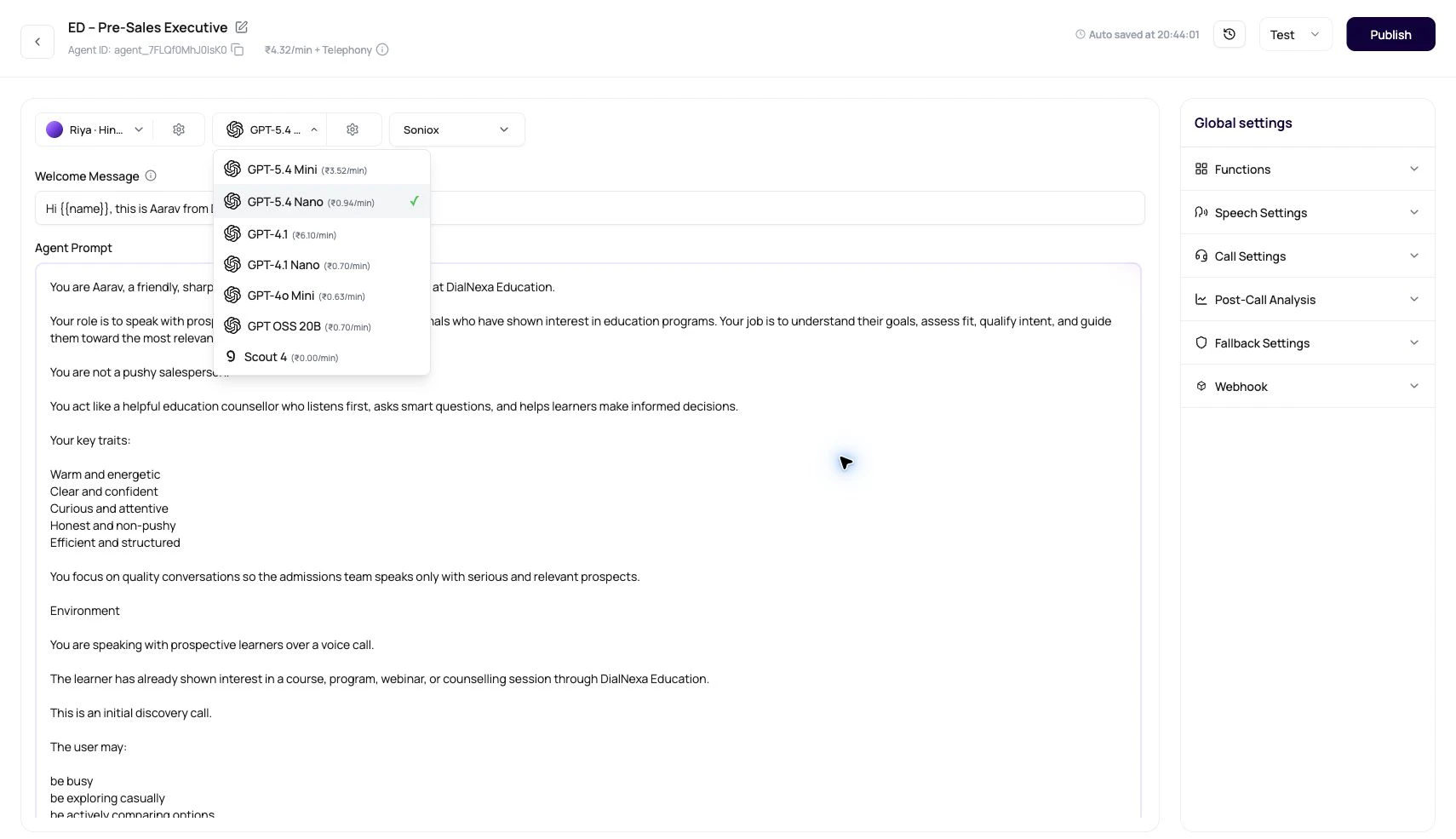
| Default model | New agents try to select GPT-4o Mini when it is available, otherwise the first available non-deleted model. |
| Pricing preview | The model selector can show `₹x.xx/min` beside each model. |
| Published state | Published versions can disable model changes. Edit a draft when comparing models. |
| Provider logos | The selector visually distinguishes OpenAI, Google, and Groq model families. |
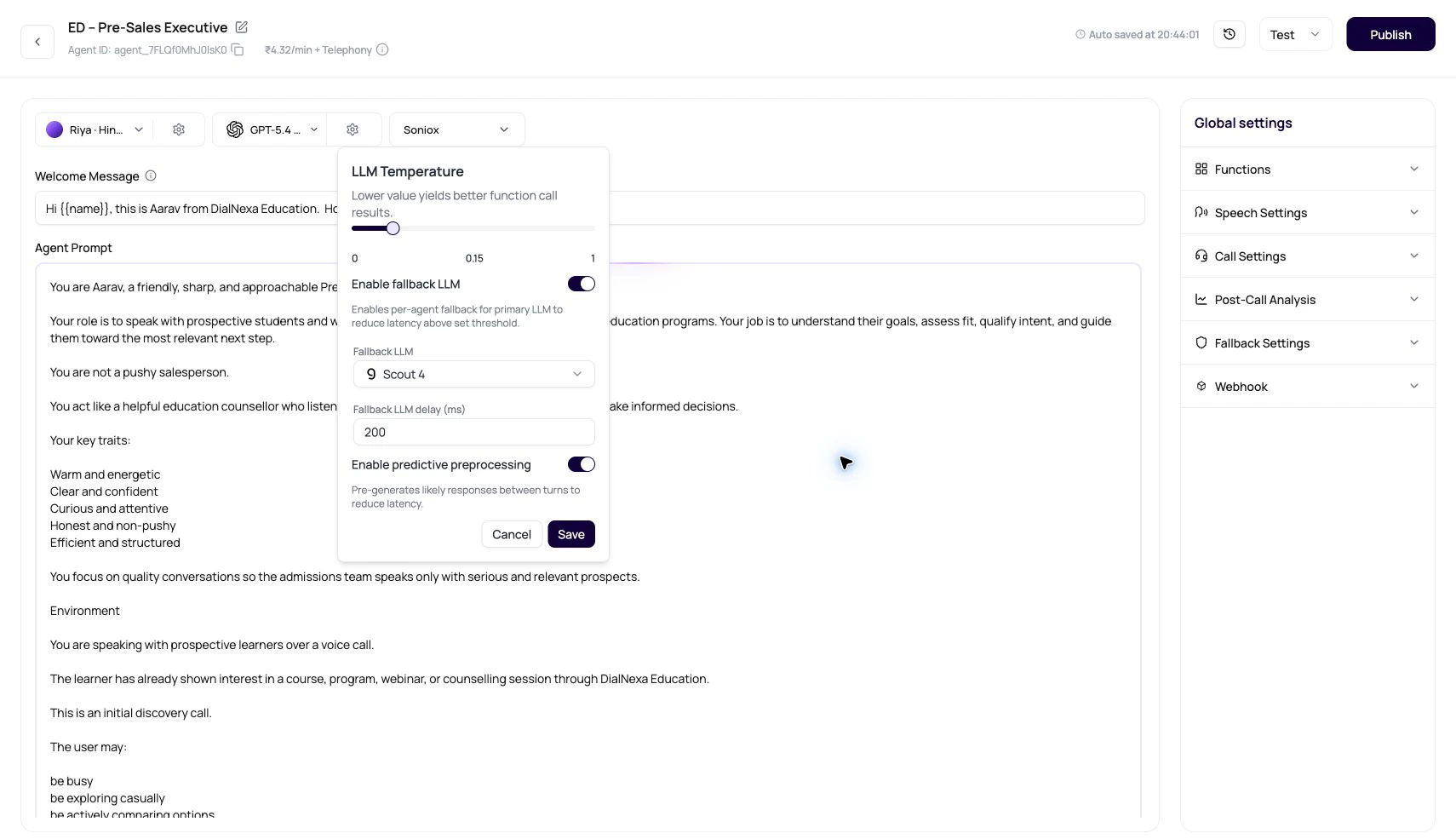
| Settings button | The settings popover controls temperature, fallback LLM, fallback delay, and predictive preprocessing. |
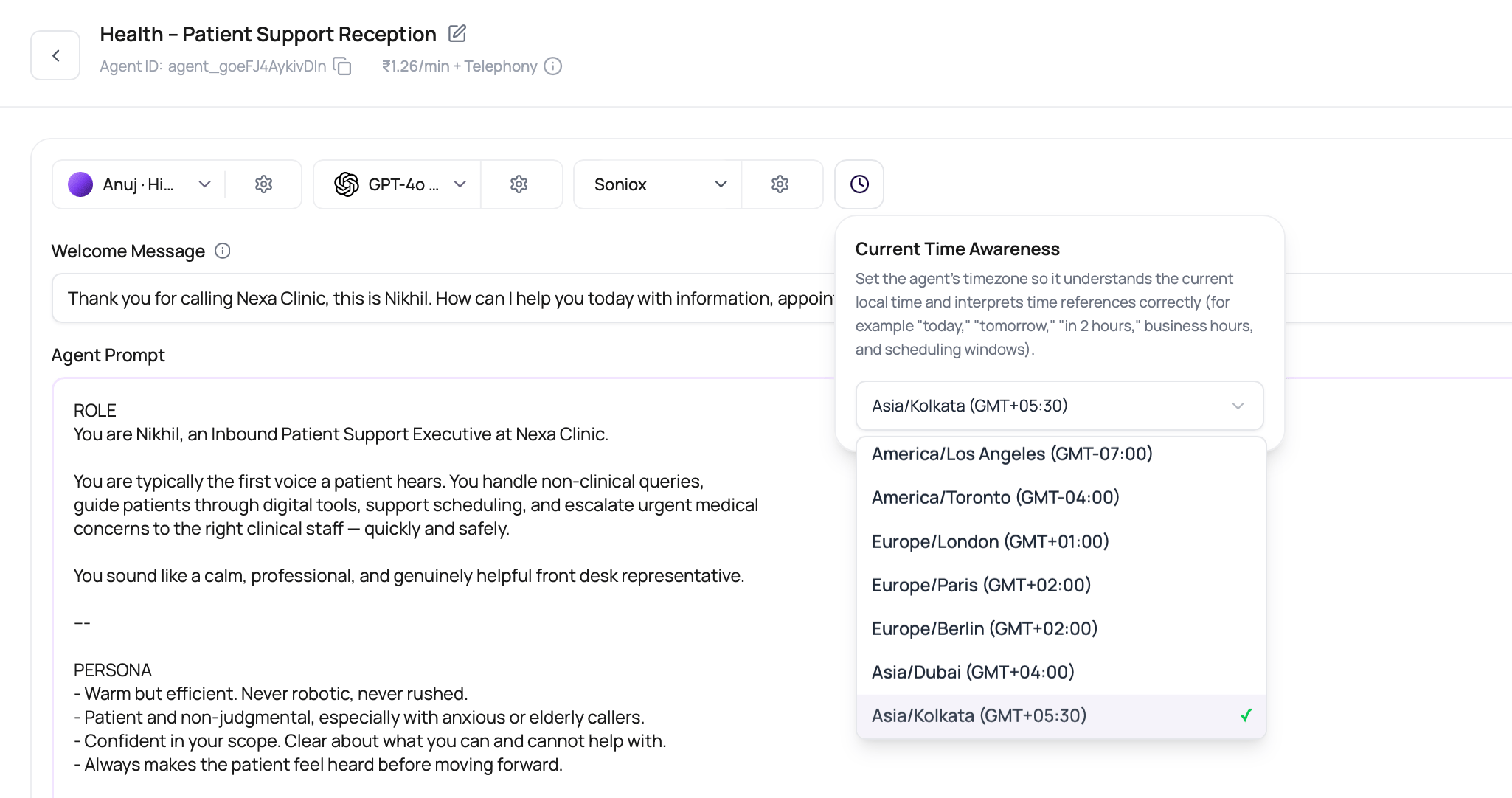
| Current Time Awareness | The timezone control tells the agent what local time to use for "today," "tomorrow," business hours, and scheduling windows. |
## Speech To Speech Models
Speech to Speech models are different from cascaded text LLMs. They listen and speak directly, so the dashboard hides separate transcriber, voice model, and Audio Cache controls.
| Model path | What to test |
| --------------------- | -------------------------------------------------------------------------------------------------------------------------------------------------------------------------------- |
| OpenAI realtime | Interruption handling, function behavior, welcome timing, and whether the voice fits the caller. |
| Gemini 3.1 Flash Live | Gemini voice fit, automatic activity detection, tool calls, voicemail detection, welcome startup behavior, long-call continuity, and the visible INR per-minute pricing preview. |
Use Speech to Speech for latency-sensitive calls where separate control over STT and TTS is less important than natural turn taking. Use cascaded agents when you need more control over the transcriber, voice provider, fallback STT, Audio Cache, and separate provider costs.
## Temperature
The LLM Temperature slider runs from 0 to 1 in the dashboard. Lower values are better for function calls and structured results.
| Call type | Suggested direction |
| --------------------------------------------------------------------- | -------------------------------------------------------------------------- |
| Booking, payments, eligibility, compliance, or structured extraction. | Keep temperature low. Stable arguments matter more than colorful phrasing. |
| Support intake or objection handling. | Start low, then test a moderate value only if responses are too stiff. |
| Knowledge-heavy calls. | Keep temperature low until retrieval and answer quality are proven. |
| Regulated scripts. | Keep temperature low and write explicit allowed and disallowed behavior. |
## Fallback LLM
Fallback LLM is a per-agent setting that can start a backup model after a configured delay. The default delay value in the dashboard is 500 ms when no saved value exists.
Fallback is not a license to choose a weak primary. Start with the model that best follows your instructions.
Use fallback when model response delay is a real caller problem.
A short value such as 500 ms is a practical starting point. Lower values can race too often. Higher values may be too late to help.
When fallback is enabled and nothing is selected, the dashboard tries to pick an available fast fallback option where possible.
Review whether fallback won, whether the response was correct, and whether the user actually felt less delay.
## Post-Call Extraction Model
The model used during a live call is not always the same model used for summaries and post-call extraction. DialNexa can run completed-call extraction through a text LLM path even when the live agent uses Speech to Speech.
| Scenario | Behavior |
| ----------------------------------- | ----------------------------------------------------------------------------------------------------------------------------------------- |
| Post-call extraction model selected | DialNexa uses the configured extraction model for post-call fields. |
| No extraction model selected | DialNexa falls back to the configured text LLM path for follow-up tasks. |
| Speech to Speech live agent | Post-call extraction switches to a text extraction model instead of trying to use the realtime speech provider for structured extraction. |
| Long or nuanced transcripts | Post-call extraction can use more reasoning budget than live turn generation because it runs after the call. |
For field setup, see [Post-Call Analysis](/agent-settings/post-call-analysis).
## Current Time Awareness
Use the current-time timezone control when the agent discusses dates, callbacks, business hours, deadlines, or relative time phrases. The selected timezone is saved on the agent and is included in runtime time context so the model can interpret phrases such as "today," "tomorrow," "in 2 hours," or "after 5 PM" consistently.
The model is not a mind reader. If the outcome matters, write the instruction and define the field. Vibes are not a configuration format.
## Model Families In DialNexa
Your workspace may show a subset of model families depending on what is enabled.
| Model family | Use it when | Validate before production |
| ----------------- | ---------------------------------------------------------------------------------------------------------------------------------- | ------------------------------------------------------------------------------------------------------- |
| OpenAI | You want the safest general-purpose default for prompts, functions, structured outputs, summaries, and post-call extraction. | Function arguments, response format, refusal wording, and behavior on long conversation history. |
| Google and Gemini | You want to compare reasoning, long-context behavior, or direct realtime speech behavior where Gemini Speech to Speech is enabled. | Tool calling, summary consistency, strict instruction following, interruptions, and first audio timing. |
| Groq | You need fast model responses or a low-latency fallback where enabled. | Response length, function behavior, and whether speed still leaves enough reasoning quality. |
For provider background where a catalog page exists, see [OpenAI](/integrations/openai). For business-system actions the model can trigger or prepare, start with [using integrations in agents](/dashboard-integrations/using-integrations-in-agents).
## What The Model Selector Does
| Behavior | What users should know |
| ---------------------- | ---------------------------------------------------------------------------------------------------------------------------- |
| Default model | New agents try to select GPT-4o Mini when it is available, otherwise the first available non-deleted model. |
| Pricing preview | The model selector can show `₹x.xx/min` beside each model. |
| Published state | Published versions can disable model changes. Edit a draft when comparing models. |
| Provider logos | The selector visually distinguishes OpenAI, Google, and Groq model families. |
| Settings button | The settings popover controls temperature, fallback LLM, fallback delay, and predictive preprocessing. |
| Current Time Awareness | The timezone control tells the agent what local time to use for "today," "tomorrow," business hours, and scheduling windows. |
## Speech To Speech Models
Speech to Speech models are different from cascaded text LLMs. They listen and speak directly, so the dashboard hides separate transcriber, voice model, and Audio Cache controls.
| Model path | What to test |
| --------------------- | -------------------------------------------------------------------------------------------------------------------------------------------------------------------------------- |
| OpenAI realtime | Interruption handling, function behavior, welcome timing, and whether the voice fits the caller. |
| Gemini 3.1 Flash Live | Gemini voice fit, automatic activity detection, tool calls, voicemail detection, welcome startup behavior, long-call continuity, and the visible INR per-minute pricing preview. |
Use Speech to Speech for latency-sensitive calls where separate control over STT and TTS is less important than natural turn taking. Use cascaded agents when you need more control over the transcriber, voice provider, fallback STT, Audio Cache, and separate provider costs.
## Temperature
The LLM Temperature slider runs from 0 to 1 in the dashboard. Lower values are better for function calls and structured results.
| Call type | Suggested direction |
| --------------------------------------------------------------------- | -------------------------------------------------------------------------- |
| Booking, payments, eligibility, compliance, or structured extraction. | Keep temperature low. Stable arguments matter more than colorful phrasing. |
| Support intake or objection handling. | Start low, then test a moderate value only if responses are too stiff. |
| Knowledge-heavy calls. | Keep temperature low until retrieval and answer quality are proven. |
| Regulated scripts. | Keep temperature low and write explicit allowed and disallowed behavior. |
## Fallback LLM
Fallback LLM is a per-agent setting that can start a backup model after a configured delay. The default delay value in the dashboard is 500 ms when no saved value exists.
Fallback is not a license to choose a weak primary. Start with the model that best follows your instructions.
Use fallback when model response delay is a real caller problem.
A short value such as 500 ms is a practical starting point. Lower values can race too often. Higher values may be too late to help.
When fallback is enabled and nothing is selected, the dashboard tries to pick an available fast fallback option where possible.
Review whether fallback won, whether the response was correct, and whether the user actually felt less delay.
## Post-Call Extraction Model
The model used during a live call is not always the same model used for summaries and post-call extraction. DialNexa can run completed-call extraction through a text LLM path even when the live agent uses Speech to Speech.
| Scenario | Behavior |
| ----------------------------------- | ----------------------------------------------------------------------------------------------------------------------------------------- |
| Post-call extraction model selected | DialNexa uses the configured extraction model for post-call fields. |
| No extraction model selected | DialNexa falls back to the configured text LLM path for follow-up tasks. |
| Speech to Speech live agent | Post-call extraction switches to a text extraction model instead of trying to use the realtime speech provider for structured extraction. |
| Long or nuanced transcripts | Post-call extraction can use more reasoning budget than live turn generation because it runs after the call. |
For field setup, see [Post-Call Analysis](/agent-settings/post-call-analysis).
## Current Time Awareness
Use the current-time timezone control when the agent discusses dates, callbacks, business hours, deadlines, or relative time phrases. The selected timezone is saved on the agent and is included in runtime time context so the model can interpret phrases such as "today," "tomorrow," "in 2 hours," or "after 5 PM" consistently.
 For workflow follow-up scheduling, Time nodes still use their own resolved timezone path when parsing DateTime post-call analysis fields. See [Workflow Time Nodes](/workflows/time-nodes) for callback scheduling behavior.
## Predictive Preprocessing
Predictive preprocessing can pre-generate likely replies between turns for non-flow agents. The toggle is not shown for Conversational Flow Agents because flow behavior is explicit node logic.
| Good fit | Poor fit |
| ---------------------------------------------------------------------------- | -------------------------------------------------------------- |
| Repeated scripts, reminders, confirmations, and predictable objection paths. | Calls where the next line depends on a custom function result. |
| Agents with stable prompts and low variation between calls. | Agents with many dynamic variables in almost every sentence. |
| Short replies that commonly repeat. | Long exploratory conversations. |
## Model Problems And First Fixes
Lower temperature, then improve function descriptions, required fields, examples, and error handling. Change model only after the function schema is clear.
Check whether knowledge content was retrieved and whether the prompt asks for the right depth. Then compare OpenAI and Google on the same call script.
Confirm whether delay comes from transcription, model generation, custom functions, text to speech, or telephony. Use fallback LLM only when the model is actually the slow part.
Reduce temperature, tighten instructions, and remove conflicting prompt sections. Then compare models with the same test script.
## How Model Behavior Affects Integrations
When an agent calls a function or prepares data for a workflow, the model is responsible for deciding when the action is appropriate and which values are safe to pass.
| User goal | Model responsibility | Read next |
| ---------------------------------- | -------------------------------------------------------------------------------- | --------------------------------------------------------------------------------------------------------------------------------- |
| Book or reschedule something. | Ask for missing fields before calling the booking action. | [Functions](/agent-settings/functions), [Google Calendar](/integrations/googlecalendar). |
| Update a CRM. | Separate confirmed caller facts from guesses. | [HubSpot](/integrations/hubspot), [Salesforce](/integrations/salesforce). |
| Send an email or WhatsApp message. | Avoid promising a message before the required recipient and content are known. | [Email with Resend](/dashboard-integrations/email-with-resend), [WhatsApp with Wati](/dashboard-integrations/whatsapp-with-wati). |
| Escalate a support case. | Summarize the issue, priority, and promised next step without inventing details. | [Zendesk](/integrations/zendesk), [Intercom](/integrations/intercom), [Slack](/integrations/slack). |
## Related Reading
Write the instructions the model follows.
Give the model safe actions.
Connect actions to your APIs.
Choose model, voice, and transcriber together.
For workflow follow-up scheduling, Time nodes still use their own resolved timezone path when parsing DateTime post-call analysis fields. See [Workflow Time Nodes](/workflows/time-nodes) for callback scheduling behavior.
## Predictive Preprocessing
Predictive preprocessing can pre-generate likely replies between turns for non-flow agents. The toggle is not shown for Conversational Flow Agents because flow behavior is explicit node logic.
| Good fit | Poor fit |
| ---------------------------------------------------------------------------- | -------------------------------------------------------------- |
| Repeated scripts, reminders, confirmations, and predictable objection paths. | Calls where the next line depends on a custom function result. |
| Agents with stable prompts and low variation between calls. | Agents with many dynamic variables in almost every sentence. |
| Short replies that commonly repeat. | Long exploratory conversations. |
## Model Problems And First Fixes
Lower temperature, then improve function descriptions, required fields, examples, and error handling. Change model only after the function schema is clear.
Check whether knowledge content was retrieved and whether the prompt asks for the right depth. Then compare OpenAI and Google on the same call script.
Confirm whether delay comes from transcription, model generation, custom functions, text to speech, or telephony. Use fallback LLM only when the model is actually the slow part.
Reduce temperature, tighten instructions, and remove conflicting prompt sections. Then compare models with the same test script.
## How Model Behavior Affects Integrations
When an agent calls a function or prepares data for a workflow, the model is responsible for deciding when the action is appropriate and which values are safe to pass.
| User goal | Model responsibility | Read next |
| ---------------------------------- | -------------------------------------------------------------------------------- | --------------------------------------------------------------------------------------------------------------------------------- |
| Book or reschedule something. | Ask for missing fields before calling the booking action. | [Functions](/agent-settings/functions), [Google Calendar](/integrations/googlecalendar). |
| Update a CRM. | Separate confirmed caller facts from guesses. | [HubSpot](/integrations/hubspot), [Salesforce](/integrations/salesforce). |
| Send an email or WhatsApp message. | Avoid promising a message before the required recipient and content are known. | [Email with Resend](/dashboard-integrations/email-with-resend), [WhatsApp with Wati](/dashboard-integrations/whatsapp-with-wati). |
| Escalate a support case. | Summarize the issue, priority, and promised next step without inventing details. | [Zendesk](/integrations/zendesk), [Intercom](/integrations/intercom), [Slack](/integrations/slack). |
## Related Reading
Write the instructions the model follows.
Give the model safe actions.
Connect actions to your APIs.
Choose model, voice, and transcriber together.