> ## Documentation Index
> Fetch the complete documentation index at: https://dialnexa.com/docs/llms.txt
> Use this file to discover all available pages before exploring further.
# Background Noise Denoising And Audio Quality In DialNexa
> Understand DialNexa background noise, Denoising Mode, Deepgram and Soniox telephony audio paths, SIP audio, web calls, recordings, and transcript quality.
Background noise and audio quality affect what DialNexa hears, how quickly it responds, and what evidence appears in Call History. Denoising Mode can help, but the first step is always to inspect the recording.
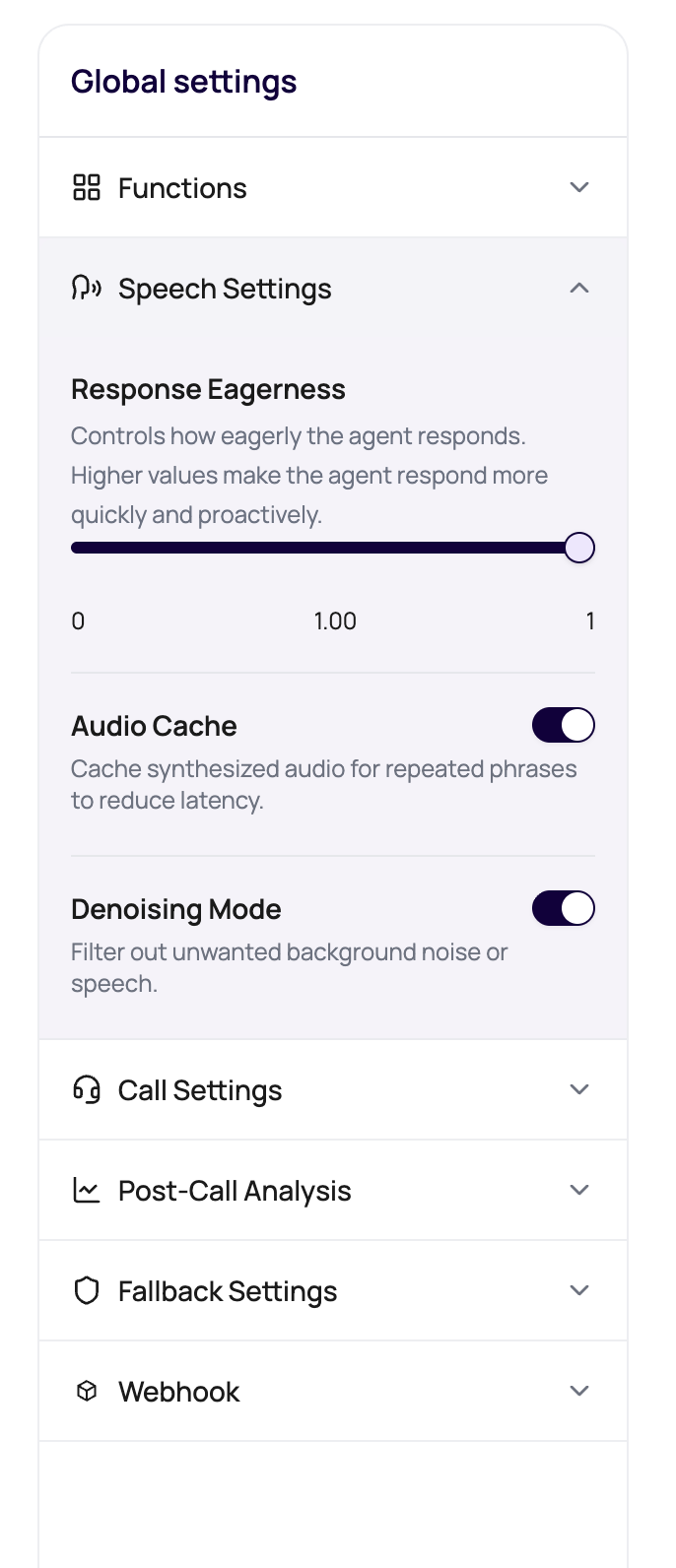 Bad audio makes every other setting look guilty. Always listen before rewriting the agent.
## Audio Quality Signals
Use the call detail page to separate audio issues from prompt issues.
| Signal | What it tells you |
| --------------------- | --------------------------------------------------------------------------------------------------- |
| Recording | Best evidence for noise, echo, clipping, silence, overlap, and caller distance from the microphone. |
| Realtime transcript | What the agent likely heard during the live conversation. |
| Post-call transcript | Whether cleanup or post-processing improved the readable text after the call. |
| Status and end reason | Whether the call failed, was not picked, hit voicemail, ended on silence, or completed. |
| Transfer details | Whether an audio bridge or handoff affected the caller experience. |
## How Phone Audio Reaches Transcribers
| Call path | What DialNexa handles |
| ----------------- | ---------------------------------------------------------------------------------------------------------------------- |
| Plivo phone calls | 8 kHz telephony audio. Deepgram can receive mu-law audio directly. Soniox receives converted PCM16 audio. |
| SIP trunk calls | SIP-style telephony audio follows a similar 8 kHz phone path. Test with your actual trunk because carriers can differ. |
| Web calls | Browser audio can be cleaner than phone network audio, but microphone choice and permissions still matter. |
## Denoising Mode
Denoising Mode reduces unwanted background sound before it damages the transcript. It is useful, but it is not magic dust. A caller on a scooter in traffic still deserves a realistic test.
Current outbound call processing keeps server-side denoising off unless DialNexa enables it for the route. Treat Denoising Mode as a setting to validate in Call History, not as a guarantee that every outbound path will apply noise cleanup.
| Use Denoising Mode when | Be careful when |
| ---------------------------------------------------------------------------- | ------------------------------------------------------------------------------ |
| Background speech or noise corrupts transcripts. | The caller is soft-spoken and cleanup may remove speech details. |
| A known campaign has noisy call environments. | You have only tested on clean office calls. |
| Soniox or another supported path accepts denoise configuration for the call. | The issue is actually a long prompt, slow function, or wrong language setting. |
If the denoiser fails during a call path where fallback is available, DialNexa can continue with raw audio instead of ending the call because cleanup failed. Treat that as a resilience behavior, not proof that audio quality was good. Review the recording and transcript before deciding whether the route needs denoising changes.
## Investigate A Bad-Audio Call
Use the call detail page for the affected call. Averages hide the moment that broke the conversation.
Listen for noise, clipping, echo, silence, overlap, low volume, and transfer bridge issues.
Check whether the transcript missed the same words that were hard to hear in the recording.
Tune Denoising Mode, transcriber, language, or call path one change at a time.
A quiet retest does not prove a noisy-call fix.
## Audio Problems That Masquerade As Agent Bugs
The caller answer may not have been captured clearly. Check whether the transcript contains the answer before changing the prompt.
The correction may have overlapped with agent speech, or the transcriber may have finalized the previous turn too early.
The needed detail may be absent or garbled in the transcript. Fix the audio or transcriber fit before editing extraction fields.
Check transfer details and bridge audio before blaming the base agent prompt.
## Related Reading
Tune Denoising Mode and Audio Cache.
Understand telephony path setup.
Compare transcriber behavior on phone audio.
Review exact call evidence.
Bad audio makes every other setting look guilty. Always listen before rewriting the agent.
## Audio Quality Signals
Use the call detail page to separate audio issues from prompt issues.
| Signal | What it tells you |
| --------------------- | --------------------------------------------------------------------------------------------------- |
| Recording | Best evidence for noise, echo, clipping, silence, overlap, and caller distance from the microphone. |
| Realtime transcript | What the agent likely heard during the live conversation. |
| Post-call transcript | Whether cleanup or post-processing improved the readable text after the call. |
| Status and end reason | Whether the call failed, was not picked, hit voicemail, ended on silence, or completed. |
| Transfer details | Whether an audio bridge or handoff affected the caller experience. |
## How Phone Audio Reaches Transcribers
| Call path | What DialNexa handles |
| ----------------- | ---------------------------------------------------------------------------------------------------------------------- |
| Plivo phone calls | 8 kHz telephony audio. Deepgram can receive mu-law audio directly. Soniox receives converted PCM16 audio. |
| SIP trunk calls | SIP-style telephony audio follows a similar 8 kHz phone path. Test with your actual trunk because carriers can differ. |
| Web calls | Browser audio can be cleaner than phone network audio, but microphone choice and permissions still matter. |
## Denoising Mode
Denoising Mode reduces unwanted background sound before it damages the transcript. It is useful, but it is not magic dust. A caller on a scooter in traffic still deserves a realistic test.
Current outbound call processing keeps server-side denoising off unless DialNexa enables it for the route. Treat Denoising Mode as a setting to validate in Call History, not as a guarantee that every outbound path will apply noise cleanup.
| Use Denoising Mode when | Be careful when |
| ---------------------------------------------------------------------------- | ------------------------------------------------------------------------------ |
| Background speech or noise corrupts transcripts. | The caller is soft-spoken and cleanup may remove speech details. |
| A known campaign has noisy call environments. | You have only tested on clean office calls. |
| Soniox or another supported path accepts denoise configuration for the call. | The issue is actually a long prompt, slow function, or wrong language setting. |
If the denoiser fails during a call path where fallback is available, DialNexa can continue with raw audio instead of ending the call because cleanup failed. Treat that as a resilience behavior, not proof that audio quality was good. Review the recording and transcript before deciding whether the route needs denoising changes.
## Investigate A Bad-Audio Call
Use the call detail page for the affected call. Averages hide the moment that broke the conversation.
Listen for noise, clipping, echo, silence, overlap, low volume, and transfer bridge issues.
Check whether the transcript missed the same words that were hard to hear in the recording.
Tune Denoising Mode, transcriber, language, or call path one change at a time.
A quiet retest does not prove a noisy-call fix.
## Audio Problems That Masquerade As Agent Bugs
The caller answer may not have been captured clearly. Check whether the transcript contains the answer before changing the prompt.
The correction may have overlapped with agent speech, or the transcriber may have finalized the previous turn too early.
The needed detail may be absent or garbled in the transcript. Fix the audio or transcriber fit before editing extraction fields.
Check transfer details and bridge audio before blaming the base agent prompt.
## Related Reading
Tune Denoising Mode and Audio Cache.
Understand telephony path setup.
Compare transcriber behavior on phone audio.
Review exact call evidence.