> ## Documentation Index
> Fetch the complete documentation index at: https://dialnexa.com/docs/llms.txt
> Use this file to discover all available pages before exploring further.
# Manage Your DialNexa DND List
> Use the DialNexa DND list to block outbound calls to selected numbers, skip them in uploads, and stop their workflow processing.
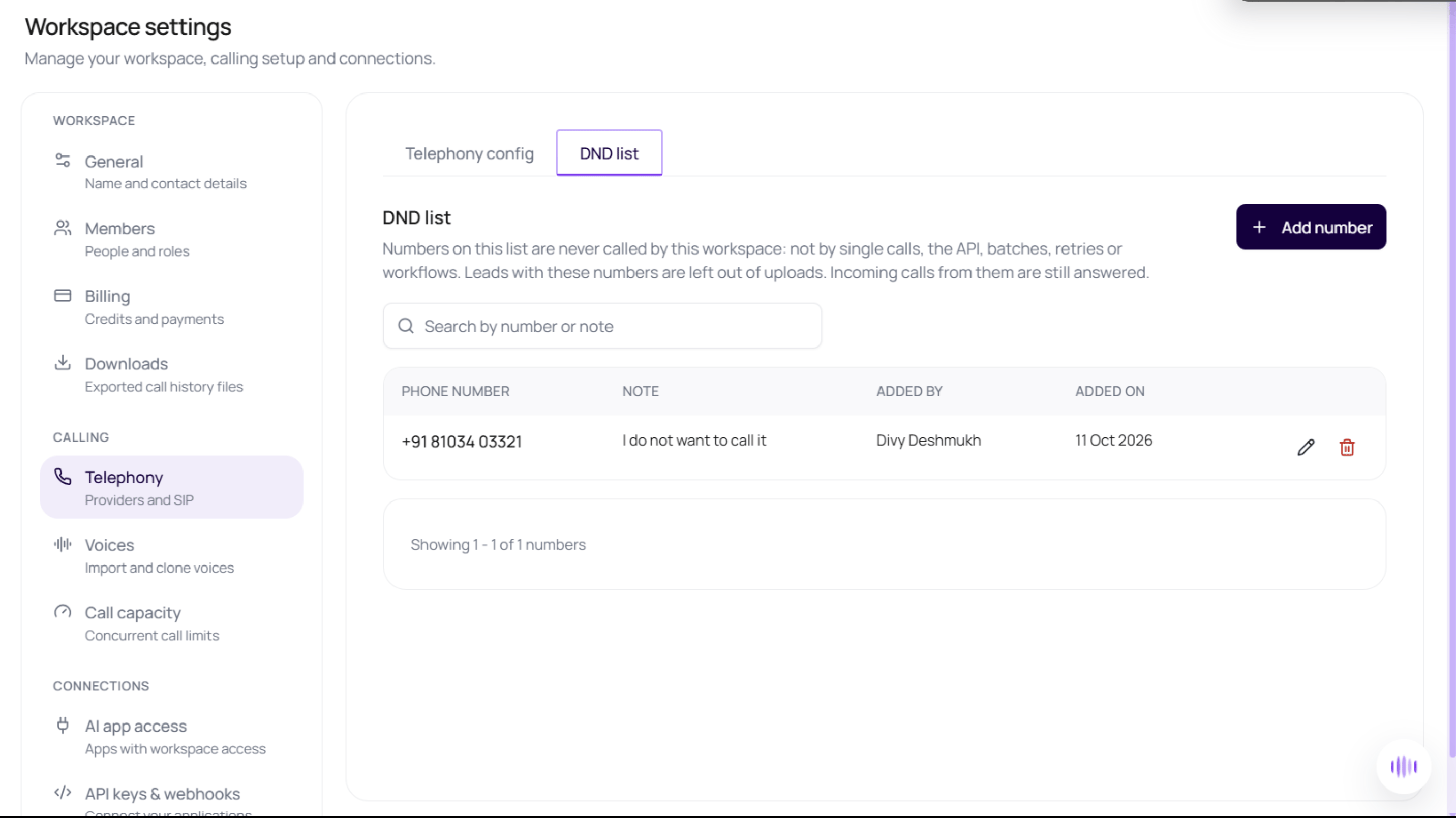
The DialNexa DND list blocks outbound calls to selected phone numbers in one workspace. Listed numbers are excluded from batch and workflow uploads and checked again before queued calls dial. Incoming calls from those numbers are still answered.
## When To Use The DialNexa DND List
Use the list when a customer asks not to be called or your team needs to exclude a number from outbound activity. Each workspace has its own list. Adding a number here does not change another workspace's list.
## Before You Begin
* Open the workspace whose outbound calls you want to control. Every workspace member can view and manage the list.
* Have the phone number and its country code ready.
* Prepare a required note explaining why the number should not be called. Notes can contain up to 500 characters.
## Add A Number To The DND List
1. Open **Workspace settings > Telephony > DND list**.
2. Select **Add number**.
3. Choose the country and enter the phone number. Check the country code so you block the intended number.
4. Enter the note and save.
5. Search for the number or note and confirm that the new row appears. The table shows the number, note, who added it, and when it was added.
 ## What Blocking A Number Changes
| Activity | Result |
| - | - |
| Single outbound call or API call | Refused when the destination is listed. An API Create Call request returns `403`. |
| Batch or workflow upload | Listed rows are skipped and the upload reports how many were left out. If every row is listed, the upload is refused instead of creating an empty campaign. |
| Number added after a call was queued | The final check prevents dialing. The call can appear as `failed` with `end_reason` `dnd_blocked`; it is not retried and sends no webhook. |
| Workflow lead already enrolled | The lead stops before its next step of any kind, including a message, function, or wait. Its execution becomes `dnd_blocked`, and history records why it stopped. |
| Incoming call from a listed number | Still answered. It does not resume an existing workflow execution stopped by the DND list. |
Calls already in progress are not ended by adding a number. Check [call end reasons](/docs/reference/statuses#call-end-reasons) and [workflow lead history](/docs/workflows/lead-history-and-debugging) when investigating a stopped call or lead.
## Edit Or Remove A Number
Use the row's pencil action to update its number or note, then save and search again to verify the change. A note cannot be blank.
Use the remove action and confirm removal when the number should become callable again. Removing it allows future outbound calls but does not revive skipped uploads or stopped workflow executions. Upload the lead again if it should enter a workflow anew.
## Troubleshooting
| Problem | What to check |
| - | - |
| Number already listed | Search for it and edit the existing row. Different spacing does not create a separate number. |
| Number rejected | Choose the correct country and supply a valid international number. Do not include letters or guess a missing country code. |
| Upload contains fewer leads | Read the DND skip notice. Correct the list only if the number should be called, then upload again. |
| Workflow remains stopped after removal | Removing a number does not restart its old execution. Upload the lead again. |
| List fails to load | Retry the list before making changes; an unavailable list is not evidence that it is empty. |
## Related Pages
* [Batch recipient uploads](/docs/batch-calls/recipient-files)
* [Create Call API](/docs/api-reference/v1/calls/create)
* [Workflow statuses](/docs/workflows/workflow-statuses)
This documentation is built and hosted on [Mintlify](https://mintlify.com), a developer documentation platform.
## What Blocking A Number Changes
| Activity | Result |
| - | - |
| Single outbound call or API call | Refused when the destination is listed. An API Create Call request returns `403`. |
| Batch or workflow upload | Listed rows are skipped and the upload reports how many were left out. If every row is listed, the upload is refused instead of creating an empty campaign. |
| Number added after a call was queued | The final check prevents dialing. The call can appear as `failed` with `end_reason` `dnd_blocked`; it is not retried and sends no webhook. |
| Workflow lead already enrolled | The lead stops before its next step of any kind, including a message, function, or wait. Its execution becomes `dnd_blocked`, and history records why it stopped. |
| Incoming call from a listed number | Still answered. It does not resume an existing workflow execution stopped by the DND list. |
Calls already in progress are not ended by adding a number. Check [call end reasons](/docs/reference/statuses#call-end-reasons) and [workflow lead history](/docs/workflows/lead-history-and-debugging) when investigating a stopped call or lead.
## Edit Or Remove A Number
Use the row's pencil action to update its number or note, then save and search again to verify the change. A note cannot be blank.
Use the remove action and confirm removal when the number should become callable again. Removing it allows future outbound calls but does not revive skipped uploads or stopped workflow executions. Upload the lead again if it should enter a workflow anew.
## Troubleshooting
| Problem | What to check |
| - | - |
| Number already listed | Search for it and edit the existing row. Different spacing does not create a separate number. |
| Number rejected | Choose the correct country and supply a valid international number. Do not include letters or guess a missing country code. |
| Upload contains fewer leads | Read the DND skip notice. Correct the list only if the number should be called, then upload again. |
| Workflow remains stopped after removal | Removing a number does not restart its old execution. Upload the lead again. |
| List fails to load | Retry the list before making changes; an unavailable list is not evidence that it is empty. |
## Related Pages
* [Batch recipient uploads](/docs/batch-calls/recipient-files)
* [Create Call API](/docs/api-reference/v1/calls/create)
* [Workflow statuses](/docs/workflows/workflow-statuses)
This documentation is built and hosted on [Mintlify](https://mintlify.com), a developer documentation platform.