> ## Documentation Index
> Fetch the complete documentation index at: https://dialnexa.com/docs/llms.txt
> Use this file to discover all available pages before exploring further.
# DialNexa Call History
> Use DialNexa Call History to filter calls, search by call id, sort by created time or duration, export data, and open call details.
DialNexa Call History is the central table for reviewing calls. Users can filter by date range and call metadata, search by call id, sort by created time or duration, open retry rows, export CSV data, and click a row to inspect the call detail page.
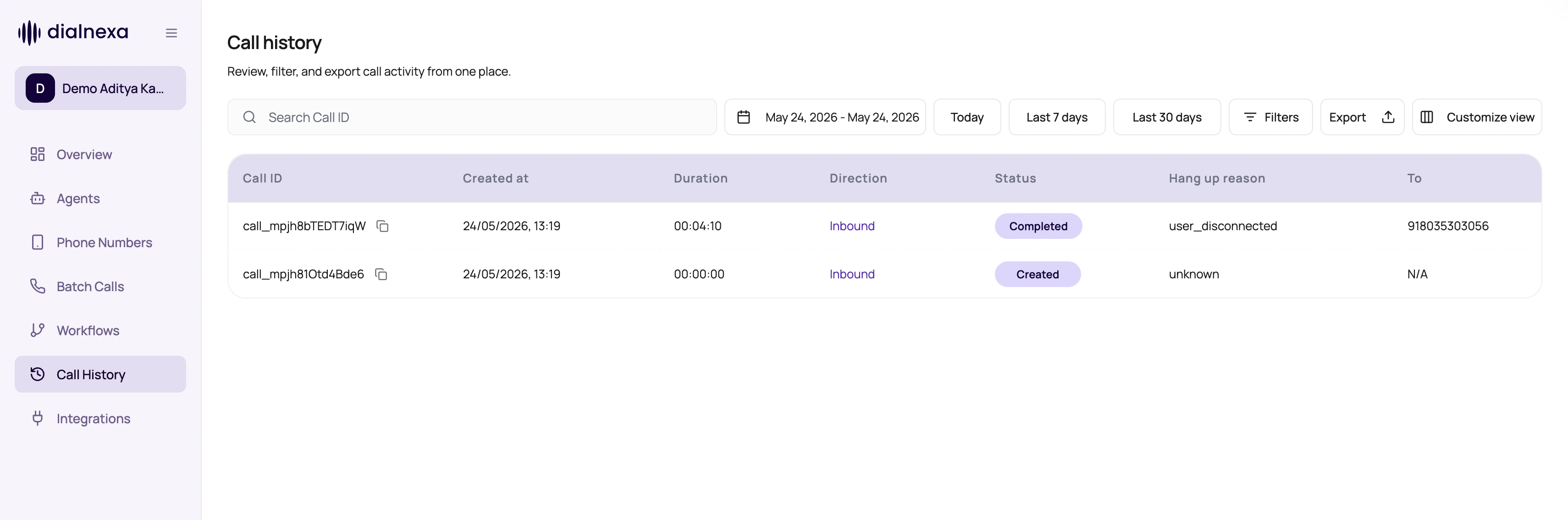 Start with the exact call row before you compare aggregate results. The row shows the status, timestamps, linked campaign or workflow context, and the path to the call detail page.
## Call History Controls
These controls shape the visible call set.
| Control | Behavior |
| -------------- | -------------------------------------------------------------------------------------------------------------------------------------------------------------------------------------------------------------------------------------------------------- |
| Date range | Limits results by call creation date unless call id search overrides it. |
| Filters | Filter by agent, batch call id, call type, direction, status, duration, caller number, destination number, sentiment, hang up reason, and other supported fields. Status, sentiment, agent, and hang up reason filters support multiple selected values. |
| Call id search | When searching by call id, the page ignores date range and other filters so the exact call can be found. |
| Sort | Sort by created time or duration. |
| Pagination | Move through large result sets and change the page size from the filter menu. |
| Export | Download CSV rows matching the selected filters. |
## Filter And Detail Controls
Call History is built for repeated investigation work. Use the newer controls to keep the table and detail drawer focused.
| Control | How it helps |
| ------------------------ | ---------------------------------------------------------------------------------------------------------------------------------------------------------------------------- |
| Agent filter | Search agents by name or ID, select multiple agents, and review only their calls. |
| Multi-status filter | Compare groups such as completed, failed, busy, and did-not-pick without running separate searches. |
| Hang Up Reason filter | Select one or more `end_reason` values, such as user disconnected, voicemail detected, invalid phone number, destination forbidden, insufficient balance, or system failure. |
| Duration filters | Enter minutes in the dashboard. DialNexa applies the filter in seconds behind the scenes. |
| Relative dates | Recent rows can show relative time labels while the exact timestamp remains available in detail context. |
| Detail drawer navigation | Use previous and next controls or keyboard navigation to move through calls without closing the drawer. |
| Resizable detail drawer | Resize the right-side detail panel when transcript, retry, or metadata review needs more room. |
## Call Status Filters
Call History status filters use call log statuses. In-progress statuses show calls that are still waiting for provider or runtime updates. Final statuses are ready for outcome review and export.
| Status | Final? | What it means in Call History |
| --------------- | ------ | ---------------------------------------------------------------------------------------------- |
| `created` | No | The call log exists and is queued or prepared. |
| `initiated` | No | Call setup has started. |
| `sent` | No | The outbound request was sent to the provider. |
| `received` | No | DialNexa received an inbound or provider event. |
| `completed` | Yes | The call connected and ended. Review transcript, recording, summary, fields, and `end_reason`. |
| `did_not_pick` | Yes | The recipient did not answer or voicemail was detected. |
| `busy` | Yes | The line was busy or rejected as busy. |
| `no_answer` | Yes | The provider returned no answer. |
| `failed` | Yes | The call failed before a useful conversation completed. |
| `cancelled` | Yes | The call was stopped before completion, often because a campaign was cancelled. |
| `retry_expired` | Yes | Retry handling ended without a successful final result. |
## Hang Up Reason Filters
Use the Hang Up Reason filter when status is too broad. It filters the stored `end_reason` value, so it is useful for separating user behavior from route, wallet, and provider problems.
Start with the exact call row before you compare aggregate results. The row shows the status, timestamps, linked campaign or workflow context, and the path to the call detail page.
## Call History Controls
These controls shape the visible call set.
| Control | Behavior |
| -------------- | -------------------------------------------------------------------------------------------------------------------------------------------------------------------------------------------------------------------------------------------------------- |
| Date range | Limits results by call creation date unless call id search overrides it. |
| Filters | Filter by agent, batch call id, call type, direction, status, duration, caller number, destination number, sentiment, hang up reason, and other supported fields. Status, sentiment, agent, and hang up reason filters support multiple selected values. |
| Call id search | When searching by call id, the page ignores date range and other filters so the exact call can be found. |
| Sort | Sort by created time or duration. |
| Pagination | Move through large result sets and change the page size from the filter menu. |
| Export | Download CSV rows matching the selected filters. |
## Filter And Detail Controls
Call History is built for repeated investigation work. Use the newer controls to keep the table and detail drawer focused.
| Control | How it helps |
| ------------------------ | ---------------------------------------------------------------------------------------------------------------------------------------------------------------------------- |
| Agent filter | Search agents by name or ID, select multiple agents, and review only their calls. |
| Multi-status filter | Compare groups such as completed, failed, busy, and did-not-pick without running separate searches. |
| Hang Up Reason filter | Select one or more `end_reason` values, such as user disconnected, voicemail detected, invalid phone number, destination forbidden, insufficient balance, or system failure. |
| Duration filters | Enter minutes in the dashboard. DialNexa applies the filter in seconds behind the scenes. |
| Relative dates | Recent rows can show relative time labels while the exact timestamp remains available in detail context. |
| Detail drawer navigation | Use previous and next controls or keyboard navigation to move through calls without closing the drawer. |
| Resizable detail drawer | Resize the right-side detail panel when transcript, retry, or metadata review needs more room. |
## Call Status Filters
Call History status filters use call log statuses. In-progress statuses show calls that are still waiting for provider or runtime updates. Final statuses are ready for outcome review and export.
| Status | Final? | What it means in Call History |
| --------------- | ------ | ---------------------------------------------------------------------------------------------- |
| `created` | No | The call log exists and is queued or prepared. |
| `initiated` | No | Call setup has started. |
| `sent` | No | The outbound request was sent to the provider. |
| `received` | No | DialNexa received an inbound or provider event. |
| `completed` | Yes | The call connected and ended. Review transcript, recording, summary, fields, and `end_reason`. |
| `did_not_pick` | Yes | The recipient did not answer or voicemail was detected. |
| `busy` | Yes | The line was busy or rejected as busy. |
| `no_answer` | Yes | The provider returned no answer. |
| `failed` | Yes | The call failed before a useful conversation completed. |
| `cancelled` | Yes | The call was stopped before completion, often because a campaign was cancelled. |
| `retry_expired` | Yes | Retry handling ended without a successful final result. |
## Hang Up Reason Filters
Use the Hang Up Reason filter when status is too broad. It filters the stored `end_reason` value, so it is useful for separating user behavior from route, wallet, and provider problems.
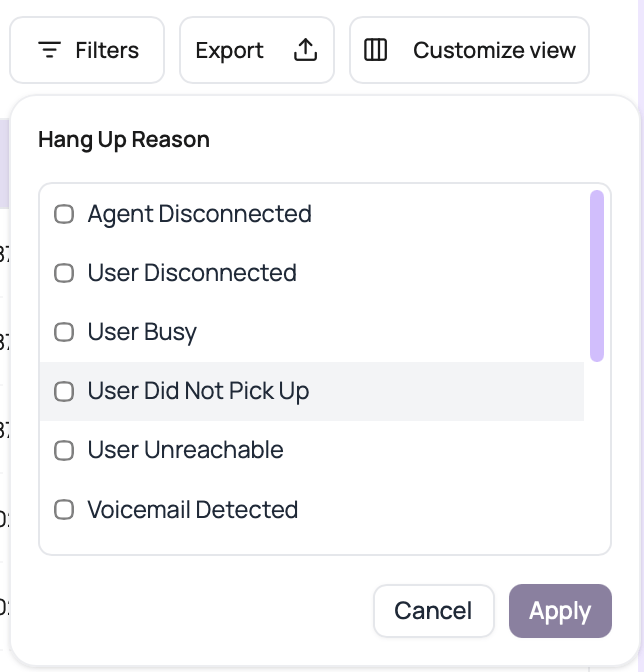 | End reason | Typical investigation |
| ------------------------------------------------------------ | ----------------------------------------------------------- |
| `user_disconnected` or `agent_disconnected` | Who ended the connected call. |
| `user_busy`, `user_did_not_pick_up`, or `user_unreachable` | Recipient availability and retry policy. |
| `voicemail_detected` | Voicemail detection and retry follow-up. |
| `invalid_phone_number` or `destination_forbidden` | Recipient formatting, country enablement, and prefix rules. |
| `network_failure`, `system_failure`, or `system_at_capacity` | Provider and platform reliability. |
| `insufficient_balance` | Wallet recharge and billing readiness. |
| `unknown` | Calls that need manual detail review. |
## Batch-Aware Monitoring
Call History also supports campaign review.
Open logs for one batch campaign through the batch call id.
Campaign views can refresh while the campaign status is running or active.
Export completed, did-not-pick, or failed groups for follow-up.
Expand retry rows to inspect attempt history.
## Call History Confusions
Clear filters or search by exact call id.
Call id search intentionally bypasses date and other filters.
Live updating is enabled while the batch campaign is running or active.
Confirm whether you are sorting duration or created time.
## Related Reading
Open one call.
Review campaign rows.
Understand status labels.
| End reason | Typical investigation |
| ------------------------------------------------------------ | ----------------------------------------------------------- |
| `user_disconnected` or `agent_disconnected` | Who ended the connected call. |
| `user_busy`, `user_did_not_pick_up`, or `user_unreachable` | Recipient availability and retry policy. |
| `voicemail_detected` | Voicemail detection and retry follow-up. |
| `invalid_phone_number` or `destination_forbidden` | Recipient formatting, country enablement, and prefix rules. |
| `network_failure`, `system_failure`, or `system_at_capacity` | Provider and platform reliability. |
| `insufficient_balance` | Wallet recharge and billing readiness. |
| `unknown` | Calls that need manual detail review. |
## Batch-Aware Monitoring
Call History also supports campaign review.
Open logs for one batch campaign through the batch call id.
Campaign views can refresh while the campaign status is running or active.
Export completed, did-not-pick, or failed groups for follow-up.
Expand retry rows to inspect attempt history.
## Call History Confusions
Clear filters or search by exact call id.
Call id search intentionally bypasses date and other filters.
Live updating is enabled while the batch campaign is running or active.
Confirm whether you are sorting duration or created time.
## Related Reading
Open one call.
Review campaign rows.
Understand status labels.