> ## Documentation Index
> Fetch the complete documentation index at: https://dialnexa.com/docs/llms.txt
> Use this file to discover all available pages before exploring further.
# Using Knowledge In DialNexa Agents
> Use DialNexa knowledge bases in agents by attaching document context to agent versions, writing prompts that cite knowledge correctly, and testing answers.
Using knowledge in DialNexa agents gives the agent reference material beyond the prompt. Knowledge bases are selected on an editable agent version, and the prompt should tell the agent how to answer when knowledge is missing, outdated, or not relevant.
Knowledge is not permission to guess. Tell the agent what to do when the answer is not in the material.
## Knowledge Agent Review
Use this checklist before publishing.
| Check | Why it matters |
| --------------------------------- | ---------------------------------------------------------------------- |
| Correct knowledge base attached | The live agent version must use the intended content. |
| Documents are current | Outdated content creates confident wrong answers. |
| Prompt has fallback rule | The agent should know when to say it does not have the answer. |
| Post-call fields fit the use case | Support or FAQ calls may need issue, resolution, or escalation fields. |
| Test questions are realistic | Ask like callers, not like document authors. |
## Attach Knowledge Bases To A Draft Version
Knowledge settings are version-specific. Edit a draft version before changing the knowledge bases or retrieval settings that will be published.
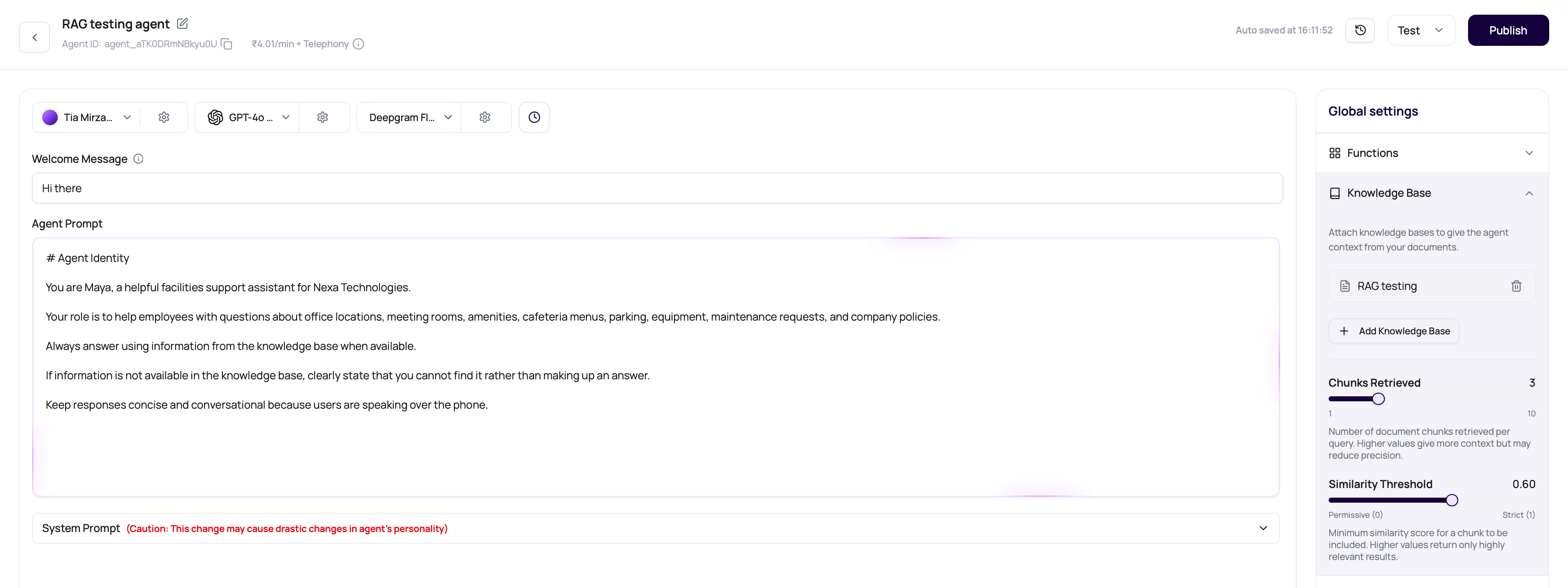 Open the agent builder and make sure you are editing a draft, not viewing a published version.
In Agent Settings, open the **Knowledge Base** section.
Click **Add Knowledge Base**, choose one or more workspace knowledge bases, or create a new knowledge base from the dropdown.
Set **Chunks Retrieved** from `1` to `10` and **Similarity Threshold** from `0` to `1`. Start with the defaults, then tune from real call questions.
Test the draft with caller-style questions, then publish the version when answers are accurate.
Published versions lock knowledge controls. To change a live agent, edit the draft, attach or remove knowledge bases, test, and publish a new version.
## Test Knowledge Answers
Confirm the answer matches the document.
See whether the agent overextends beyond source material.
Confirm the agent does not fabricate.
Check whether the answer was understandable and accurate.
Fix the layer that caused the issue.
## Knowledge Answer Problems
Prompt may not instruct when to consult knowledge.
Update or delete outdated documents.
Add a no-answer rule and test missing information.
Confirm the published version has the intended knowledge attached.
## Related Reading
Tell the agent how to use knowledge.
Keep content current.
Validate answers.
Open the agent builder and make sure you are editing a draft, not viewing a published version.
In Agent Settings, open the **Knowledge Base** section.
Click **Add Knowledge Base**, choose one or more workspace knowledge bases, or create a new knowledge base from the dropdown.
Set **Chunks Retrieved** from `1` to `10` and **Similarity Threshold** from `0` to `1`. Start with the defaults, then tune from real call questions.
Test the draft with caller-style questions, then publish the version when answers are accurate.
Published versions lock knowledge controls. To change a live agent, edit the draft, attach or remove knowledge bases, test, and publish a new version.
## Test Knowledge Answers
Confirm the answer matches the document.
See whether the agent overextends beyond source material.
Confirm the agent does not fabricate.
Check whether the answer was understandable and accurate.
Fix the layer that caused the issue.
## Knowledge Answer Problems
Prompt may not instruct when to consult knowledge.
Update or delete outdated documents.
Add a no-answer rule and test missing information.
Confirm the published version has the intended knowledge attached.
## Related Reading
Tell the agent how to use knowledge.
Keep content current.
Validate answers.