> ## Documentation Index
> Fetch the complete documentation index at: https://dialnexa.com/docs/llms.txt
> Use this file to discover all available pages before exploring further.
# DialNexa Knowledge Base Overview
> Understand DialNexa knowledge bases for agent context, organization documents, retrieval settings, document management, and agent version usage where enabled.
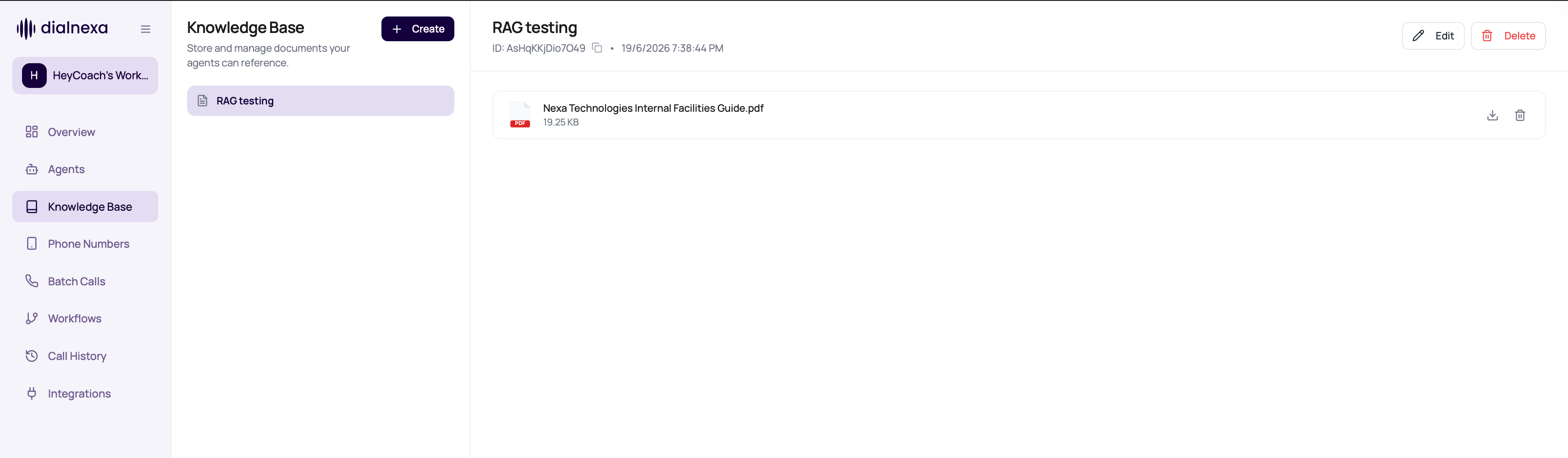
DialNexa knowledge bases store workspace documents that can be attached to draft agent versions. A knowledge base has a name, organization context, and related documents that can be uploaded, parsed, searched, and used by supported agents at call time.
 Knowledge helps an agent answer from material you provide. It does not replace a clear prompt telling the agent when to use that material.
## Knowledge Base Objects
These objects define how knowledge content is stored.
| Object | Meaning |
| ------------------------ | -------------------------------------------------------------------------------------------------------------- |
| Knowledge base | Named collection tied to an organization. |
| Document | Uploaded or created content tied to a knowledge base. |
| Document type | File or content type such as PDF or TXT. |
| Source | Optional source label for where the document came from. |
| Agent version attachment | One or more knowledge bases selected on an editable agent version. |
| Retrieval settings | Chunks Retrieved and Similarity Threshold values that control how much matching context the agent can receive. |
The vector store behind a knowledge base is managed by DialNexa. Users should work with knowledge base names, documents, and agent version attachments instead of copying or editing vector IDs.
## How Agent Retrieval Works
When a supported cascaded agent has knowledge bases attached, DialNexa searches the selected collections during the call and sends the best matching chunks as context for the model.
| Setting | Default | Range | Meaning |
| -------------------- | ------- | ----------- | -------------------------------------------------------------------- |
| Chunks Retrieved | `3` | `1` to `10` | Higher values give the model more context, but can reduce precision. |
| Similarity Threshold | `0.60` | `0` to `1` | Higher values include only more closely matching chunks. |
Speech to Speech agents do not use the separate knowledge retrieval path. Use a cascaded agent when the call needs document-backed retrieval.
## Where Knowledge Matters
Use knowledge when callers ask about factual material.
Give the agent reference material for product, policy, or FAQ questions.
Upload, update, download, and soft-delete knowledge documents.
Use accepted document types and keep files within upload constraints.
If the agent answered incorrectly, compare prompt, knowledge, transcript, and document content.
## Knowledge Base Questions
No. Use it when the agent needs factual reference material beyond the prompt.
Only partly. The prompt still needs to tell the agent when and how to use knowledge.
Treat deleted documents as unavailable for future use and retest the agent.
## Related Reading
Maintain document content.
Attach knowledge to behavior.
Prepare files.
Knowledge helps an agent answer from material you provide. It does not replace a clear prompt telling the agent when to use that material.
## Knowledge Base Objects
These objects define how knowledge content is stored.
| Object | Meaning |
| ------------------------ | -------------------------------------------------------------------------------------------------------------- |
| Knowledge base | Named collection tied to an organization. |
| Document | Uploaded or created content tied to a knowledge base. |
| Document type | File or content type such as PDF or TXT. |
| Source | Optional source label for where the document came from. |
| Agent version attachment | One or more knowledge bases selected on an editable agent version. |
| Retrieval settings | Chunks Retrieved and Similarity Threshold values that control how much matching context the agent can receive. |
The vector store behind a knowledge base is managed by DialNexa. Users should work with knowledge base names, documents, and agent version attachments instead of copying or editing vector IDs.
## How Agent Retrieval Works
When a supported cascaded agent has knowledge bases attached, DialNexa searches the selected collections during the call and sends the best matching chunks as context for the model.
| Setting | Default | Range | Meaning |
| -------------------- | ------- | ----------- | -------------------------------------------------------------------- |
| Chunks Retrieved | `3` | `1` to `10` | Higher values give the model more context, but can reduce precision. |
| Similarity Threshold | `0.60` | `0` to `1` | Higher values include only more closely matching chunks. |
Speech to Speech agents do not use the separate knowledge retrieval path. Use a cascaded agent when the call needs document-backed retrieval.
## Where Knowledge Matters
Use knowledge when callers ask about factual material.
Give the agent reference material for product, policy, or FAQ questions.
Upload, update, download, and soft-delete knowledge documents.
Use accepted document types and keep files within upload constraints.
If the agent answered incorrectly, compare prompt, knowledge, transcript, and document content.
## Knowledge Base Questions
No. Use it when the agent needs factual reference material beyond the prompt.
Only partly. The prompt still needs to tell the agent when and how to use knowledge.
Treat deleted documents as unavailable for future use and retest the agent.
## Related Reading
Maintain document content.
Attach knowledge to behavior.
Prepare files.