> ## Documentation Index
> Fetch the complete documentation index at: https://dialnexa.com/docs/llms.txt
> Use this file to discover all available pages before exploring further.
# Managing DialNexa Knowledge Base Documents
> Manage DialNexa knowledge base documents by uploading, listing, updating, deleting, downloading, and extracting content for a knowledge base.
Managing DialNexa knowledge base documents means keeping source content accurate, searchable, and safe to use in agent responses. Users can create knowledge bases, rename them, upload documents, list documents by knowledge base, delete documents, download source files, and soft-delete one or many knowledge bases.
Knowledge management is mostly deciding what not to let the agent keep believing.
## Document Actions
These actions keep knowledge content current.
| Action | Purpose |
| ---------------------- | ---------------------------------------------------------------------- |
| Upload | Add a PDF, TXT, or supported file with title, description, and source. |
| List by knowledge base | See all documents attached to one collection. |
| Rename knowledge base | Change the collection name without changing its documents. |
| Add documents | Upload files into an existing knowledge base. |
| Delete one | Soft-delete a document. |
| Delete multiple | Remove several documents from the same knowledge base. |
| Download | Retrieve the stored source document when available. |
## Knowledge Base Page Actions
The Knowledge Base page shows workspace knowledge bases in the sidebar. Selecting a knowledge base opens its details, document list, and actions.
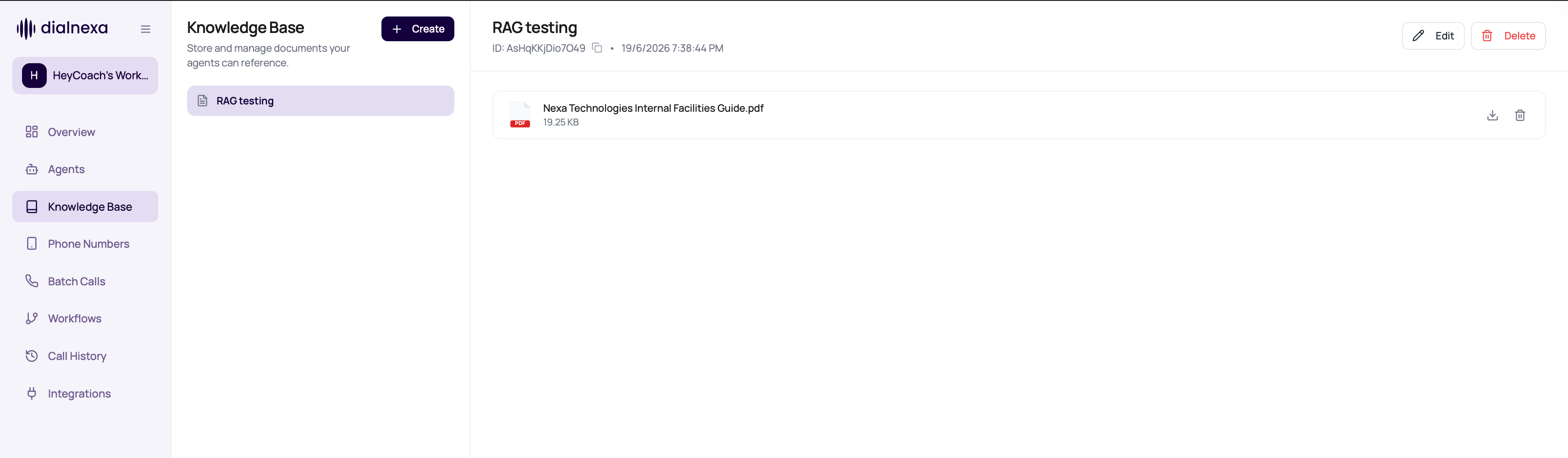 | Action | What happens |
| --------------------- | ------------------------------------------------------------------------------------------ |
| Copy ID | Copies the knowledge base ID for support or API-adjacent troubleshooting. |
| Edit | Lets you rename the knowledge base and upload more documents. |
| Delete document | Removes the selected document from future retrieval. |
| Download document | Downloads the stored source file when available. |
| Delete knowledge base | Checks which published agents and active campaigns use the knowledge base before deletion. |
If active batch calls are using an agent version attached to the knowledge base, deletion can be blocked. If published agents use the knowledge base without active campaigns, review the warning before deleting and retest affected agents afterward.
## Maintain Knowledge Quality
Know who approves each document.
Update or delete documents when policies change.
Review warnings for published agents and active campaigns before deleting a knowledge base.
Ask questions covered by changed documents.
If the agent answered incorrectly, compare transcript and knowledge content.
## Document Management Mistakes
Duplicate content can confuse review and maintenance.
The agent may lose an answer path.
Reviewers need to know what each document contains.
Add source labels when documents come from different teams or systems.
## Related Reading
Prepare uploads.
Connect knowledge to callers.
Review answers.
| Action | What happens |
| --------------------- | ------------------------------------------------------------------------------------------ |
| Copy ID | Copies the knowledge base ID for support or API-adjacent troubleshooting. |
| Edit | Lets you rename the knowledge base and upload more documents. |
| Delete document | Removes the selected document from future retrieval. |
| Download document | Downloads the stored source file when available. |
| Delete knowledge base | Checks which published agents and active campaigns use the knowledge base before deletion. |
If active batch calls are using an agent version attached to the knowledge base, deletion can be blocked. If published agents use the knowledge base without active campaigns, review the warning before deleting and retest affected agents afterward.
## Maintain Knowledge Quality
Know who approves each document.
Update or delete documents when policies change.
Review warnings for published agents and active campaigns before deleting a knowledge base.
Ask questions covered by changed documents.
If the agent answered incorrectly, compare transcript and knowledge content.
## Document Management Mistakes
Duplicate content can confuse review and maintenance.
The agent may lose an answer path.
Reviewers need to know what each document contains.
Add source labels when documents come from different teams or systems.
## Related Reading
Prepare uploads.
Connect knowledge to callers.
Review answers.