> ## Documentation Index
> Fetch the complete documentation index at: https://dialnexa.com/docs/llms.txt
> Use this file to discover all available pages before exploring further.
# Using Integrations In DialNexa Workflows
> Use DialNexa integrations in workflow Application nodes with Wati, Resend, connected providers, action config, variables, success and failure outputs, and invocation evidence.
DialNexa workflows use integrations through Application nodes. A workflow can send a Wati WhatsApp message, send a Resend email, or run another enabled cloud action by mapping lead data, post-call fields, call attributes, and static configuration into required fields.
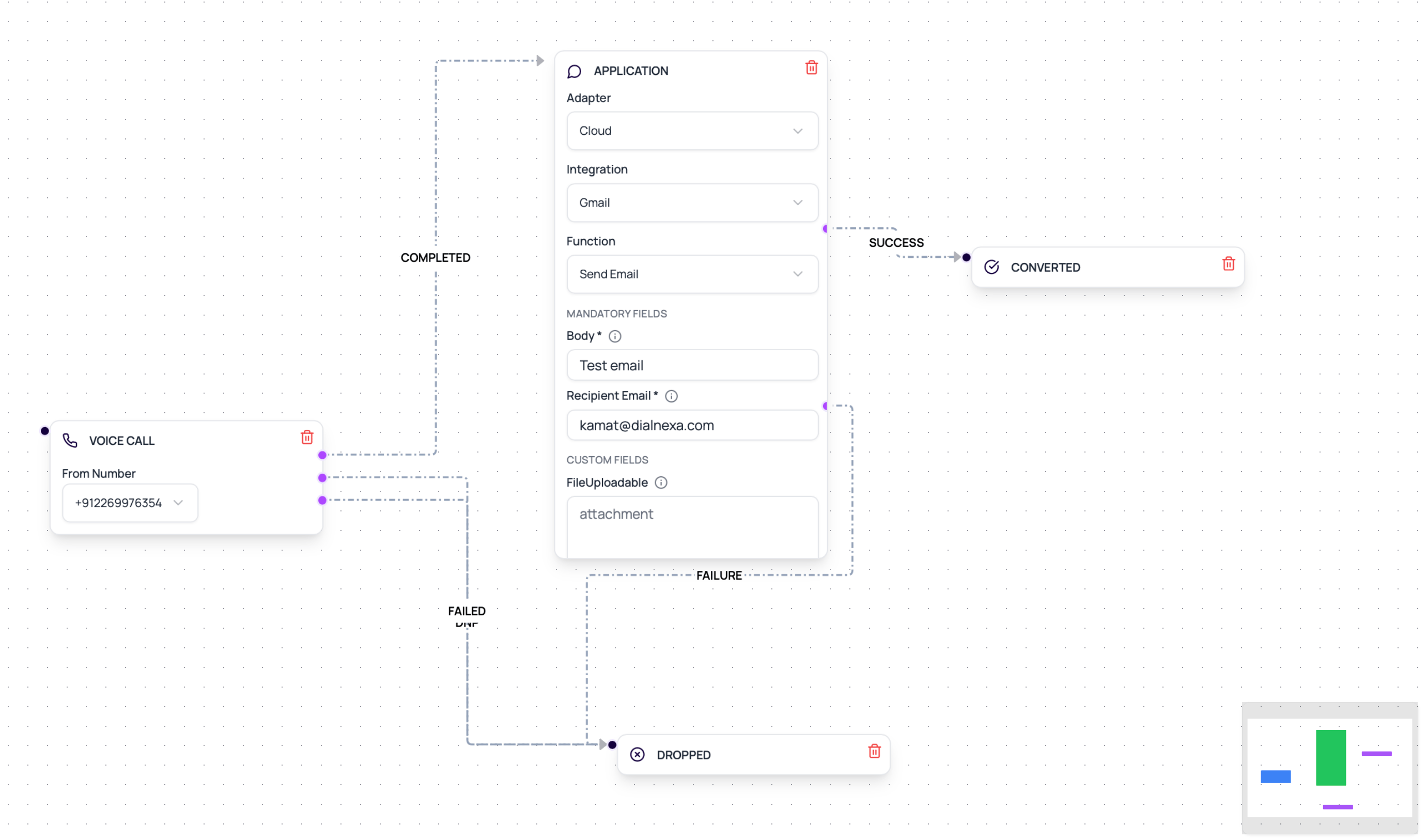 Always wire the failure output. External services have opinions, limits, and bad days.
## Workflow Integration Fields
These are the stored configuration keys behind an Application node - you never type them by hand. Picking the integration, action, and template in the node's dropdowns fills them in.
| Field | Purpose |
| -------------------------- | ---------------------------------------------------------------------------------------------------------------------------- |
| `application_adapter_mode` | Whether the node uses Cloud mode or a native action where enabled. |
| `provider_key` | Which integration provider to use, such as Wati or Resend. |
| `adapter_key` | How the provider is connected - the connection variant selected when the integration was set up. |
| `action_key` | Which operation to run, such as send WhatsApp template or send email. |
| `function_key` | The catalog function that implements the action, for catalog-based integrations (for example, Wati's send-message function). |
| `action_config` | Message body, template name, parameters, email fields, or other action inputs. |
| `outputs.success` | Next node after a successful provider result. |
| `outputs.failure` | Next node after an error or missing requirement. |
## Data Mapping Sources
Values uploaded with the lead, such as name, phone number, email, city, or appointment date.
Runtime call values and post-call analysis values, such as interested, reason, preferred time, or support issue.
Fixed template name, broadcast name, subject, or text body.
Provider message id, response payload, error code, and latency.
## Wati And Resend Workflow Examples
| Workflow moment | Integration action | Required mapping |
| ----------------------------------- | ------------------------------ | ----------------------------------------------------------------------- |
| Lead booked an appointment | Wati template or Resend email. | Recipient phone or email, appointment date, time, location, agent name. |
| Call outcome is interested | Wati follow-up template. | Lead phone, template name, lead name, offer or next step. |
| Call outcome needs manual review | Resend email. | Ops recipient, call summary, call link or lead id, reason. |
| Payment reminder failed by WhatsApp | Resend fallback email. | Recipient email, amount, due date, support contact. |
## Build A Reliable Application Node
Do this before adding the node to an active workflow.
Cloud mode loads connected integrations and their workflow-safe functions.
Use lead variables, post-call analysis fields, call attributes, or static values. Empty fields should be intentional, not surprising.
Success and failure paths should be obvious on the canvas.
Open lead history and check the integration invocation result.
One successful test should show correct request payload, provider response, and downstream branch.
Composio-backed cloud executions are billed in batches of `100` at approximately `INR 1.79` per batch. Billing does not block workflow execution, so review integration invocation evidence and wallet transactions together.
## Workflow Integration Mistakes
Provider actions can fail because of credentials, rate limits, template rules, missing fields, or invalid recipient data. Always route failure.
Replace hard-coded email addresses, phone numbers, and template parameters before launch.
If a workflow needs a stable value, extract it into a post-call field first and map that field.
A workflow node can only map fields that are already available at that point in the workflow.
## Related Reading
Configure the workflow node.
Map data into actions.
Send WhatsApp messages.
Send email messages.
Always wire the failure output. External services have opinions, limits, and bad days.
## Workflow Integration Fields
These are the stored configuration keys behind an Application node - you never type them by hand. Picking the integration, action, and template in the node's dropdowns fills them in.
| Field | Purpose |
| -------------------------- | ---------------------------------------------------------------------------------------------------------------------------- |
| `application_adapter_mode` | Whether the node uses Cloud mode or a native action where enabled. |
| `provider_key` | Which integration provider to use, such as Wati or Resend. |
| `adapter_key` | How the provider is connected - the connection variant selected when the integration was set up. |
| `action_key` | Which operation to run, such as send WhatsApp template or send email. |
| `function_key` | The catalog function that implements the action, for catalog-based integrations (for example, Wati's send-message function). |
| `action_config` | Message body, template name, parameters, email fields, or other action inputs. |
| `outputs.success` | Next node after a successful provider result. |
| `outputs.failure` | Next node after an error or missing requirement. |
## Data Mapping Sources
Values uploaded with the lead, such as name, phone number, email, city, or appointment date.
Runtime call values and post-call analysis values, such as interested, reason, preferred time, or support issue.
Fixed template name, broadcast name, subject, or text body.
Provider message id, response payload, error code, and latency.
## Wati And Resend Workflow Examples
| Workflow moment | Integration action | Required mapping |
| ----------------------------------- | ------------------------------ | ----------------------------------------------------------------------- |
| Lead booked an appointment | Wati template or Resend email. | Recipient phone or email, appointment date, time, location, agent name. |
| Call outcome is interested | Wati follow-up template. | Lead phone, template name, lead name, offer or next step. |
| Call outcome needs manual review | Resend email. | Ops recipient, call summary, call link or lead id, reason. |
| Payment reminder failed by WhatsApp | Resend fallback email. | Recipient email, amount, due date, support contact. |
## Build A Reliable Application Node
Do this before adding the node to an active workflow.
Cloud mode loads connected integrations and their workflow-safe functions.
Use lead variables, post-call analysis fields, call attributes, or static values. Empty fields should be intentional, not surprising.
Success and failure paths should be obvious on the canvas.
Open lead history and check the integration invocation result.
One successful test should show correct request payload, provider response, and downstream branch.
Composio-backed cloud executions are billed in batches of `100` at approximately `INR 1.79` per batch. Billing does not block workflow execution, so review integration invocation evidence and wallet transactions together.
## Workflow Integration Mistakes
Provider actions can fail because of credentials, rate limits, template rules, missing fields, or invalid recipient data. Always route failure.
Replace hard-coded email addresses, phone numbers, and template parameters before launch.
If a workflow needs a stable value, extract it into a post-call field first and map that field.
A workflow node can only map fields that are already available at that point in the workflow.
## Related Reading
Configure the workflow node.
Map data into actions.
Send WhatsApp messages.
Send email messages.