> ## Documentation Index
> Fetch the complete documentation index at: https://dialnexa.com/docs/llms.txt
> Use this file to discover all available pages before exploring further.
# DialNexa Dashboard Integrations Overview
> Understand DialNexa dashboard integrations, including Wati, Resend, provider connections, actions, statuses, validation, workflow usage, agent usage, and invocation evidence.
DialNexa dashboard integrations connect calls to the tools your team already uses. A voice agent can collect information, but the business value usually appears when that information becomes a WhatsApp message, an email, a CRM update, a workflow branch, a ticket, or a review row.
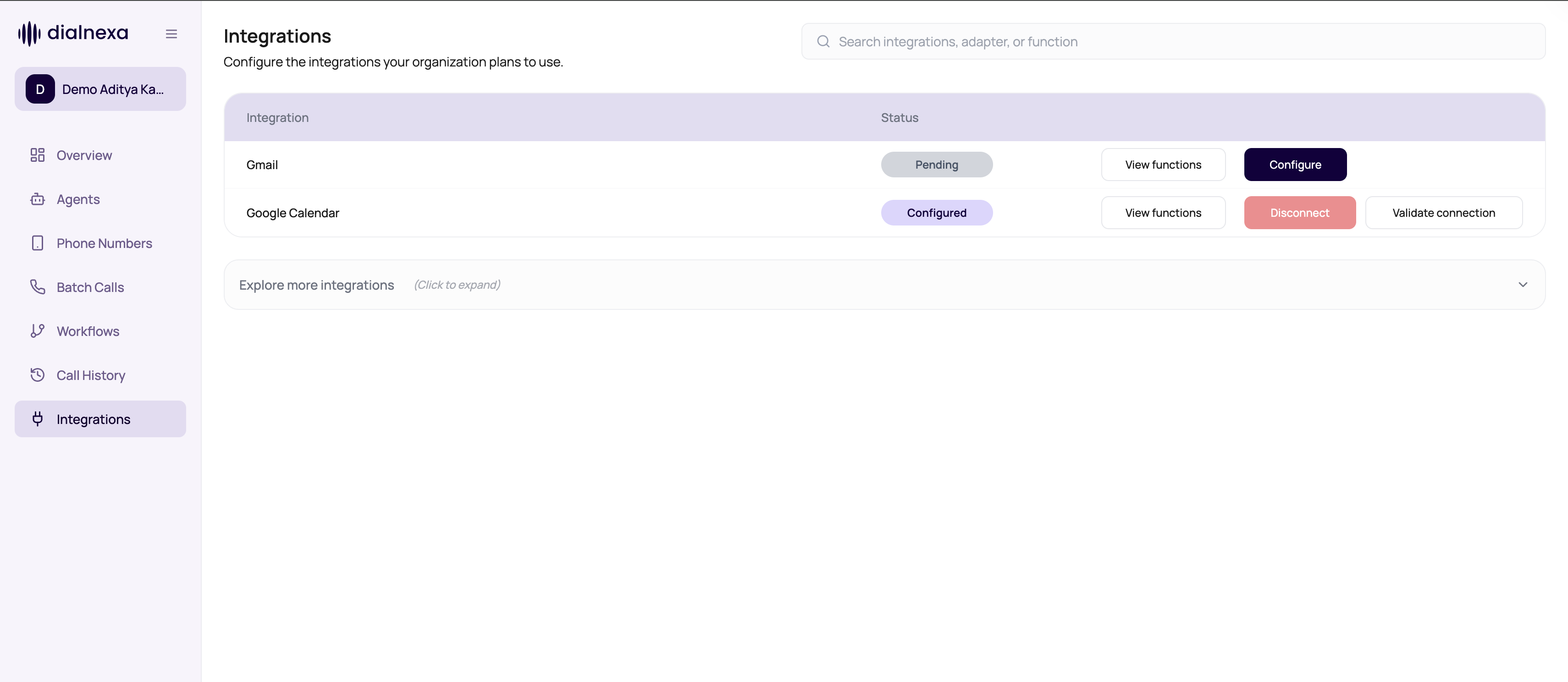 An integration is not useful because it is connected. It is useful when a call or workflow can do the right thing with it.
## Public Integration Catalog
This table is the curated set with first-class dashboard support. The full connector list - hundreds of providers - lives in the [Integration Catalog](/integrations/overview).
| Integration | Use it for | Typical inputs | Best place to use |
| ------------------- | ---------------------------------------------------------------------- | ------------------------------------------------------------------------------- | ------------------------------------------------------------------------------ |
| Wati | Send WhatsApp session messages or approved WhatsApp template messages. | Phone number, message body, template name, template parameters, broadcast name. | Workflow Application nodes and integration-backed agent actions where enabled. |
| Resend | Send transactional or follow-up emails. | From email, recipient email, subject, text body. | Workflow Application nodes after call outcomes or lead qualification. |
| Request integration | Ask for a provider or action that is not in the catalog. | Tool name, action needed, trigger point, required fields, expected result. | Integration request modal. |
## Integration Concepts
| Concept | Meaning |
| --------------- | --------------------------------------------------------------------------------------------------------------------------------------------------- |
| Provider | The product family, such as Wati or Resend. |
| Adapter | The connection method DialNexa uses for that provider - chosen when the integration is connected, then reused by every action that runs through it. |
| Function | The catalog operation an action resolves to, such as Wati's send-message function. Selected automatically when you pick an action. |
| Connection type | Credential entry or a hosted connection flow, depending on the provider. |
| Status | Connection state such as connected, pending, or error. |
| Action | A specific operation, such as sending a WhatsApp template or sending an email. |
| Invocation | A stored action execution result with redacted request, redacted response, missing fields, error, and latency. |
## Where Integrations Are Used
Send WhatsApp messages, emails, or other catalog actions after workflow branches.
Expose selected integration actions to an agent when the model should act during a call.
Confirm credentials still work before relying on actions.
Debug missing fields, provider errors, message ids, and latency.
Choose the call stack before connecting the outcome to other tools.
Browse provider and business-system pages that can support call workflows.
## Voice Call Examples
| Voice call outcome | Integration action | Useful pages |
| ------------------------------------------- | ----------------------------------------------------------------------- | ---------------------------------------------------------------------------------------------------------------------------------------------- |
| Caller books a demo. | Send a confirmation email and add a calendar event. | [Email with Resend](/dashboard-integrations/email-with-resend), [Google Calendar](/integrations/googlecalendar), [Gmail](/integrations/gmail). |
| Lead qualifies during the call. | Add CRM context and alert the owner. | [HubSpot](/integrations/hubspot), [Salesforce](/integrations/salesforce), [Slack](/integrations/slack). |
| Support issue needs a person. | Create or update a ticket with summary and transcript context. | [Zendesk](/integrations/zendesk), [Intercom](/integrations/intercom). |
| Outbound reminder reaches the right person. | Send a WhatsApp template or email follow-up after the branch completes. | [WhatsApp with Wati](/dashboard-integrations/whatsapp-with-wati), [Resend](/integrations/resend). |
| Campaign results need review. | Write call outcomes into a spreadsheet before widening automation. | [Google Sheets](/integrations/googlesheets), [call data model](/data/call-data-model). |
## Integration Decision Guide
| Need | Use |
| ------------------------------------------------------------------------ | --------------------------------------------- |
| Send a WhatsApp reminder, confirmation, or template follow-up | Wati. |
| Send a written summary, appointment confirmation, or manual-review email | Resend. |
| Call your own internal API during a call | Custom Function, not a dashboard integration. |
| Receive call events in another system | External Webhook. |
| Ask DialNexa to add a new app or catalog action | Request integration. |
## Use An Integration Safely
Enter required fields or complete the hosted connection flow.
Confirm the provider accepts the credentials before wiring production workflows.
Use lead variables, call attributes, or static values for every required input.
Workflows should handle both outcomes. External services fail loudly, quietly, and sometimes poetically.
Use redacted payloads, missing fields, provider errors, message ids, and latency to fix issues.
## Related Reading
Set up credentials and validation.
Send WhatsApp messages and templates.
Send email follow-ups.
Understand action execution evidence.
An integration is not useful because it is connected. It is useful when a call or workflow can do the right thing with it.
## Public Integration Catalog
This table is the curated set with first-class dashboard support. The full connector list - hundreds of providers - lives in the [Integration Catalog](/integrations/overview).
| Integration | Use it for | Typical inputs | Best place to use |
| ------------------- | ---------------------------------------------------------------------- | ------------------------------------------------------------------------------- | ------------------------------------------------------------------------------ |
| Wati | Send WhatsApp session messages or approved WhatsApp template messages. | Phone number, message body, template name, template parameters, broadcast name. | Workflow Application nodes and integration-backed agent actions where enabled. |
| Resend | Send transactional or follow-up emails. | From email, recipient email, subject, text body. | Workflow Application nodes after call outcomes or lead qualification. |
| Request integration | Ask for a provider or action that is not in the catalog. | Tool name, action needed, trigger point, required fields, expected result. | Integration request modal. |
## Integration Concepts
| Concept | Meaning |
| --------------- | --------------------------------------------------------------------------------------------------------------------------------------------------- |
| Provider | The product family, such as Wati or Resend. |
| Adapter | The connection method DialNexa uses for that provider - chosen when the integration is connected, then reused by every action that runs through it. |
| Function | The catalog operation an action resolves to, such as Wati's send-message function. Selected automatically when you pick an action. |
| Connection type | Credential entry or a hosted connection flow, depending on the provider. |
| Status | Connection state such as connected, pending, or error. |
| Action | A specific operation, such as sending a WhatsApp template or sending an email. |
| Invocation | A stored action execution result with redacted request, redacted response, missing fields, error, and latency. |
## Where Integrations Are Used
Send WhatsApp messages, emails, or other catalog actions after workflow branches.
Expose selected integration actions to an agent when the model should act during a call.
Confirm credentials still work before relying on actions.
Debug missing fields, provider errors, message ids, and latency.
Choose the call stack before connecting the outcome to other tools.
Browse provider and business-system pages that can support call workflows.
## Voice Call Examples
| Voice call outcome | Integration action | Useful pages |
| ------------------------------------------- | ----------------------------------------------------------------------- | ---------------------------------------------------------------------------------------------------------------------------------------------- |
| Caller books a demo. | Send a confirmation email and add a calendar event. | [Email with Resend](/dashboard-integrations/email-with-resend), [Google Calendar](/integrations/googlecalendar), [Gmail](/integrations/gmail). |
| Lead qualifies during the call. | Add CRM context and alert the owner. | [HubSpot](/integrations/hubspot), [Salesforce](/integrations/salesforce), [Slack](/integrations/slack). |
| Support issue needs a person. | Create or update a ticket with summary and transcript context. | [Zendesk](/integrations/zendesk), [Intercom](/integrations/intercom). |
| Outbound reminder reaches the right person. | Send a WhatsApp template or email follow-up after the branch completes. | [WhatsApp with Wati](/dashboard-integrations/whatsapp-with-wati), [Resend](/integrations/resend). |
| Campaign results need review. | Write call outcomes into a spreadsheet before widening automation. | [Google Sheets](/integrations/googlesheets), [call data model](/data/call-data-model). |
## Integration Decision Guide
| Need | Use |
| ------------------------------------------------------------------------ | --------------------------------------------- |
| Send a WhatsApp reminder, confirmation, or template follow-up | Wati. |
| Send a written summary, appointment confirmation, or manual-review email | Resend. |
| Call your own internal API during a call | Custom Function, not a dashboard integration. |
| Receive call events in another system | External Webhook. |
| Ask DialNexa to add a new app or catalog action | Request integration. |
## Use An Integration Safely
Enter required fields or complete the hosted connection flow.
Confirm the provider accepts the credentials before wiring production workflows.
Use lead variables, call attributes, or static values for every required input.
Workflows should handle both outcomes. External services fail loudly, quietly, and sometimes poetically.
Use redacted payloads, missing fields, provider errors, message ids, and latency to fix issues.
## Related Reading
Set up credentials and validation.
Send WhatsApp messages and templates.
Send email follow-ups.
Understand action execution evidence.