> ## Documentation Index
> Fetch the complete documentation index at: https://dialnexa.com/docs/llms.txt
> Use this file to discover all available pages before exploring further.
# Voicemail Detection In DialNexa
> Understand DialNexa voicemail detection, voicemail messages, hangup behavior, and dynamic variables in voicemail messages.
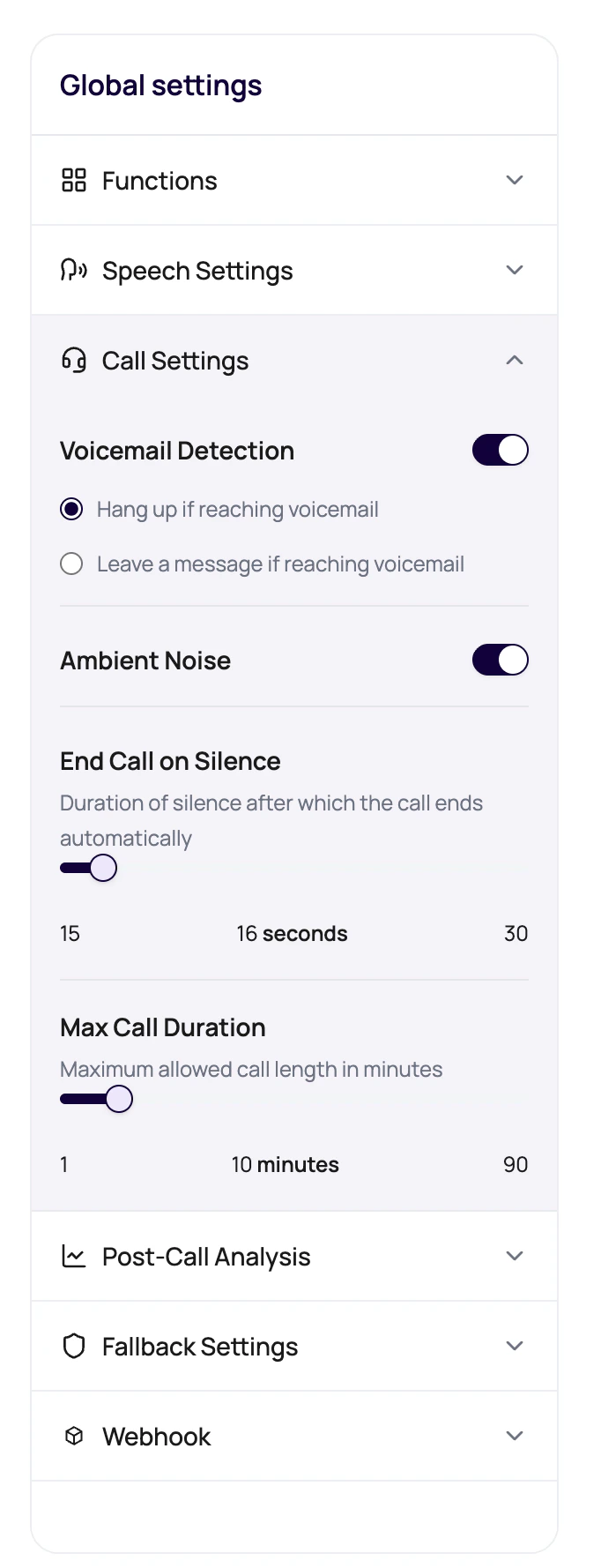
DialNexa voicemail detection controls what happens when an outbound call reaches voicemail instead of a person. The call settings panel supports voicemail detection, hangup behavior, and voicemail messages that can include dynamic variables.
 Voicemail is not a failed conversation if your campaign planned for it. It is only chaos when nobody decided what should happen.
## What Voicemail Detection Supports
DialNexa voicemail detection recognizes some automated call paths and applies your hangup or leave-message settings. It does not treat every device that can record a message the same way.
| Supported | What it looks like | Example |
| ------------------- | ---------------------------------------------------------------------- | ------------------------------------------------------------------------------------- |
| Voicemail detection | A carrier or mobile voicemail greeting after the call is not answered. | "The person you are calling is not available. Please leave a message after the tone." |
| IVR detection | An automated phone menu before a person or voicemail picks up. | "Thank you for calling Metro Clinic. Press 1 for appointments." |
| Not supported | What it looks like | Example |
| ------------------ | -------------------------------------------------------------------------------- | -------------------------------------------------------------------------------------------------------------------------------------------------- |
| Answering machines | A standalone answering device that picks up on its own with a recorded greeting. | A home or office machine that answers on the first ring and says, "Hi, you've reached the Smith residence. Please state your reason for the call." |
If a call reaches an answering machine, DialNexa may not classify it as voicemail. Test numbers from your target list before you launch a batch campaign.
## Voicemail Options
Voicemail behavior is configured per agent version.
| Option | Behavior |
| ------------------------------------- | ---------------------------------------------------------------------------------- |
| Voicemail Detection | Turns voicemail handling on or off. |
| Hang up if reaching voicemail | Ends the call when voicemail is detected. |
| Leave a message if reaching voicemail | Speaks the configured voicemail message instead of hanging up. |
| Voicemail message | Text the agent should leave. It can include placeholders such as `{{first_name}}`. |
## Prepare Voicemail For A Campaign
For some reminders, leaving a short message is useful. For other use cases, hanging up is cleaner.
Voicemail should identify the reason for the call without sounding like a full script.
Add fallback values for every placeholder used in the voicemail message.
Confirm the message sounds natural when recorded.
## Voicemail Problems
Add or fix the default dynamic variable.
Move details into follow-up channels and keep voicemail concise.
Check hangup versus leave-message selection before batch launch.
## Related Reading
Configure voicemail behavior.
Use safe placeholders.
Plan campaign behavior.
Voicemail is not a failed conversation if your campaign planned for it. It is only chaos when nobody decided what should happen.
## What Voicemail Detection Supports
DialNexa voicemail detection recognizes some automated call paths and applies your hangup or leave-message settings. It does not treat every device that can record a message the same way.
| Supported | What it looks like | Example |
| ------------------- | ---------------------------------------------------------------------- | ------------------------------------------------------------------------------------- |
| Voicemail detection | A carrier or mobile voicemail greeting after the call is not answered. | "The person you are calling is not available. Please leave a message after the tone." |
| IVR detection | An automated phone menu before a person or voicemail picks up. | "Thank you for calling Metro Clinic. Press 1 for appointments." |
| Not supported | What it looks like | Example |
| ------------------ | -------------------------------------------------------------------------------- | -------------------------------------------------------------------------------------------------------------------------------------------------- |
| Answering machines | A standalone answering device that picks up on its own with a recorded greeting. | A home or office machine that answers on the first ring and says, "Hi, you've reached the Smith residence. Please state your reason for the call." |
If a call reaches an answering machine, DialNexa may not classify it as voicemail. Test numbers from your target list before you launch a batch campaign.
## Voicemail Options
Voicemail behavior is configured per agent version.
| Option | Behavior |
| ------------------------------------- | ---------------------------------------------------------------------------------- |
| Voicemail Detection | Turns voicemail handling on or off. |
| Hang up if reaching voicemail | Ends the call when voicemail is detected. |
| Leave a message if reaching voicemail | Speaks the configured voicemail message instead of hanging up. |
| Voicemail message | Text the agent should leave. It can include placeholders such as `{{first_name}}`. |
## Prepare Voicemail For A Campaign
For some reminders, leaving a short message is useful. For other use cases, hanging up is cleaner.
Voicemail should identify the reason for the call without sounding like a full script.
Add fallback values for every placeholder used in the voicemail message.
Confirm the message sounds natural when recorded.
## Voicemail Problems
Add or fix the default dynamic variable.
Move details into follow-up channels and keep voicemail concise.
Check hangup versus leave-message selection before batch launch.
## Related Reading
Configure voicemail behavior.
Use safe placeholders.
Plan campaign behavior.