> ## Documentation Index
> Fetch the complete documentation index at: https://dialnexa.com/docs/llms.txt
> Use this file to discover all available pages before exploring further.
# SIP Trunking In DialNexa
> Understand DialNexa SIP trunking, linking SIP credentials to a phone number, termination URI, optional credentials, nickname, SIP rate, routing, audio quality, and testing.
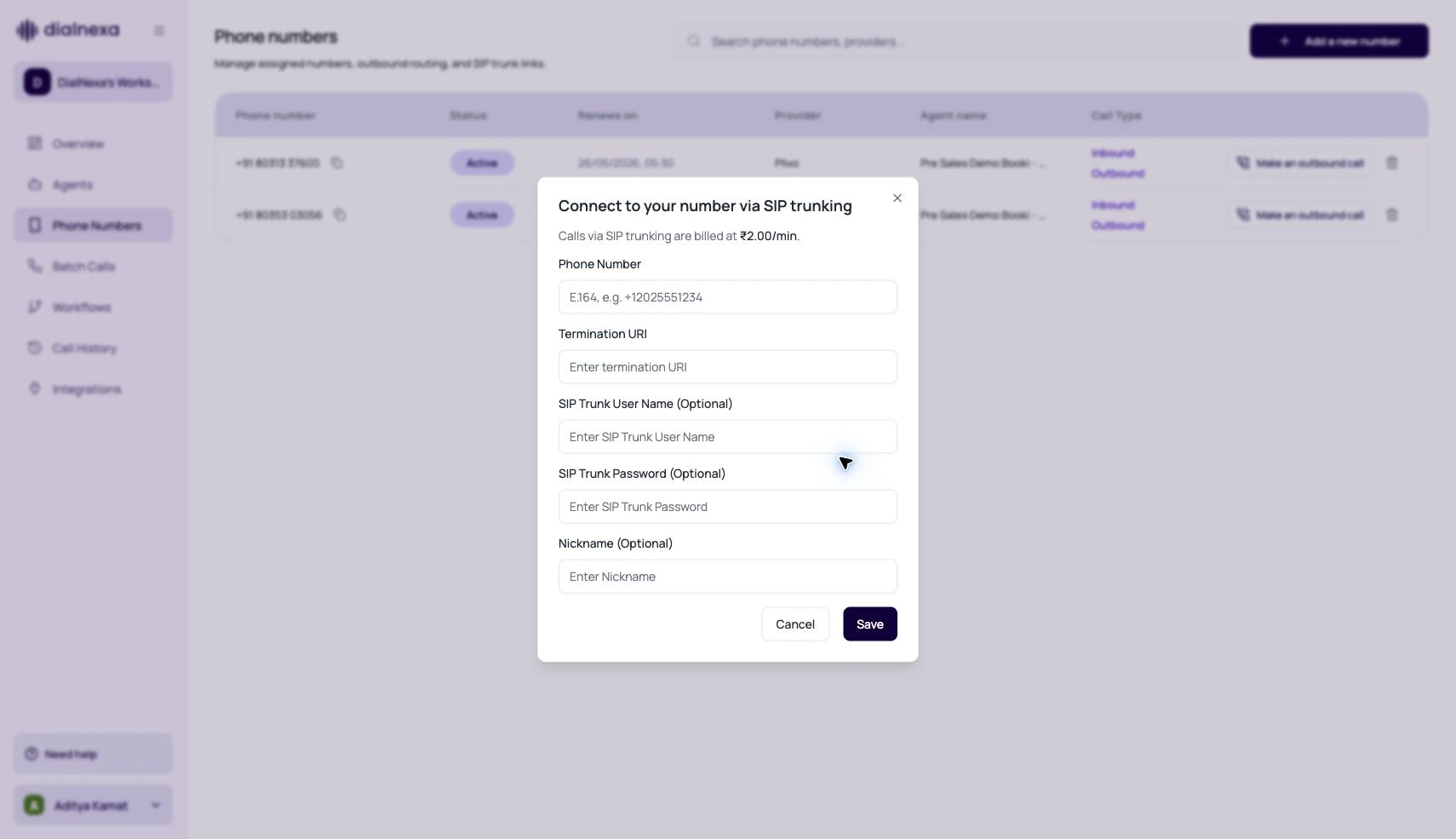
SIP trunking in DialNexa lets a workspace connect an existing phone number to a SIP trunk path while still using DialNexa agents, transcripts, recordings, call history, and monitoring.
 SIP trunking gives you control over the telephony path. It also gives you the homework: prove the path works before live traffic.
## SIP Trunk Versus Plivo Number Purchase
| Option | Use it when | Operational responsibility |
| --------------------- | ------------------------------------------------------------------------ | ----------------------------------------------------------------------------------------- |
| Plivo number purchase | You want to buy and route a number inside DialNexa. | Number availability, compliance, provider readiness, and assignment. |
| SIP trunking | You already manage telephony and want DialNexa to connect to that route. | Termination URI, credentials, carrier behavior, caller ID, media path, and audio quality. |
## Fields In The SIP Trunk Modal
| Field | Required | Purpose |
| ------------------- | ------------ | ----------------------------------------------------- |
| Phone Number | Yes | The E.164 number to link, such as `+12025551234`. |
| Termination URI | Yes | The SIP destination URI used for routing. |
| SIP Trunk User Name | Optional | Username for trunks that require credentials. |
| SIP Trunk Password | Optional | Password for trunks that require credentials. |
| Nickname | Optional | Human-readable label for the number. |
| SIP rate | Display only | Shows the per-minute SIP trunking rate before saving. |
## Link And Validate A SIP Number
Use the Phone Numbers page to start the SIP linking flow.
Provide phone number, termination URI, and optional credentials if your trunk requires them.
The number still needs inbound or outbound published agent versions. SIP decides the route, not the conversation behavior.
Confirm the correct agent answers, the caller hears audio, and Call History stores the call.
Confirm caller ID, audio quality, transcript quality, status, duration, and end reason.
## SIP Audio Review
SIP-routed calls use phone-grade audio. The exact quality depends on your carrier and trunk configuration.
| Evidence | What to inspect |
| --------------- | ------------------------------------------------------------------ |
| Recording | Noise, clipping, silence, echo, one-way audio, or bridge issues. |
| Transcript | Whether Deepgram or Soniox heard the caller correctly. |
| Call status | Whether the call connected, failed, ended early, or hit voicemail. |
| Transfer detail | Whether human handoff behaves differently through the trunk. |
| Audio Cache tab | Whether repeated speech was served quickly or missed cache. |
## Troubleshooting
Check phone number format, termination URI, credentials, and whether the linked number is active.
Review trunk media settings, recording, and transcript. Compare against a Plivo or web call if you need a baseline.
Phone number assignment controls the agent. Check inbound and outbound published versions.
Test transfer behavior through the exact trunk before production use.
## Related Reading
Manage number status and assignments.
Review recording and transcript quality.
Test handoffs through the trunk.
Audit SIP-routed calls.
SIP trunking gives you control over the telephony path. It also gives you the homework: prove the path works before live traffic.
## SIP Trunk Versus Plivo Number Purchase
| Option | Use it when | Operational responsibility |
| --------------------- | ------------------------------------------------------------------------ | ----------------------------------------------------------------------------------------- |
| Plivo number purchase | You want to buy and route a number inside DialNexa. | Number availability, compliance, provider readiness, and assignment. |
| SIP trunking | You already manage telephony and want DialNexa to connect to that route. | Termination URI, credentials, carrier behavior, caller ID, media path, and audio quality. |
## Fields In The SIP Trunk Modal
| Field | Required | Purpose |
| ------------------- | ------------ | ----------------------------------------------------- |
| Phone Number | Yes | The E.164 number to link, such as `+12025551234`. |
| Termination URI | Yes | The SIP destination URI used for routing. |
| SIP Trunk User Name | Optional | Username for trunks that require credentials. |
| SIP Trunk Password | Optional | Password for trunks that require credentials. |
| Nickname | Optional | Human-readable label for the number. |
| SIP rate | Display only | Shows the per-minute SIP trunking rate before saving. |
## Link And Validate A SIP Number
Use the Phone Numbers page to start the SIP linking flow.
Provide phone number, termination URI, and optional credentials if your trunk requires them.
The number still needs inbound or outbound published agent versions. SIP decides the route, not the conversation behavior.
Confirm the correct agent answers, the caller hears audio, and Call History stores the call.
Confirm caller ID, audio quality, transcript quality, status, duration, and end reason.
## SIP Audio Review
SIP-routed calls use phone-grade audio. The exact quality depends on your carrier and trunk configuration.
| Evidence | What to inspect |
| --------------- | ------------------------------------------------------------------ |
| Recording | Noise, clipping, silence, echo, one-way audio, or bridge issues. |
| Transcript | Whether Deepgram or Soniox heard the caller correctly. |
| Call status | Whether the call connected, failed, ended early, or hit voicemail. |
| Transfer detail | Whether human handoff behaves differently through the trunk. |
| Audio Cache tab | Whether repeated speech was served quickly or missed cache. |
## Troubleshooting
Check phone number format, termination URI, credentials, and whether the linked number is active.
Review trunk media settings, recording, and transcript. Compare against a Plivo or web call if you need a baseline.
Phone number assignment controls the agent. Check inbound and outbound published versions.
Test transfer behavior through the exact trunk before production use.
## Related Reading
Manage number status and assignments.
Review recording and transcript quality.
Test handoffs through the trunk.
Audit SIP-routed calls.