> ## Documentation Index
> Fetch the complete documentation index at: https://dialnexa.com/docs/llms.txt
> Use this file to discover all available pages before exploring further.
# DialNexa Phone Numbers
> Understand DialNexa phone numbers, Plivo number purchase, SIP trunk linking, inbound and outbound agent assignments, provider metadata, rental status, and single outbound calls.
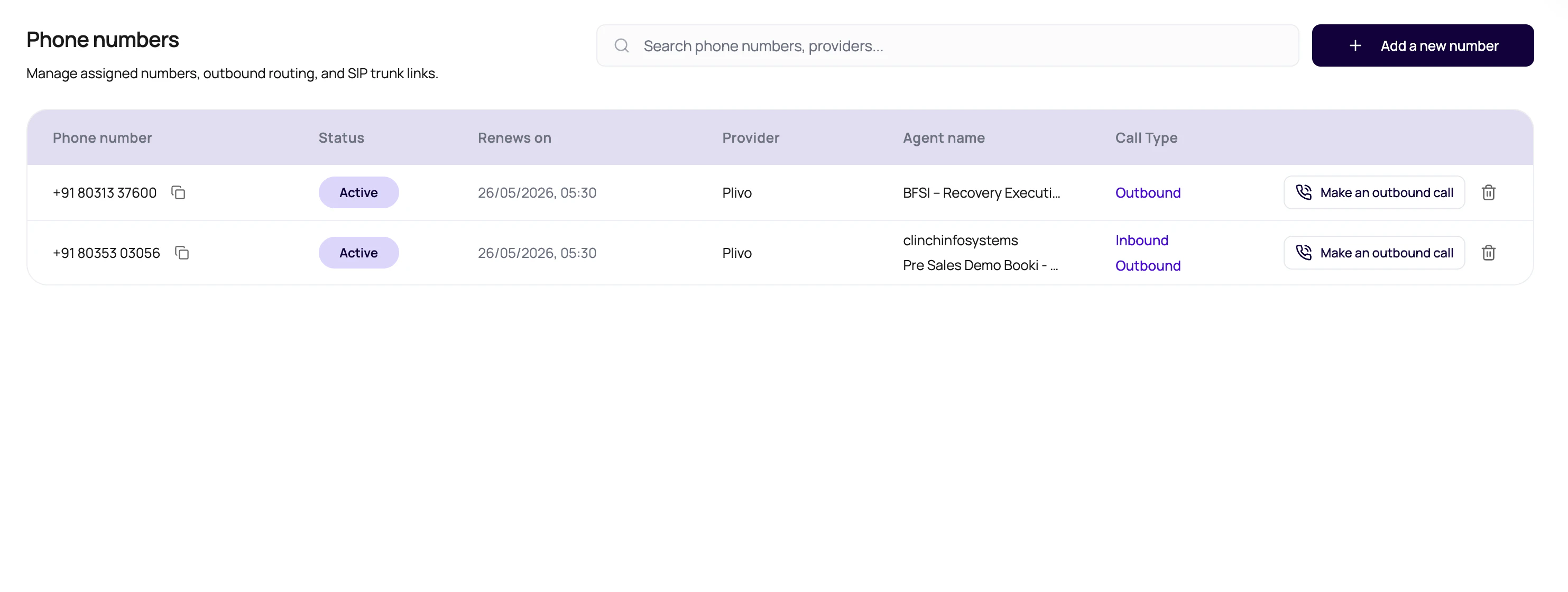
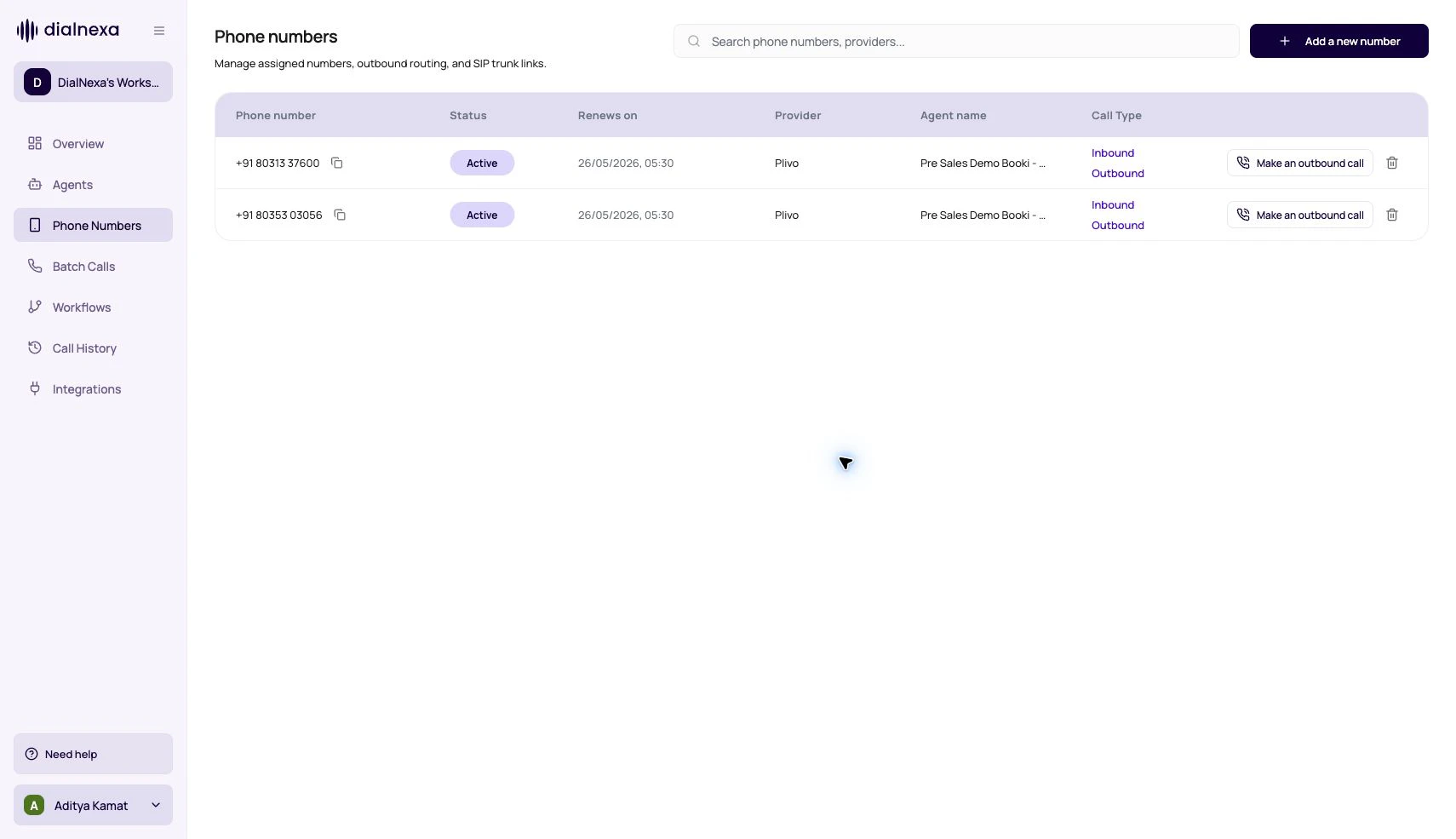
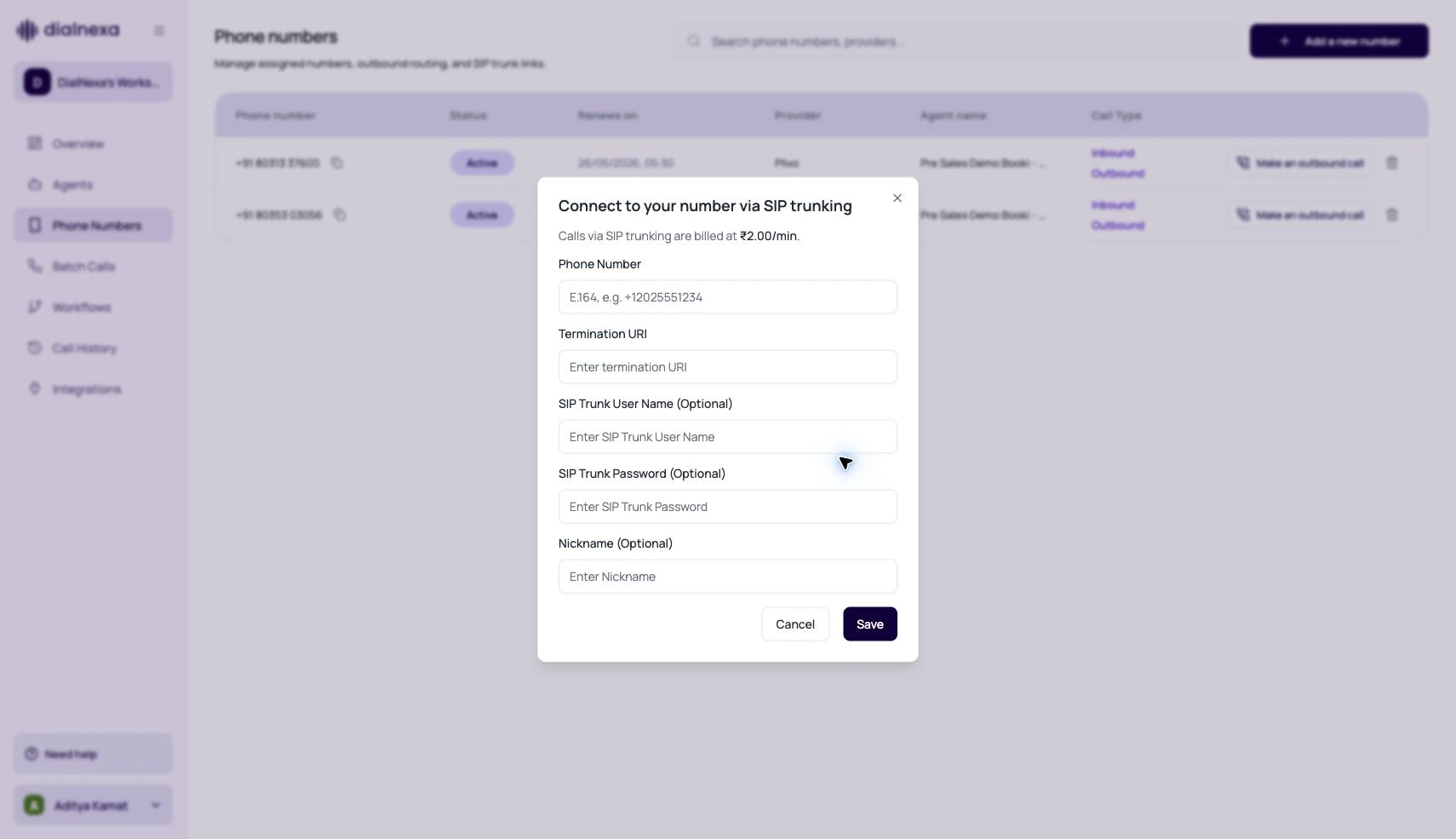
DialNexa phone numbers route live traffic to published agent versions. A number can be bought through the Plivo purchase flow, linked through SIP trunking, assigned to inbound and outbound agents, and used for one-off outbound calls.
 A published agent without a route is a script waiting by the phone with no phone.
## Buy A Number
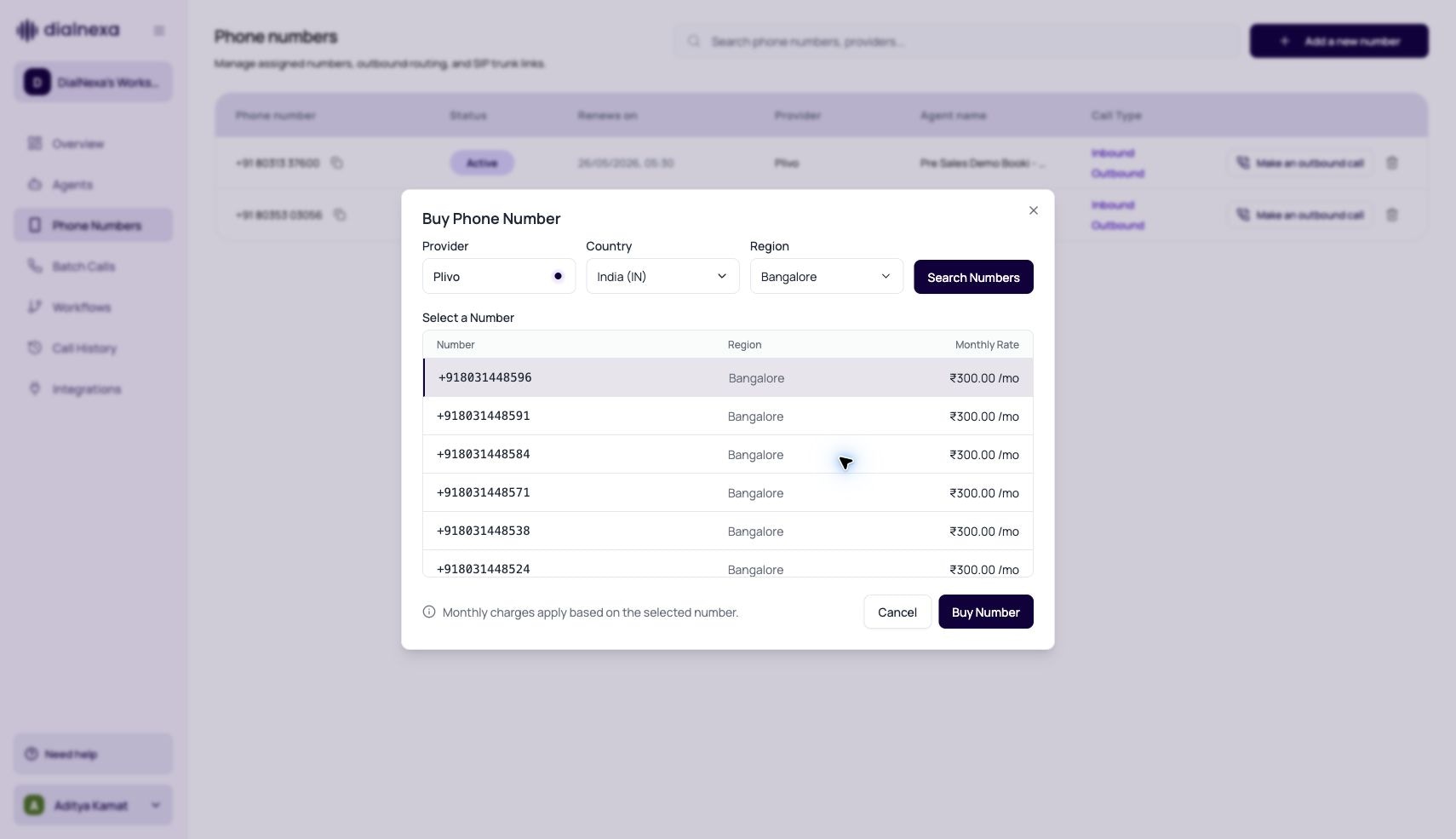
In the left sidebar, click **Phone Numbers**, then click **Buy Number**.
Select the destination country and, where offered, a region or number type. The modal lists available numbers with their monthly rate.
Pick a number from the list and review the monthly rental cost shown next to it. The cost is billed from your wallet.
Click **Buy**. The number appears in your Phone Numbers list within a few seconds. If provisioning stays pending, check your wallet balance first.
Buying a number only creates the route. Callers reach an agent only after you assign a published inbound agent version, and outbound calls also require [KYC verification](/platform/kyc-and-outbound-readiness).
## Number Types In The Dashboard
| Number path | Use it when | What to test |
| ------------------------- | --------------------------------------------------------------------- | ------------------------------------------------------------------------------------------------------- |
| Plivo number purchase | You want to buy and manage a number inside DialNexa. | Compliance readiness, active status, inbound routing, outbound routing, and recording quality. |
| SIP trunk linked number | You bring your own telephony path and want DialNexa to connect to it. | Termination URI, optional credentials, caller ID, inbound route, outbound route, and transfer handling. |
| Existing workspace number | You already have a number and need to review or change assignments. | Status, provider, rental state, SIP state, and agent version mapping. |
## Buy Number Compliance Gates
The Buy Phone Number modal supports United States and India purchase flows, but the dashboard can block a country before search when the workspace is not ready.
| Country | Purchase readiness |
| ------------- | ----------------------------------------------------------------------------------------------- |
| United States | KYC verification must be complete before search and purchase. |
| India | KYC verification and compliance documentation must both be complete before search and purchase. |
When a country is blocked, its dropdown option is disabled with a tooltip, the search button is disabled, and an inline warning explains what must be completed first. The US message points users back to KYC verification. The India message asks users to submit compliance documentation and complete KYC verification.
If a country is available, users can select the region, search available numbers, review monthly rental pricing, and purchase from the returned list. If search stays disabled after readiness is complete, refresh the organization context and confirm the workspace has the latest KYC and compliance state.
## Phone Number Fields Users Should Recognize
| Field | Meaning |
| ---------------------- | ----------------------------------------------------------------------------- |
| Status | Whether the number is pending, active, or unavailable for production routing. |
| Rental status | Whether the number is active, expired, or available for reassignment. |
| Provider | The telephony path. SIP trunk numbers display as SIP trunk. |
| Country code | Stored separately from the local number and used for formatted dialing. |
| SIP trunk enabled | Whether the number is linked to SIP trunk details. |
| Inbound agent version | The published agent version that answers incoming calls to the number. |
| Outbound agent version | The published agent version used when this number places outbound calls. |
## Inbound And Outbound Assignments Are Separate
The Phone Numbers table shows assigned agent context and call direction for each number. Use the agent or routing configuration flow for version changes. The table row itself is not where you rename agents or edit published versions.
| Assignment | What it controls | Common mistake |
| -------------- | -------------------------------------------------------------------------------------- | ------------------------------------------------------------------------- |
| Inbound agent | Which agent answers when a caller dials the number. | Updating outbound assignment and expecting inbound behavior to change. |
| Outbound agent | Which agent speaks when the number starts a single call, batch call, or workflow call. | Starting outbound traffic before assigning an outbound published version. |
## Telephony Pricing Behavior
| Route | How to think about cost |
| ------------------- | -------------------------------------------------------------------------------------------------------------------- |
| Plivo-style routing | Destination matching is based on the called number's country ISO code and the longest matching network group prefix. |
| SIP trunking | DialNexa shows a flat SIP trunking rate when configured, such as `₹x.xx/min`, before saving the trunk link. |
| Web call | Browser audio avoids carrier routing, but call behavior should still be reviewed in Call History. |
Source number country does not decide outbound destination pricing. The called number does.
## Outbound Destination Validation
Single outbound calls and batch calls validate the destination before creating call records. The checks happen in this order:
1. The destination must be present, parseable, and possible as an international phone number.
2. If [KYC is not verified](/platform/kyc-and-outbound-readiness), the owner can only call the registered verification number.
3. For non-SIP routes, the destination country ISO code must be enabled in **Workspace Settings > Telephony Config**.
4. If the enabled network group has prefixes, DialNexa checks the most specific matching prefix for that destination country. A shorter enabled prefix does not allow a number whose more specific matching prefix is disabled.
5. SIP trunk numbers and enabled SIP/BYOC workspace config bypass destination country rules.
When validation fails, the dashboard shows the API error message. Batch CSV uploads can group many failed rows by the same validation reason so users can fix the file faster.
Country ISO matching matters for countries that share a calling code. For example, destinations under `+1` are evaluated by the resolved country, not only by the `1` calling code.
## Prepare A Number For Production
Pending or expired numbers should not be used for critical traffic.
Complete KYC or regional requirements where the dashboard asks for them.
Select the inbound and outbound agent versions that should own live calls.
Confirm the destination countries and network groups you plan to call are enabled for this workspace.
Call the number and confirm the correct agent answers.
Start a call from the number and review status, recording, transcript, and extracted fields.
## Common Phone Number Mistakes
Check direction. Inbound and outbound assignments are independent.
Live routes should use published versions. Publish the version before assigning it.
Test the exact SIP trunk path. Your carrier, trunk configuration, and caller ID behavior can change audio and routing.
Confirm whether the number is active, default, or used by campaigns before deleting it.
## Related Reading
Link a number to SIP trunking.
Route incoming callers.
Start individual outbound calls.
Understand phone audio and transcription.
A published agent without a route is a script waiting by the phone with no phone.
## Buy A Number
In the left sidebar, click **Phone Numbers**, then click **Buy Number**.
Select the destination country and, where offered, a region or number type. The modal lists available numbers with their monthly rate.
Pick a number from the list and review the monthly rental cost shown next to it. The cost is billed from your wallet.
Click **Buy**. The number appears in your Phone Numbers list within a few seconds. If provisioning stays pending, check your wallet balance first.
Buying a number only creates the route. Callers reach an agent only after you assign a published inbound agent version, and outbound calls also require [KYC verification](/platform/kyc-and-outbound-readiness).
## Number Types In The Dashboard
| Number path | Use it when | What to test |
| ------------------------- | --------------------------------------------------------------------- | ------------------------------------------------------------------------------------------------------- |
| Plivo number purchase | You want to buy and manage a number inside DialNexa. | Compliance readiness, active status, inbound routing, outbound routing, and recording quality. |
| SIP trunk linked number | You bring your own telephony path and want DialNexa to connect to it. | Termination URI, optional credentials, caller ID, inbound route, outbound route, and transfer handling. |
| Existing workspace number | You already have a number and need to review or change assignments. | Status, provider, rental state, SIP state, and agent version mapping. |
## Buy Number Compliance Gates
The Buy Phone Number modal supports United States and India purchase flows, but the dashboard can block a country before search when the workspace is not ready.
| Country | Purchase readiness |
| ------------- | ----------------------------------------------------------------------------------------------- |
| United States | KYC verification must be complete before search and purchase. |
| India | KYC verification and compliance documentation must both be complete before search and purchase. |
When a country is blocked, its dropdown option is disabled with a tooltip, the search button is disabled, and an inline warning explains what must be completed first. The US message points users back to KYC verification. The India message asks users to submit compliance documentation and complete KYC verification.
If a country is available, users can select the region, search available numbers, review monthly rental pricing, and purchase from the returned list. If search stays disabled after readiness is complete, refresh the organization context and confirm the workspace has the latest KYC and compliance state.
## Phone Number Fields Users Should Recognize
| Field | Meaning |
| ---------------------- | ----------------------------------------------------------------------------- |
| Status | Whether the number is pending, active, or unavailable for production routing. |
| Rental status | Whether the number is active, expired, or available for reassignment. |
| Provider | The telephony path. SIP trunk numbers display as SIP trunk. |
| Country code | Stored separately from the local number and used for formatted dialing. |
| SIP trunk enabled | Whether the number is linked to SIP trunk details. |
| Inbound agent version | The published agent version that answers incoming calls to the number. |
| Outbound agent version | The published agent version used when this number places outbound calls. |
## Inbound And Outbound Assignments Are Separate
The Phone Numbers table shows assigned agent context and call direction for each number. Use the agent or routing configuration flow for version changes. The table row itself is not where you rename agents or edit published versions.
| Assignment | What it controls | Common mistake |
| -------------- | -------------------------------------------------------------------------------------- | ------------------------------------------------------------------------- |
| Inbound agent | Which agent answers when a caller dials the number. | Updating outbound assignment and expecting inbound behavior to change. |
| Outbound agent | Which agent speaks when the number starts a single call, batch call, or workflow call. | Starting outbound traffic before assigning an outbound published version. |
## Telephony Pricing Behavior
| Route | How to think about cost |
| ------------------- | -------------------------------------------------------------------------------------------------------------------- |
| Plivo-style routing | Destination matching is based on the called number's country ISO code and the longest matching network group prefix. |
| SIP trunking | DialNexa shows a flat SIP trunking rate when configured, such as `₹x.xx/min`, before saving the trunk link. |
| Web call | Browser audio avoids carrier routing, but call behavior should still be reviewed in Call History. |
Source number country does not decide outbound destination pricing. The called number does.
## Outbound Destination Validation
Single outbound calls and batch calls validate the destination before creating call records. The checks happen in this order:
1. The destination must be present, parseable, and possible as an international phone number.
2. If [KYC is not verified](/platform/kyc-and-outbound-readiness), the owner can only call the registered verification number.
3. For non-SIP routes, the destination country ISO code must be enabled in **Workspace Settings > Telephony Config**.
4. If the enabled network group has prefixes, DialNexa checks the most specific matching prefix for that destination country. A shorter enabled prefix does not allow a number whose more specific matching prefix is disabled.
5. SIP trunk numbers and enabled SIP/BYOC workspace config bypass destination country rules.
When validation fails, the dashboard shows the API error message. Batch CSV uploads can group many failed rows by the same validation reason so users can fix the file faster.
Country ISO matching matters for countries that share a calling code. For example, destinations under `+1` are evaluated by the resolved country, not only by the `1` calling code.
## Prepare A Number For Production
Pending or expired numbers should not be used for critical traffic.
Complete KYC or regional requirements where the dashboard asks for them.
Select the inbound and outbound agent versions that should own live calls.
Confirm the destination countries and network groups you plan to call are enabled for this workspace.
Call the number and confirm the correct agent answers.
Start a call from the number and review status, recording, transcript, and extracted fields.
## Common Phone Number Mistakes
Check direction. Inbound and outbound assignments are independent.
Live routes should use published versions. Publish the version before assigning it.
Test the exact SIP trunk path. Your carrier, trunk configuration, and caller ID behavior can change audio and routing.
Confirm whether the number is active, default, or used by campaigns before deleting it.
## Related Reading
Link a number to SIP trunking.
Route incoming callers.
Start individual outbound calls.
Understand phone audio and transcription.