> ## Documentation Index
> Fetch the complete documentation index at: https://dialnexa.com/docs/llms.txt
> Use this file to discover all available pages before exploring further.
# DialNexa Batch Call Recipient Files
> Prepare DialNexa batch call recipient files with phone number columns, dynamic variable mapping, agent-specific templates, spreadsheet uploads, and validation checks.
DialNexa batch call recipient files provide the phone numbers and dynamic variable values for outbound campaigns. The create page can download a CSV template based on the selected agent version default variables, then map uploaded recipient headers into the fields DialNexa needs before creating the review table.
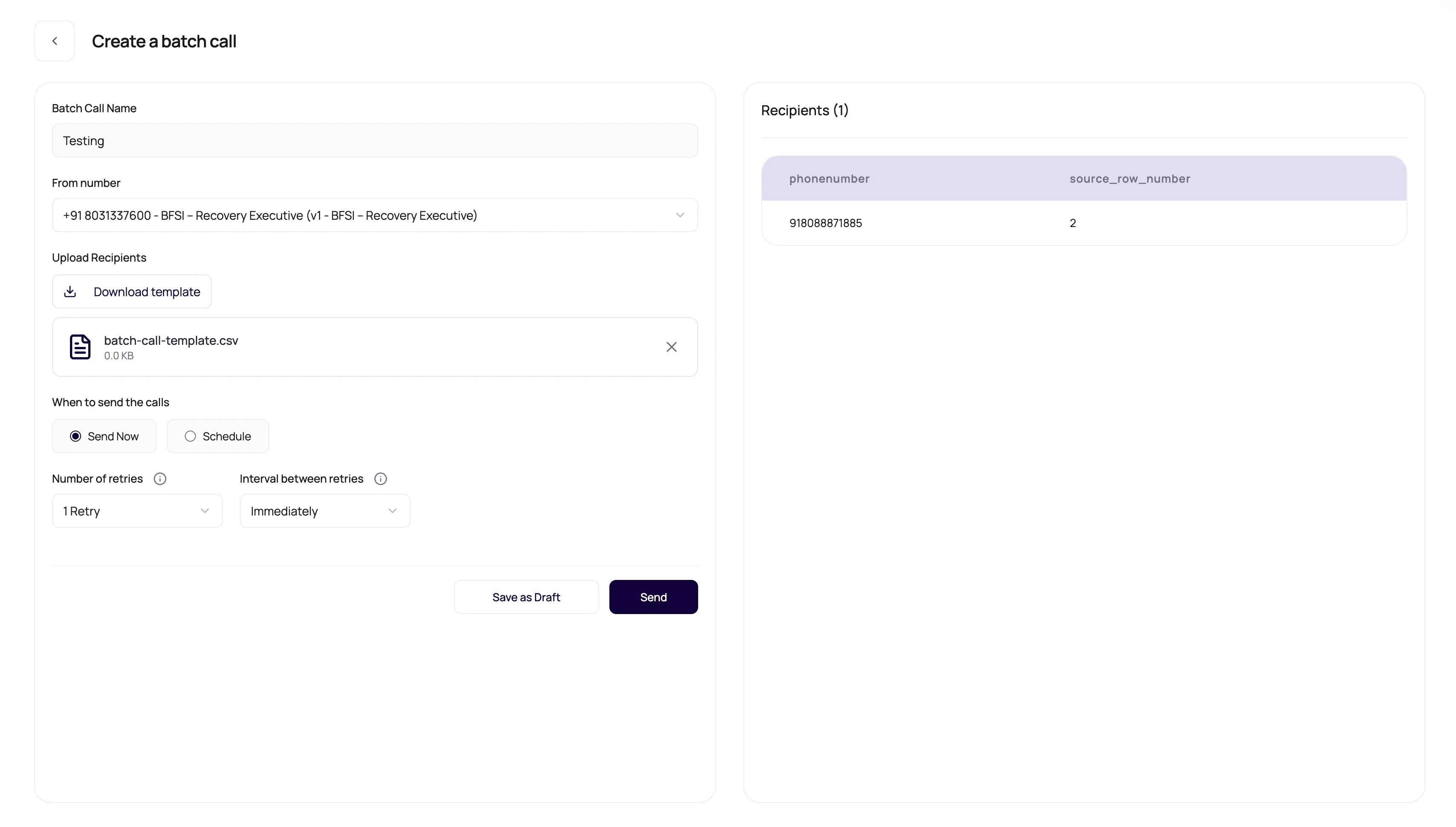 CSV files are simple right up until one header has an invisible extra space. Then they become a personality test.
## Expected CSV Shape
Keep recipient files boring and predictable.
| Column | Purpose |
| ------------------------ | ------------------------------------------------------------------------------------------------------------------- |
| phone number | Recipient number in a format the selected outbound route can validate. Use full international format when possible. |
| Dynamic variable columns | Values for placeholders used by the selected published agent version. |
| Additional columns | Can be shown in the recipient table when parsed, but should not replace required variables. |
| One recipient per row | Each row represents one outbound call target. |
The upload flow reads headers from CSV files and supported spreadsheet files. For Excel uploads, DialNexa converts the mapped sheet data to CSV before sending it for campaign parsing.
## Template Behavior
The download template changes with the selected number and agent version.
The template uses default dynamic variable keys from the selected agent version when available.
If no agent variables are available, the template includes generic placeholder variable columns.
Parsed recipients are displayed in a table before launch.
The page validates CSV type and rejects large or invalid uploads.
## Match Uploaded Columns
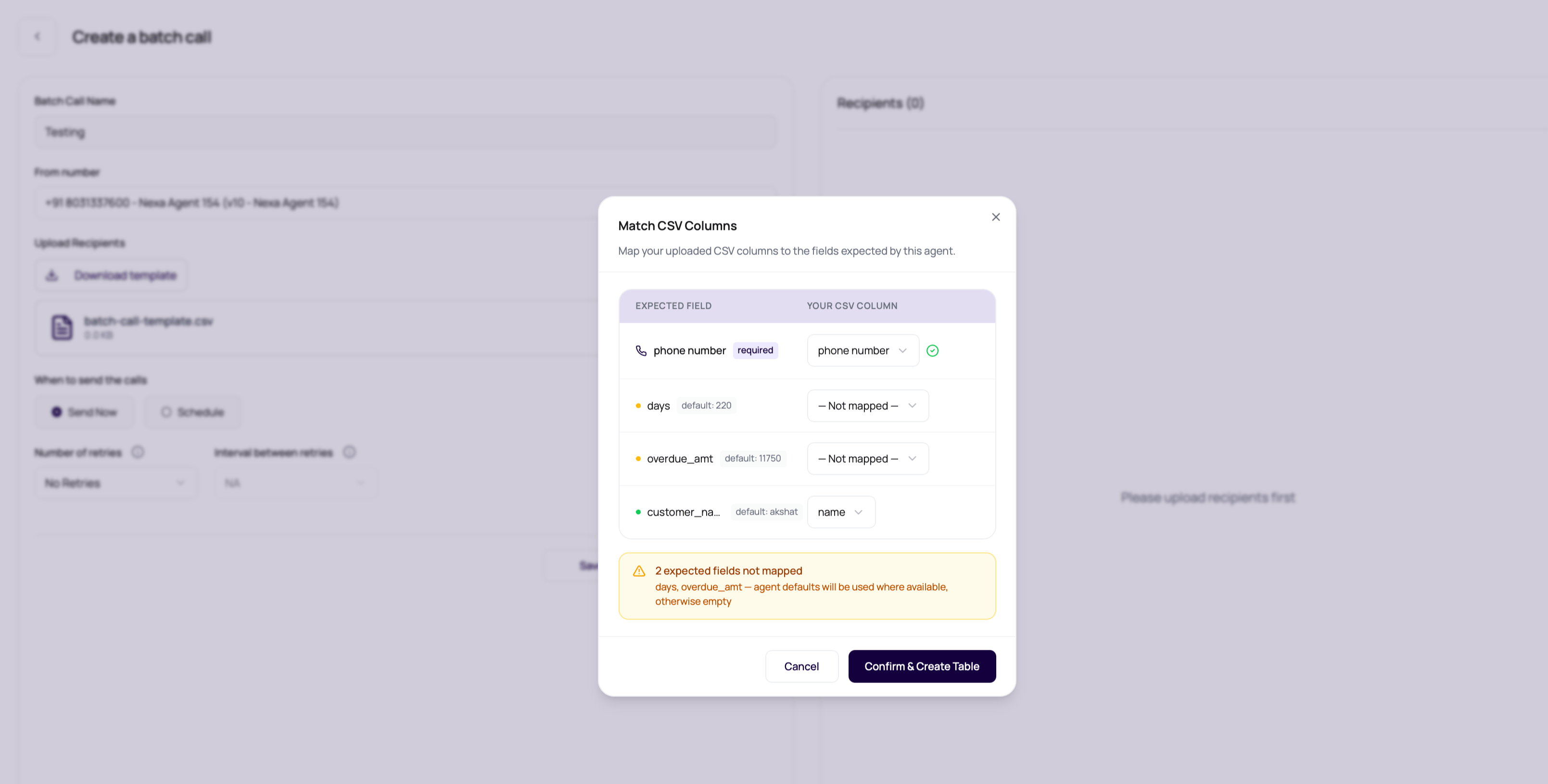
After upload, the **Match CSV Columns** modal lets you align the file with the selected agent version before the table is created.
CSV files are simple right up until one header has an invisible extra space. Then they become a personality test.
## Expected CSV Shape
Keep recipient files boring and predictable.
| Column | Purpose |
| ------------------------ | ------------------------------------------------------------------------------------------------------------------- |
| phone number | Recipient number in a format the selected outbound route can validate. Use full international format when possible. |
| Dynamic variable columns | Values for placeholders used by the selected published agent version. |
| Additional columns | Can be shown in the recipient table when parsed, but should not replace required variables. |
| One recipient per row | Each row represents one outbound call target. |
The upload flow reads headers from CSV files and supported spreadsheet files. For Excel uploads, DialNexa converts the mapped sheet data to CSV before sending it for campaign parsing.
## Template Behavior
The download template changes with the selected number and agent version.
The template uses default dynamic variable keys from the selected agent version when available.
If no agent variables are available, the template includes generic placeholder variable columns.
Parsed recipients are displayed in a table before launch.
The page validates CSV type and rejects large or invalid uploads.
## Match Uploaded Columns
After upload, the **Match CSV Columns** modal lets you align the file with the selected agent version before the table is created.
 | Modal area | Behavior |
| ----------------- | ------------------------------------------------------------------------------------------------------------------------------------- |
| Phone number | Auto-detects common headers such as `phone`, `mobile`, `contact_number`, or `telephone`. You can choose a different column if needed. |
| Dynamic variables | Auto-matches exact, case-insensitive, and normalized header names for expected variables. |
| Defaults | Shows agent default values next to variables that have fallbacks. |
| Unmapped fields | Warns when expected variables are not mapped. Defaults are used where available, otherwise values are empty. |
| Extra columns | Shows columns that will remain visible in the table but will not be used during calls. |
When you confirm the mapping, DialNexa normalizes the selected phone column to `phonenumber` and renames mapped variable columns to the expected agent variable keys. This lets operators upload files with readable business headers without editing the source spreadsheet first.
## Review AI Name Suggestions
If the uploaded file has a mapped name column and fewer than `1,000` leads, the create page can check the names for cleanup suggestions before building the recipient table. This is an optional dashboard review step. If name cleanup fails, DialNexa continues with the original names.
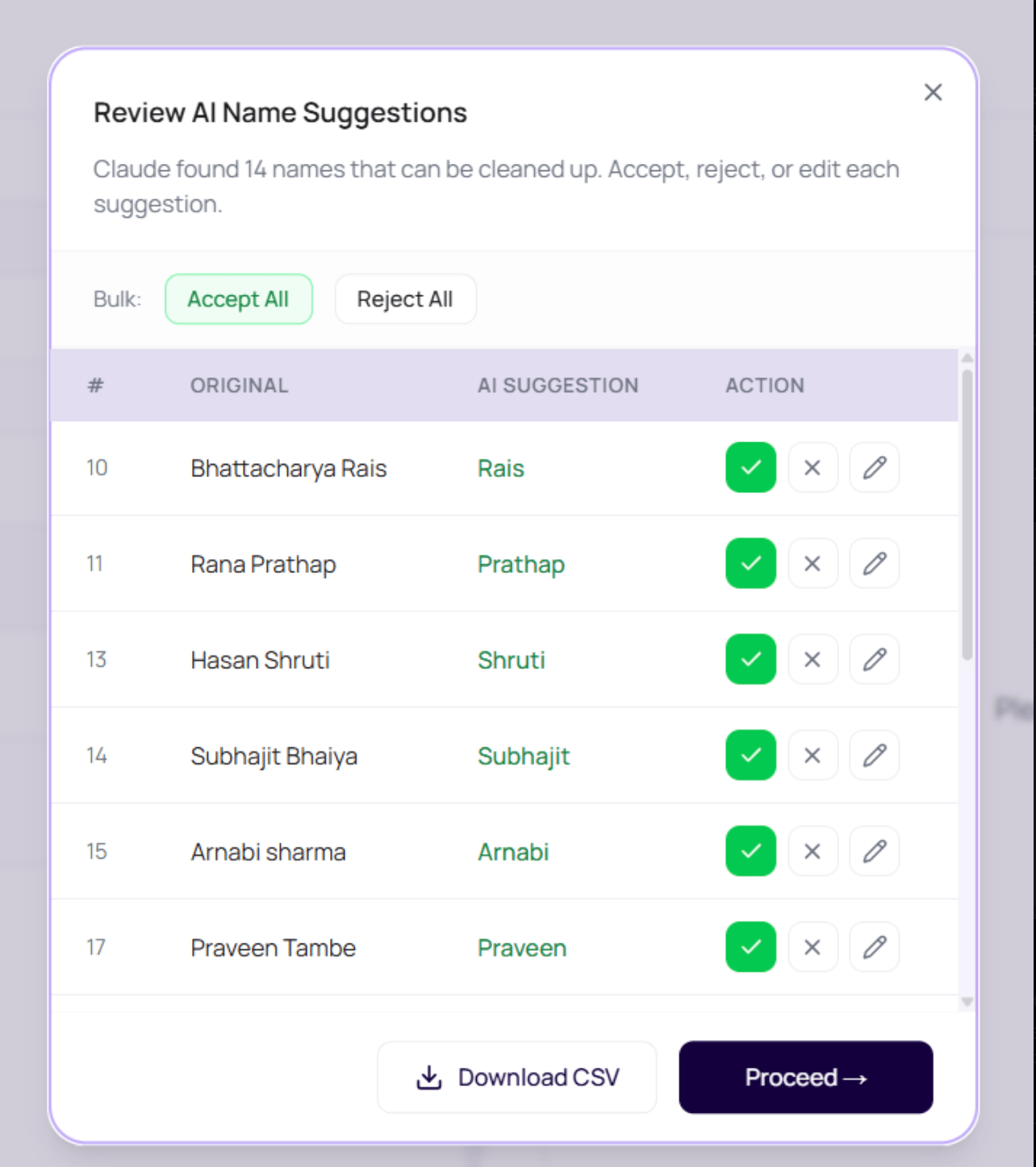
The **Review AI Name Suggestions** modal shows the original value, the suggested value, and row-level controls.
| Modal area | Behavior |
| ----------------- | ------------------------------------------------------------------------------------------------------------------------------------- |
| Phone number | Auto-detects common headers such as `phone`, `mobile`, `contact_number`, or `telephone`. You can choose a different column if needed. |
| Dynamic variables | Auto-matches exact, case-insensitive, and normalized header names for expected variables. |
| Defaults | Shows agent default values next to variables that have fallbacks. |
| Unmapped fields | Warns when expected variables are not mapped. Defaults are used where available, otherwise values are empty. |
| Extra columns | Shows columns that will remain visible in the table but will not be used during calls. |
When you confirm the mapping, DialNexa normalizes the selected phone column to `phonenumber` and renames mapped variable columns to the expected agent variable keys. This lets operators upload files with readable business headers without editing the source spreadsheet first.
## Review AI Name Suggestions
If the uploaded file has a mapped name column and fewer than `1,000` leads, the create page can check the names for cleanup suggestions before building the recipient table. This is an optional dashboard review step. If name cleanup fails, DialNexa continues with the original names.
The **Review AI Name Suggestions** modal shows the original value, the suggested value, and row-level controls.
 | Control | Behavior |
| ------------------------ | ------------------------------------------------------------------- |
| Accept | Uses the suggested clean name for that row. |
| Reject | Keeps the original uploaded name. |
| Edit | Lets the operator type a custom replacement. |
| Accept All or Reject All | Applies the same decision to every suggested row. |
| Download CSV | Downloads a reviewed CSV before proceeding. |
| Proceed | Applies accepted or edited names, then continues recipient parsing. |
For batches over `1,000` contacts, the dashboard skips AI name cleanup and shows a warning. Review names in the source file before upload when large campaigns need standardized salutations.
## Duplicate Phone Number Handling
The create page skips duplicate phone numbers by default before the recipient table is built. When the same non-empty phone number appears more than once, DialNexa keeps the first mapped row and removes later rows with that number. After upload, the page shows how many duplicate phone numbers were skipped.
| Control | Behavior |
| --------------------------------- | -------------------------------------------------------------------------------------------------- |
| Skip duplicate phone numbers | Enabled by default before file upload. Leave it on when each phone number should receive one call. |
| Duplicate non-empty phone numbers | Only the first mapped row for that number is kept. Later rows are removed before campaign parsing. |
| Empty phone numbers | Rows without a phone number still pass through so backend validation can report the missing value. |
| Changing the duplicate setting | Remove the uploaded file first, then turn the setting on or off before uploading again. |
Turn duplicate skipping off only when repeated calls to the same phone number are intentional for that campaign.
## Prepare A Clean File
This lets the page know which agent version variables to use.
Start with headers that match the selected agent.
Use production-ready names, dates, amounts, and transfer destinations.
Check the preview table before saving or starting.
Do not launch a file whose preview already looks wrong.
## File Requirements
| Requirement | Value |
| ----------------- | --------------------------------------------------------------------------------------------- |
| File type | CSV or Excel |
| Maximum file size | 10 MB |
| Structure | One recipient per row, headers matching the downloaded template or mapped in the upload modal |
## When Rows Fail Validation
The upload parser checks recipient phone numbers against the same [destination validation rules](/calls/phone-numbers#outbound-destination-validation) used by single outbound calls. Duplicate removal happens before this validation when **Skip duplicate phone numbers** is enabled. Failed rows are grouped by reason, and larger failures offer a downloadable errors CSV. See [Common Upload Errors](/batch-calls/common-upload-errors) for each error type, what it means, and how to fix the file.
## Related Reading
Map variables to CSV columns.
Fix file issues.
Review row outcomes.
| Control | Behavior |
| ------------------------ | ------------------------------------------------------------------- |
| Accept | Uses the suggested clean name for that row. |
| Reject | Keeps the original uploaded name. |
| Edit | Lets the operator type a custom replacement. |
| Accept All or Reject All | Applies the same decision to every suggested row. |
| Download CSV | Downloads a reviewed CSV before proceeding. |
| Proceed | Applies accepted or edited names, then continues recipient parsing. |
For batches over `1,000` contacts, the dashboard skips AI name cleanup and shows a warning. Review names in the source file before upload when large campaigns need standardized salutations.
## Duplicate Phone Number Handling
The create page skips duplicate phone numbers by default before the recipient table is built. When the same non-empty phone number appears more than once, DialNexa keeps the first mapped row and removes later rows with that number. After upload, the page shows how many duplicate phone numbers were skipped.
| Control | Behavior |
| --------------------------------- | -------------------------------------------------------------------------------------------------- |
| Skip duplicate phone numbers | Enabled by default before file upload. Leave it on when each phone number should receive one call. |
| Duplicate non-empty phone numbers | Only the first mapped row for that number is kept. Later rows are removed before campaign parsing. |
| Empty phone numbers | Rows without a phone number still pass through so backend validation can report the missing value. |
| Changing the duplicate setting | Remove the uploaded file first, then turn the setting on or off before uploading again. |
Turn duplicate skipping off only when repeated calls to the same phone number are intentional for that campaign.
## Prepare A Clean File
This lets the page know which agent version variables to use.
Start with headers that match the selected agent.
Use production-ready names, dates, amounts, and transfer destinations.
Check the preview table before saving or starting.
Do not launch a file whose preview already looks wrong.
## File Requirements
| Requirement | Value |
| ----------------- | --------------------------------------------------------------------------------------------- |
| File type | CSV or Excel |
| Maximum file size | 10 MB |
| Structure | One recipient per row, headers matching the downloaded template or mapped in the upload modal |
## When Rows Fail Validation
The upload parser checks recipient phone numbers against the same [destination validation rules](/calls/phone-numbers#outbound-destination-validation) used by single outbound calls. Duplicate removal happens before this validation when **Skip duplicate phone numbers** is enabled. Failed rows are grouped by reason, and larger failures offer a downloadable errors CSV. See [Common Upload Errors](/batch-calls/common-upload-errors) for each error type, what it means, and how to fix the file.
## Related Reading
Map variables to CSV columns.
Fix file issues.
Review row outcomes.