> ## Documentation Index
> Fetch the complete documentation index at: https://dialnexa.com/docs/llms.txt
> Use this file to discover all available pages before exploring further.
# DialNexa Batch Calls Overview
> Understand DialNexa Batch Calls for outbound campaigns, including KYC readiness, selected outbound numbers, recipient CSVs, schedules, retries, drafts, and call history.
DialNexa Batch Calls let users call many recipients from a CSV file through a selected outbound phone number. The selected number must have an outbound agent version attached, the workspace may need KYC verification, and each recipient result can be reviewed through campaign-linked call logs.
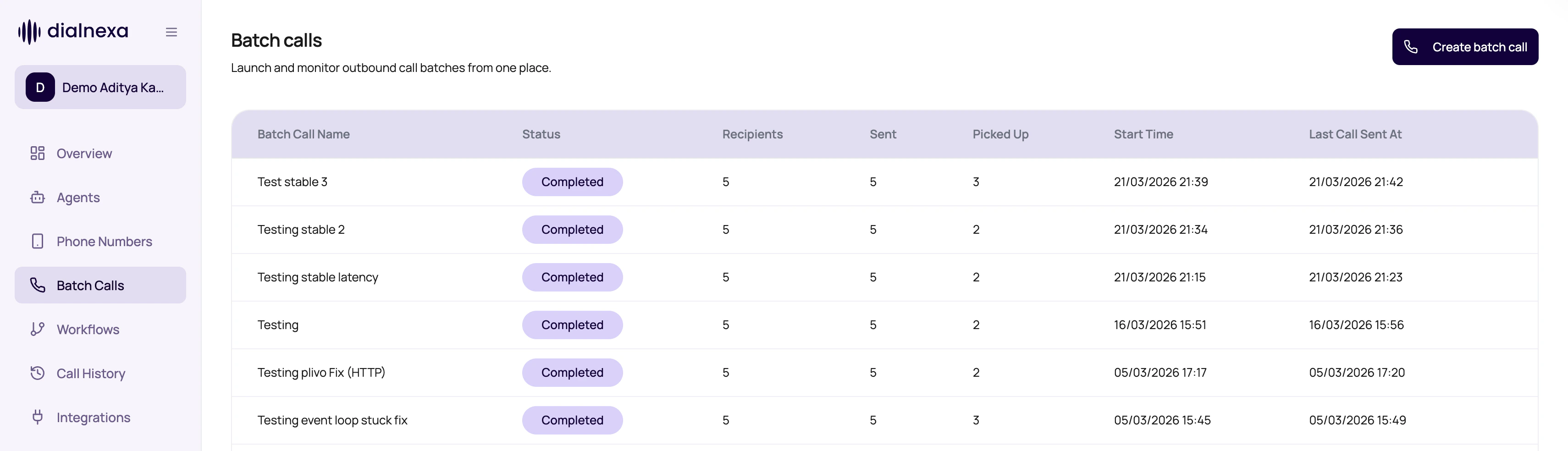 A batch call is a loop with money attached. Start small, review evidence, then scale.
## What A Batch Campaign Needs
Every campaign combines route, file, timing, and retry rules.
| Need | Why it matters |
| ------------------ | --------------------------------------------------------------------------------------------------------------------------------------------------------------------------------------- |
| Verified workspace | Batch Calls can be disabled until KYC is verified; unverified workspaces can only call their registered number. See [KYC And Outbound Readiness](/platform/kyc-and-outbound-readiness). |
| Outbound number | The number supplies the outbound agent id and version number. |
| Recipient CSV | Rows provide phone numbers and dynamic variable values. |
| Schedule | Campaign can start now or at a selected time. |
| Retries | Retry count and interval decide follow-up attempts. |
| Call History | Each call attempt creates reviewable evidence. |
## Batch Calls Are Different From Workflows
Use the right automation shape.
Best for one campaign calling a list with retry rules and exportable recipient results.
Best for multi-step lead paths with waits, conditions, application nodes, and lead history.
Best for testing one recipient or one phone number route.
Best for investigating the result of every attempt.
## Launch Safely
Check KYC and wallet context before preparing a large list.
Use a number with the intended published agent version.
Match CSV headers to agent dynamic variables.
Review file, schedule, and retries before starting.
Run a small campaign and review results before sending a full list.
## Related Reading
Prepare CSV input.
Understand attempts.
Review campaign outcomes.
A batch call is a loop with money attached. Start small, review evidence, then scale.
## What A Batch Campaign Needs
Every campaign combines route, file, timing, and retry rules.
| Need | Why it matters |
| ------------------ | --------------------------------------------------------------------------------------------------------------------------------------------------------------------------------------- |
| Verified workspace | Batch Calls can be disabled until KYC is verified; unverified workspaces can only call their registered number. See [KYC And Outbound Readiness](/platform/kyc-and-outbound-readiness). |
| Outbound number | The number supplies the outbound agent id and version number. |
| Recipient CSV | Rows provide phone numbers and dynamic variable values. |
| Schedule | Campaign can start now or at a selected time. |
| Retries | Retry count and interval decide follow-up attempts. |
| Call History | Each call attempt creates reviewable evidence. |
## Batch Calls Are Different From Workflows
Use the right automation shape.
Best for one campaign calling a list with retry rules and exportable recipient results.
Best for multi-step lead paths with waits, conditions, application nodes, and lead history.
Best for testing one recipient or one phone number route.
Best for investigating the result of every attempt.
## Launch Safely
Check KYC and wallet context before preparing a large list.
Use a number with the intended published agent version.
Match CSV headers to agent dynamic variables.
Review file, schedule, and retries before starting.
Run a small campaign and review results before sending a full list.
## Related Reading
Prepare CSV input.
Understand attempts.
Review campaign outcomes.