> ## Documentation Index
> Fetch the complete documentation index at: https://dialnexa.com/docs/llms.txt
> Use this file to discover all available pages before exploring further.
# DialNexa Batch Call Drafts Scheduling And Starting
> Understand DialNexa batch call drafts, start now versus schedule, selected dates, saving campaigns, and starting outbound runs.
DialNexa batch calls can be prepared as drafts, started immediately, or scheduled for a later start time. Drafts are useful when teams need to review the recipient file, selected outbound number, retry settings, and campaign name before placing calls.
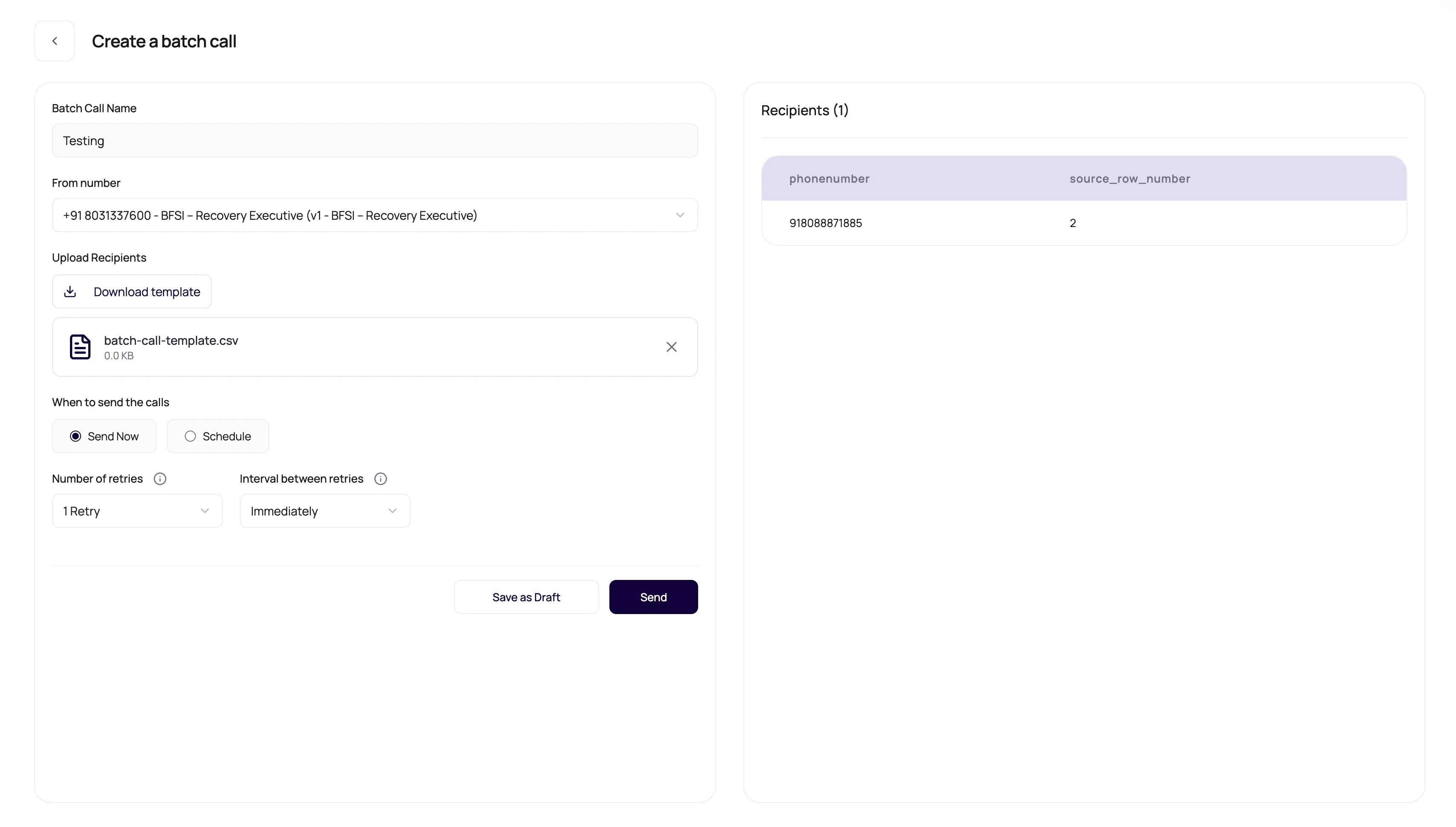 Drafts are where campaigns can be boring on purpose. Boring before launch is cheaper than exciting after launch.
## Draft And Launch Controls
These controls decide when calls begin.
| Control | Meaning |
| ------------------------ | -------------------------------------------------------------- |
| Campaign name | Human-readable name used in lists and exports. |
| Selected outbound number | Determines the agent version and caller route. |
| Send now | Starts the campaign as soon as the launch request is accepted. |
| Schedule | Stores a selected start date and time. |
| Save draft | Keeps the campaign editable before it is sent. |
| Start | Moves the campaign toward active call execution. |
## Review Before Starting
Make it recognizable in Call History and exports.
A wrong outbound number means a wrong agent version.
Scan phone numbers and variable values.
Retries can multiply call attempts.
Make sure the start time matches operations coverage.
## Launch Questions
Treat started campaigns as live activity. Review drafts before launch.
Only numbers with outbound agent assignments are useful for batch calls.
Calling outside expected hours can hurt answer rates and customer experience.
## Related Reading
Understand campaign setup.
Set retry behavior.
Watch campaign calls.
Drafts are where campaigns can be boring on purpose. Boring before launch is cheaper than exciting after launch.
## Draft And Launch Controls
These controls decide when calls begin.
| Control | Meaning |
| ------------------------ | -------------------------------------------------------------- |
| Campaign name | Human-readable name used in lists and exports. |
| Selected outbound number | Determines the agent version and caller route. |
| Send now | Starts the campaign as soon as the launch request is accepted. |
| Schedule | Stores a selected start date and time. |
| Save draft | Keeps the campaign editable before it is sent. |
| Start | Moves the campaign toward active call execution. |
## Review Before Starting
Make it recognizable in Call History and exports.
A wrong outbound number means a wrong agent version.
Scan phone numbers and variable values.
Retries can multiply call attempts.
Make sure the start time matches operations coverage.
## Launch Questions
Treat started campaigns as live activity. Review drafts before launch.
Only numbers with outbound agent assignments are useful for batch calls.
Calling outside expected hours can hurt answer rates and customer experience.
## Related Reading
Understand campaign setup.
Set retry behavior.
Watch campaign calls.