> ## Documentation Index
> Fetch the complete documentation index at: https://dialnexa.com/docs/llms.txt
> Use this file to discover all available pages before exploring further.
# Types Of DialNexa Agents
> Compare DialNexa Single Prompt, Conversational Flow, and Speech to Speech Agents before choosing a voice AI build path.
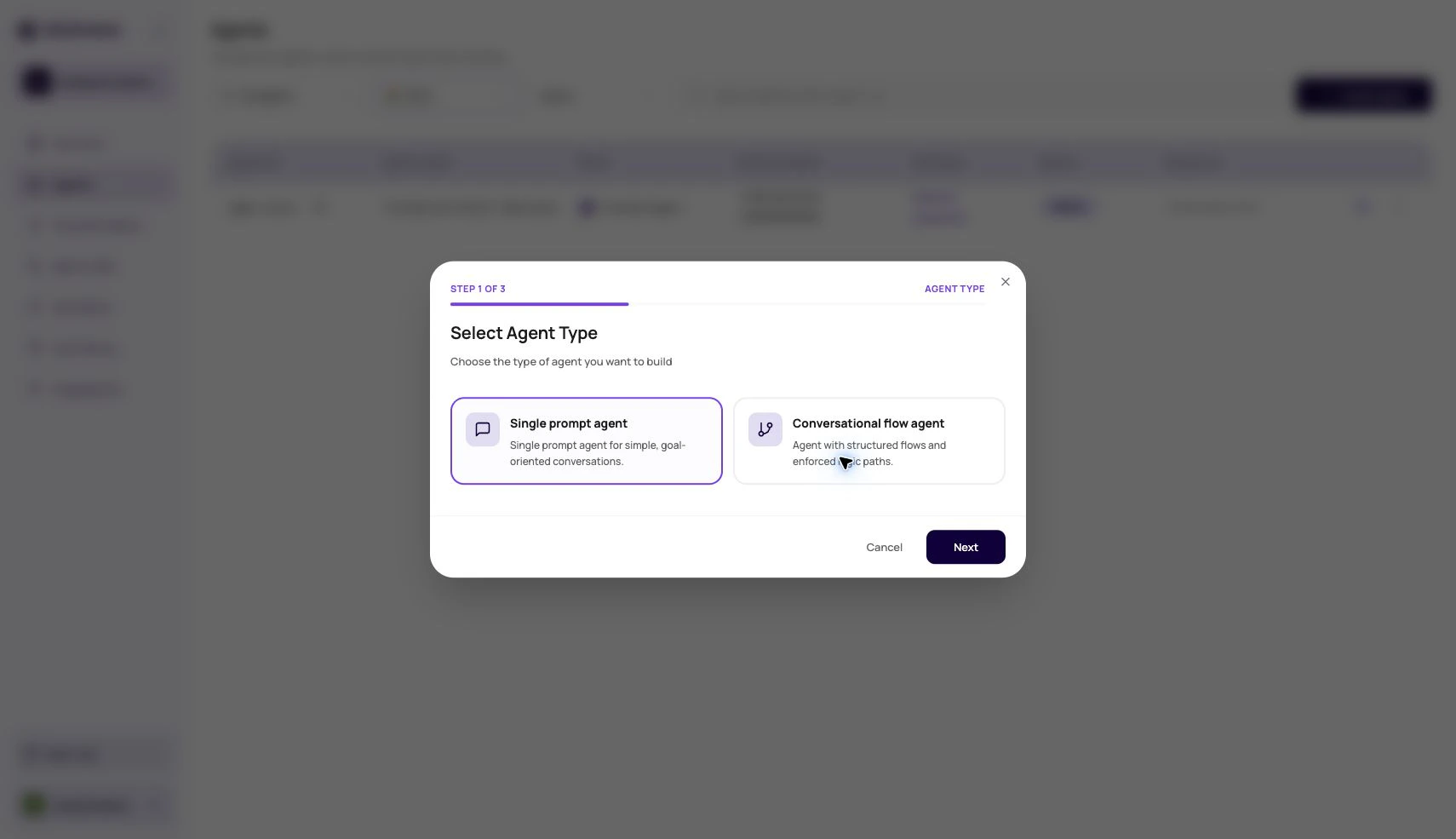
The types of DialNexa agents are Single Prompt Agents, Conversational Flow Agents, and Speech to Speech Agents. Use Single Prompt Agents when one clear prompt can handle the call, use Conversational Flow Agents when the call needs explicit branch-by-branch control, and use Speech to Speech Agents when low turn latency matters more than separate control over transcription and text to speech.
 ## Who This Is For
Use this page before you create or rebuild an agent. It helps product owners, operations teams, and developers decide which agent structure fits the call goal, compliance requirements, latency target, and debugging workflow.
## Types Of DialNexa Agents At A Glance
| Agent type | Best for | How it works | Main tradeoff |
| ------------------------- | -------------------------------------------------------------- | ---------------------------------------------------------------------------------------------------------------------------------------------- | -------------------------------------------------------------------- |
| Single Prompt Agent | Focused calls with one primary goal. | One instruction set guides the whole call. The agent uses the prompt, model, tools, variables, and post-call fields to complete the objective. | Complex branching can become hard to maintain inside one prompt. |
| Conversational Flow Agent | Calls with defined stages, compliance steps, or audited paths. | A visual node canvas controls each state, branch, function, transfer, and ending. | More setup work, and every important path must be designed. |
| Speech to Speech Agent | Latency-sensitive voice calls and web calls. | A realtime speech model listens and speaks directly. DialNexa hides separate transcriber, voice model, and Audio Cache controls. | Less separate control over STT and TTS layers than a cascaded stack. |
## Choose Single Prompt Agents For Focused Calls
A Single Prompt Agent is the fastest way to build a production voice agent when the call has one main outcome. The prompt explains the role, goal, boundaries, call flow, tool usage, and closing behavior.
Good use cases include:
* Appointment reminders
* Payment nudges
* Lead qualification with one simple script
* Feedback collection
* Support intake where the agent collects details and creates a follow-up
Use this type when the call can be tested from one prompt and the expected result can be captured in post-call fields. If the prompt keeps growing into separate stages, move the logic into a Conversational Flow Agent.
## Choose Conversational Flow Agents For Explicit Paths
A Conversational Flow Agent is the right structure when the conversation needs a visual map. Each node can have its own prompt, branch rules, function calls, transfer behavior, and ending.
Use a flow when:
* Compliance requires a specific disclosure at a specific point
* The caller's answer must move to a defined next step
* Different paths need different transfer destinations or handoff context
* Your team needs to review the call path visually
* Debugging requires node-level history instead of prompt-level reasoning
Flow agents are easier to audit than a long prompt, but they require careful path design. Every branch should lead to a useful next node, transfer, or end state.
## Choose Speech To Speech Agents For Realtime Voice
A Speech to Speech Agent uses a realtime speech model instead of a cascaded speech to text, text LLM, and text to speech pipeline. This can reduce turn latency because the model processes audio and returns audio directly.
DialNexa supports Speech to Speech model paths such as OpenAI realtime models and Gemini models where they are enabled for your workspace. Use the dashboard model selector and pricing preview as the source of truth for the models available to your account.
Speech to Speech is a good fit when:
* Callers interrupt often and fast turn taking matters
* You are testing web calls where first audio timing is very visible
* You want to compare OpenAI realtime behavior against Gemini realtime behavior
* The call can accept the realtime model's voice and model constraints
Do not choose Speech to Speech only because it sounds newer. Choose it when the call outcome improves after real tests against the same prompt, route, and caller script.
## How To Decide
Define what the call should accomplish, what result should be stored, and what should happen next.
If the path is mostly linear, start with Single Prompt. If the caller can move through many defined states, start with Conversational Flow.
If you need separate transcriber, TTS, Audio Cache, and fallback STT controls, use a cascaded Single Prompt or Conversational Flow setup. If realtime turn taking is more important, test Speech to Speech.
Use interruptions, silence, wrong-person responses, objections, and missing variables before publishing.
A draft agent does not receive live traffic until you publish a version and assign it to a phone number, workflow, batch call, or web call.
## Common Selection Mistakes
If the prompt contains many numbered branches, transfer paths, and exception rules, the user experience will usually be easier to control in a Conversational Flow Agent.
A simple reminder or survey often works better as a Single Prompt Agent. Avoid node complexity when one clear prompt and post-call fields can do the job.
Keep the prompt, route, caller script, and test conditions the same. Otherwise you are comparing the setup, not the model path.
Publishing creates a version. It does not automatically move every phone number, batch, workflow, or web call to that version.
## Recap
Choose Single Prompt when one instruction set can complete the call. Choose Conversational Flow when the path must be explicit and reviewable. Choose Speech to Speech when realtime turn taking is the main reason to change the stack, and compare OpenAI realtime and Gemini options with the same script before publishing.
## Related Pages
Build one prompt around one clear call objective.
Build explicit call paths with nodes and branches.
Configure OpenAI realtime and Gemini Speech to Speech model paths.
Choose the conversation stack for the selected agent type.
## Who This Is For
Use this page before you create or rebuild an agent. It helps product owners, operations teams, and developers decide which agent structure fits the call goal, compliance requirements, latency target, and debugging workflow.
## Types Of DialNexa Agents At A Glance
| Agent type | Best for | How it works | Main tradeoff |
| ------------------------- | -------------------------------------------------------------- | ---------------------------------------------------------------------------------------------------------------------------------------------- | -------------------------------------------------------------------- |
| Single Prompt Agent | Focused calls with one primary goal. | One instruction set guides the whole call. The agent uses the prompt, model, tools, variables, and post-call fields to complete the objective. | Complex branching can become hard to maintain inside one prompt. |
| Conversational Flow Agent | Calls with defined stages, compliance steps, or audited paths. | A visual node canvas controls each state, branch, function, transfer, and ending. | More setup work, and every important path must be designed. |
| Speech to Speech Agent | Latency-sensitive voice calls and web calls. | A realtime speech model listens and speaks directly. DialNexa hides separate transcriber, voice model, and Audio Cache controls. | Less separate control over STT and TTS layers than a cascaded stack. |
## Choose Single Prompt Agents For Focused Calls
A Single Prompt Agent is the fastest way to build a production voice agent when the call has one main outcome. The prompt explains the role, goal, boundaries, call flow, tool usage, and closing behavior.
Good use cases include:
* Appointment reminders
* Payment nudges
* Lead qualification with one simple script
* Feedback collection
* Support intake where the agent collects details and creates a follow-up
Use this type when the call can be tested from one prompt and the expected result can be captured in post-call fields. If the prompt keeps growing into separate stages, move the logic into a Conversational Flow Agent.
## Choose Conversational Flow Agents For Explicit Paths
A Conversational Flow Agent is the right structure when the conversation needs a visual map. Each node can have its own prompt, branch rules, function calls, transfer behavior, and ending.
Use a flow when:
* Compliance requires a specific disclosure at a specific point
* The caller's answer must move to a defined next step
* Different paths need different transfer destinations or handoff context
* Your team needs to review the call path visually
* Debugging requires node-level history instead of prompt-level reasoning
Flow agents are easier to audit than a long prompt, but they require careful path design. Every branch should lead to a useful next node, transfer, or end state.
## Choose Speech To Speech Agents For Realtime Voice
A Speech to Speech Agent uses a realtime speech model instead of a cascaded speech to text, text LLM, and text to speech pipeline. This can reduce turn latency because the model processes audio and returns audio directly.
DialNexa supports Speech to Speech model paths such as OpenAI realtime models and Gemini models where they are enabled for your workspace. Use the dashboard model selector and pricing preview as the source of truth for the models available to your account.
Speech to Speech is a good fit when:
* Callers interrupt often and fast turn taking matters
* You are testing web calls where first audio timing is very visible
* You want to compare OpenAI realtime behavior against Gemini realtime behavior
* The call can accept the realtime model's voice and model constraints
Do not choose Speech to Speech only because it sounds newer. Choose it when the call outcome improves after real tests against the same prompt, route, and caller script.
## How To Decide
Define what the call should accomplish, what result should be stored, and what should happen next.
If the path is mostly linear, start with Single Prompt. If the caller can move through many defined states, start with Conversational Flow.
If you need separate transcriber, TTS, Audio Cache, and fallback STT controls, use a cascaded Single Prompt or Conversational Flow setup. If realtime turn taking is more important, test Speech to Speech.
Use interruptions, silence, wrong-person responses, objections, and missing variables before publishing.
A draft agent does not receive live traffic until you publish a version and assign it to a phone number, workflow, batch call, or web call.
## Common Selection Mistakes
If the prompt contains many numbered branches, transfer paths, and exception rules, the user experience will usually be easier to control in a Conversational Flow Agent.
A simple reminder or survey often works better as a Single Prompt Agent. Avoid node complexity when one clear prompt and post-call fields can do the job.
Keep the prompt, route, caller script, and test conditions the same. Otherwise you are comparing the setup, not the model path.
Publishing creates a version. It does not automatically move every phone number, batch, workflow, or web call to that version.
## Recap
Choose Single Prompt when one instruction set can complete the call. Choose Conversational Flow when the path must be explicit and reviewable. Choose Speech to Speech when realtime turn taking is the main reason to change the stack, and compare OpenAI realtime and Gemini options with the same script before publishing.
## Related Pages
Build one prompt around one clear call objective.
Build explicit call paths with nodes and branches.
Configure OpenAI realtime and Gemini Speech to Speech model paths.
Choose the conversation stack for the selected agent type.