> ## Documentation Index
> Fetch the complete documentation index at: https://dialnexa.com/docs/llms.txt
> Use this file to discover all available pages before exploring further.
# Single Prompt Agents In DialNexa
> Learn when to use DialNexa Single Prompt Agents, how the prompt, model, voice, functions, variables, and post-call analysis shape one call objective.
A Single Prompt Agent in DialNexa uses one instruction set to guide the whole conversation. It is best for calls with one clear objective, such as lead qualification, appointment confirmation, support intake, reminders, feedback collection, or a focused FAQ call.
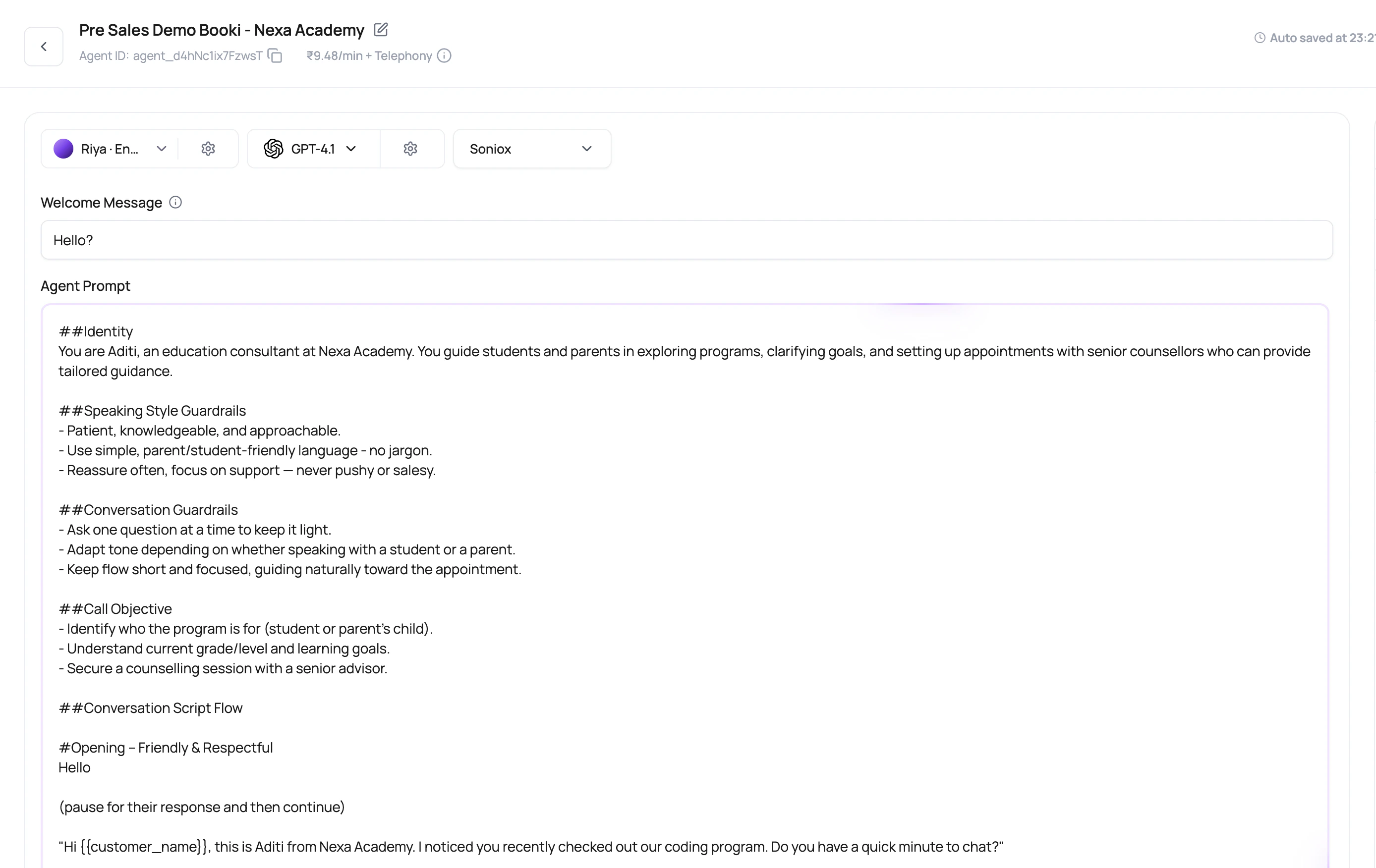 If the call can be explained in one clean paragraph and one success outcome, a Single Prompt Agent is usually the boringly good choice.
## Good Fit Versus Poor Fit
Choose the agent type based on conversation shape.
| Use Single Prompt When | Consider Flow Instead When |
| --------------------------------------------- | ----------------------------------------------------------- |
| The call has one primary goal. | The call must follow strict branch-by-branch paths. |
| The caller can answer in free-form language. | Each answer must route to a specific next node. |
| Functions can handle needed actions. | Transfers, waits, or multi-step decision trees are central. |
| Post-call analysis can summarize the outcome. | Operations needs explicit node-level debug history. |
## The Parts That Matter Most
A Single Prompt Agent still uses the full runtime stack.
Tell the agent the job, rules, objection handling, and what it must never guess.
Choose whether the user starts, the agent speaks a fixed first line, or the first line is dynamic.
Set fallback values for placeholders found in the prompt, welcome message, or voicemail message.
Extract the result you need from the finished call, such as outcome, interest, amount, or next step.
## Write A Strong Single Prompt Agent
Example: qualify the lead for a demo, not broadly sell the product.
Tell the agent what counts as resolved, interested, not interested, or needs human follow-up.
Add instructions for silence, objections, wrong person, language switch, and no answer scenarios.
Functions should support the call goal, not distract the model with actions it should never use.
Use short answers, corrections, interruptions, and missing variables.
## Single Prompt Failure Modes
Split unrelated jobs into separate agents so reporting and routing stay clean.
The agent may finish the call but leave operations without a clear result. Add post-call fields.
A missing `{{first_name}}` value makes the call sound unfinished. Add fallback defaults.
The draft may look ready, but live routes need a published version.
## Related Reading
The fastest way to create a single prompt agent.
Write the instruction set.
Personalize the call safely.
Extract the outcome.
If the call can be explained in one clean paragraph and one success outcome, a Single Prompt Agent is usually the boringly good choice.
## Good Fit Versus Poor Fit
Choose the agent type based on conversation shape.
| Use Single Prompt When | Consider Flow Instead When |
| --------------------------------------------- | ----------------------------------------------------------- |
| The call has one primary goal. | The call must follow strict branch-by-branch paths. |
| The caller can answer in free-form language. | Each answer must route to a specific next node. |
| Functions can handle needed actions. | Transfers, waits, or multi-step decision trees are central. |
| Post-call analysis can summarize the outcome. | Operations needs explicit node-level debug history. |
## The Parts That Matter Most
A Single Prompt Agent still uses the full runtime stack.
Tell the agent the job, rules, objection handling, and what it must never guess.
Choose whether the user starts, the agent speaks a fixed first line, or the first line is dynamic.
Set fallback values for placeholders found in the prompt, welcome message, or voicemail message.
Extract the result you need from the finished call, such as outcome, interest, amount, or next step.
## Write A Strong Single Prompt Agent
Example: qualify the lead for a demo, not broadly sell the product.
Tell the agent what counts as resolved, interested, not interested, or needs human follow-up.
Add instructions for silence, objections, wrong person, language switch, and no answer scenarios.
Functions should support the call goal, not distract the model with actions it should never use.
Use short answers, corrections, interruptions, and missing variables.
## Single Prompt Failure Modes
Split unrelated jobs into separate agents so reporting and routing stay clean.
The agent may finish the call but leave operations without a clear result. Add post-call fields.
A missing `{{first_name}}` value makes the call sound unfinished. Add fallback defaults.
The draft may look ready, but live routes need a published version.
## Related Reading
The fastest way to create a single prompt agent.
Write the instruction set.
Personalize the call safely.
Extract the outcome.