> ## Documentation Index
> Fetch the complete documentation index at: https://dialnexa.com/docs/llms.txt
> Use this file to discover all available pages before exploring further.
# DialNexa Agents Overview
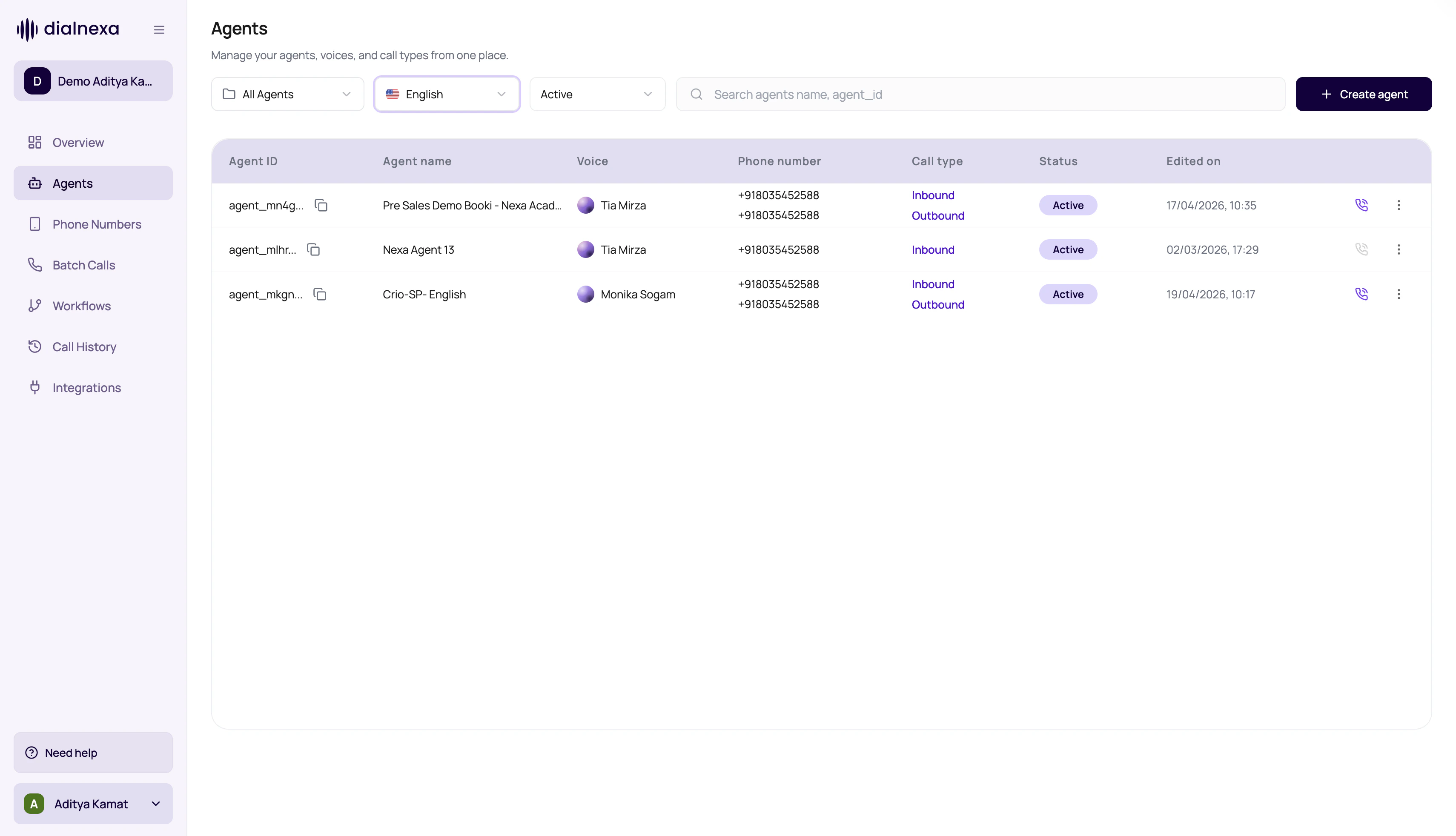
> Understand the DialNexa Agents tab, including agent lists, folders, language filters, status filters, row actions, templates, test calls, published versions, and live routing readiness.
The Agents tab is where you manage the people your callers will speak to. Each agent contains the conversation behavior, language, model, voice, transcriber, functions, call settings, post-call fields, webhooks, and published version that live traffic can use.
 Treat an agent like a hire for a very specific job. A booking agent, support intake agent, and payment reminder agent should not be the same person with a different name tag.
## Start By Choosing The Agent Type
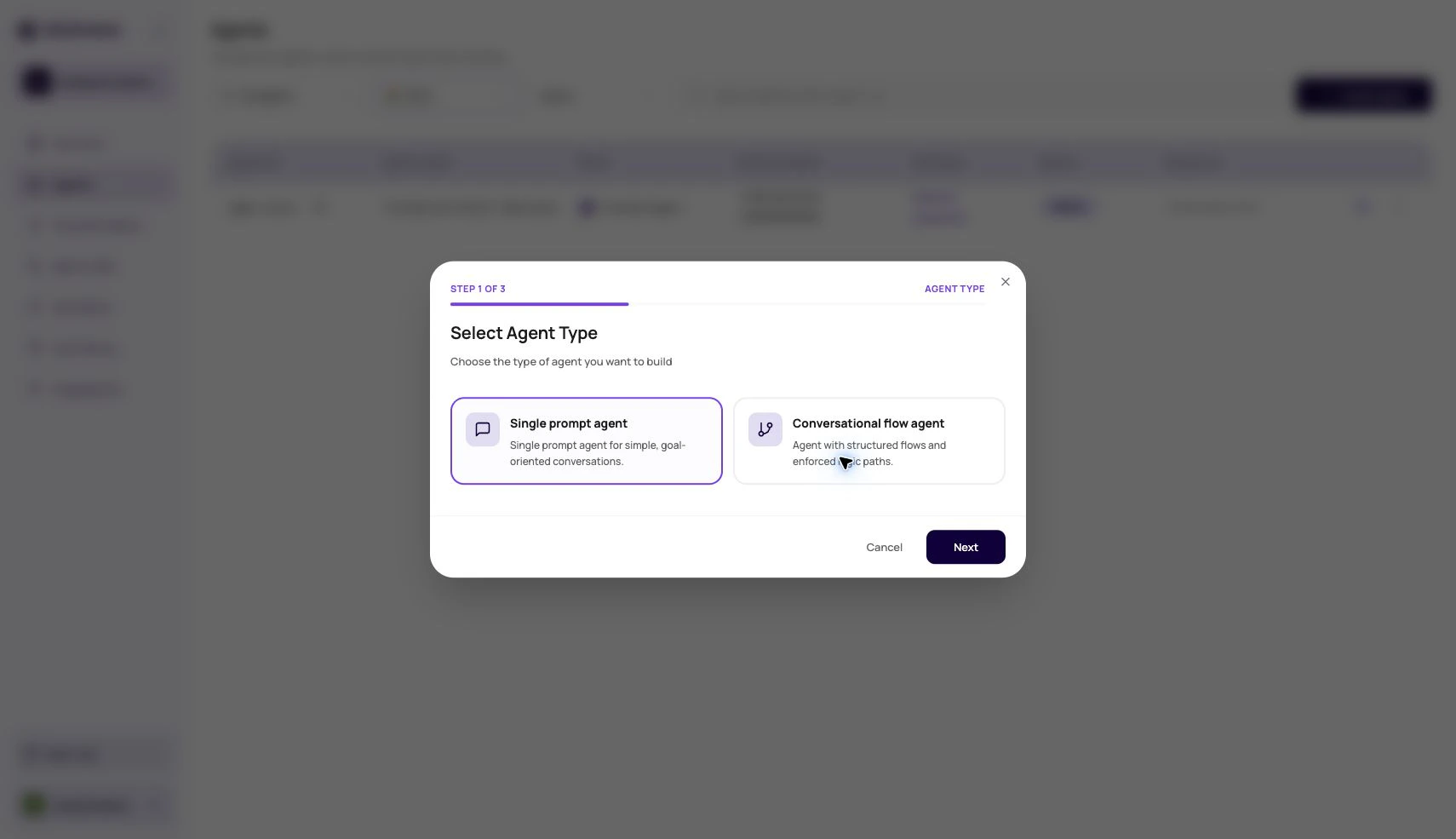
The most important early decision is the agent type. Choose Single Prompt for one focused objective, Conversational Flow for explicit node-based paths, and Speech to Speech for realtime voice calls where low turn latency matters.
Compare Single Prompt, Conversational Flow, and Speech to Speech before building.
Use one prompt for one clear call objective.
Use OpenAI realtime or Gemini model paths where enabled.
## What The Agents List Owns
| Area | What users can do |
| --------------- | -------------------------------------------------------------------------------------- |
| Search | Search by agent name and agent id. Some links can also prefill search through the URL. |
| Language filter | Filter agents by the language saved on the current version. |
| Status filter | Show all, active, or inactive agents based on publish and availability state. |
| Folders | Create folders, rename folders, delete folders, and move agents between folders. |
| Agent rows | Open an agent, inspect version context, and use row actions. |
| Create agent | Start from Agent Builder, a blank agent, or a template where available. |
## Agent Builder
Agent Builder is the guided create path for a draft Single Prompt Agent. It asks for business context, target customer, call objective, success criteria, information to collect, objections, tone, and extra context. DialNexa then drafts the prompt, welcome message, post-call fields, dynamic variables, and technical profile for review.
Use it when you want a strong first draft from structured answers. Start manually when you need a Conversational Flow Agent, exact compliance language, or a known production prompt.
## Row Actions
Starts a phone test using the latest published version. If no published version exists, publish before testing from the list.
Creates a copy so users can experiment without changing the original agent.
Exports an agent configuration for reuse or backup.
Moves the agent into a folder for use-case, customer, team, or environment organization.
## From Draft To Live Traffic
Choose a blank agent, a template, or an imported configuration.
Set voice, language, LLM model, transcriber, and voice model.
Add prompt, welcome behavior, variables, functions, and knowledge references where needed.
Add custom functions, dashboard integrations, workflow actions, or webhooks only when the call outcome needs them.
Configure speech settings, call settings, post-call analysis, fallback behavior, and webhooks.
Published versions are what live routes should use.
Attach the version to a phone number, batch call, workflow call node, web call, or test call.
## Why A Test Call May Not Start
The list action looks for a published version first. Publish the draft before using row-level test call.
The modal validates country code and expected digit length. Remove formatting and check the selected country.
If the agent prompt or flow expects variables, provide test values so the call does not sound incomplete.
Conversational flow transfer destinations can require valid dynamic values before the test call starts.
KYC, wallet, or outbound readiness can block some outbound behavior. Follow the readiness prompt in the dashboard.
## What Not To Change From The List
The Agents list is for navigation and operations. Change detailed behavior inside the agent builder.
| Need | Open this page |
| ----------------------------------------------------------- | ----------------------------------- |
| Prompt, welcome message, or model behavior. | Agent builder. |
| Voice, language, transcriber, or voice model. | Agent builder top selectors. |
| Speech timing, Audio Cache, or Hinglish Map. | Agent Settings, Speech Settings. |
| Silence timeout, duration, voicemail, or transfer behavior. | Agent Settings, Call Settings. |
| Extraction fields. | Agent Settings, Post-call Analysis. |
## Related Reading
Choose the right agent structure before configuring the stack.
Create a draft single prompt agent from a guided brief.
Choose the conversation stack.
Use one prompt for one clear objective.
Use explicit branching for scripted calls.
Compare realtime model paths for latency-sensitive calls.
Place safe test calls.
Connect agent outcomes to WhatsApp, email, workflows, and external systems.
Treat an agent like a hire for a very specific job. A booking agent, support intake agent, and payment reminder agent should not be the same person with a different name tag.
## Start By Choosing The Agent Type
The most important early decision is the agent type. Choose Single Prompt for one focused objective, Conversational Flow for explicit node-based paths, and Speech to Speech for realtime voice calls where low turn latency matters.
Compare Single Prompt, Conversational Flow, and Speech to Speech before building.
Use one prompt for one clear call objective.
Use OpenAI realtime or Gemini model paths where enabled.
## What The Agents List Owns
| Area | What users can do |
| --------------- | -------------------------------------------------------------------------------------- |
| Search | Search by agent name and agent id. Some links can also prefill search through the URL. |
| Language filter | Filter agents by the language saved on the current version. |
| Status filter | Show all, active, or inactive agents based on publish and availability state. |
| Folders | Create folders, rename folders, delete folders, and move agents between folders. |
| Agent rows | Open an agent, inspect version context, and use row actions. |
| Create agent | Start from Agent Builder, a blank agent, or a template where available. |
## Agent Builder
Agent Builder is the guided create path for a draft Single Prompt Agent. It asks for business context, target customer, call objective, success criteria, information to collect, objections, tone, and extra context. DialNexa then drafts the prompt, welcome message, post-call fields, dynamic variables, and technical profile for review.
Use it when you want a strong first draft from structured answers. Start manually when you need a Conversational Flow Agent, exact compliance language, or a known production prompt.
## Row Actions
Starts a phone test using the latest published version. If no published version exists, publish before testing from the list.
Creates a copy so users can experiment without changing the original agent.
Exports an agent configuration for reuse or backup.
Moves the agent into a folder for use-case, customer, team, or environment organization.
## From Draft To Live Traffic
Choose a blank agent, a template, or an imported configuration.
Set voice, language, LLM model, transcriber, and voice model.
Add prompt, welcome behavior, variables, functions, and knowledge references where needed.
Add custom functions, dashboard integrations, workflow actions, or webhooks only when the call outcome needs them.
Configure speech settings, call settings, post-call analysis, fallback behavior, and webhooks.
Published versions are what live routes should use.
Attach the version to a phone number, batch call, workflow call node, web call, or test call.
## Why A Test Call May Not Start
The list action looks for a published version first. Publish the draft before using row-level test call.
The modal validates country code and expected digit length. Remove formatting and check the selected country.
If the agent prompt or flow expects variables, provide test values so the call does not sound incomplete.
Conversational flow transfer destinations can require valid dynamic values before the test call starts.
KYC, wallet, or outbound readiness can block some outbound behavior. Follow the readiness prompt in the dashboard.
## What Not To Change From The List
The Agents list is for navigation and operations. Change detailed behavior inside the agent builder.
| Need | Open this page |
| ----------------------------------------------------------- | ----------------------------------- |
| Prompt, welcome message, or model behavior. | Agent builder. |
| Voice, language, transcriber, or voice model. | Agent builder top selectors. |
| Speech timing, Audio Cache, or Hinglish Map. | Agent Settings, Speech Settings. |
| Silence timeout, duration, voicemail, or transfer behavior. | Agent Settings, Call Settings. |
| Extraction fields. | Agent Settings, Post-call Analysis. |
## Related Reading
Choose the right agent structure before configuring the stack.
Create a draft single prompt agent from a guided brief.
Choose the conversation stack.
Use one prompt for one clear objective.
Use explicit branching for scripted calls.
Compare realtime model paths for latency-sensitive calls.
Place safe test calls.
Connect agent outcomes to WhatsApp, email, workflows, and external systems.