> ## Documentation Index
> Fetch the complete documentation index at: https://dialnexa.com/docs/llms.txt
> Use this file to discover all available pages before exploring further.
# Build IVR Agents In DialNexa
> Build DialNexa IVR Agents with DTMF menus, digit collection, agent handoffs, prompt audio, timing controls, and publish validation.
DialNexa IVR Agents route callers with keypad input instead of an LLM conversation. Build a DTMF menu, collect digits when needed, connect the caller to a published voice agent, or end the call. This agent type is available only to workspaces in the IVR pilot.
 ## Who Should Use DialNexa IVR Agents
Use an IVR Agent when the first part of a call should be predictable and driven by key presses. Common examples include department routing, language selection, account-number collection, and a menu that hands the caller to a conversational agent.
Do not use an IVR Agent when callers need open-ended conversation before routing. IVR Agents do not use an LLM, transcriber, knowledge base, functions, or fallback model while the caller is in the IVR menu.
## Before You Begin
* Confirm that the IVR agent type appears in the Create Agent dialog for your workspace.
* Publish every non-IVR agent that the menu should connect to.
* Write static menu prompts. IVR prompts cannot contain dynamic variables such as `{{customer_name}}`.
* Plan a valid path from Start to a Menu node and from each key option to a real node.
* Use a phone call for testing. Web tests are not available for IVR Agents.
## IVR Node Types
| Node | What it does | Required configuration |
| ---------------- | ----------------------------------------------------------- | ----------------------------------------------------------------------------------------------- |
| Menu | Speaks a static prompt and waits for one DTMF key. | Prompt text, one or more key routes using `0` to `9`, `*`, or `#`, and valid destination nodes. |
| Collect Digits | Collects a sequence such as an account or extension number. | Minimum and maximum length, storage key, terminator when used, and next node. |
| Connect To Agent | Hands the same call leg to another DialNexa agent. | A published non-IVR agent from the same workspace. |
| Hang Up | Ends the call after an optional static farewell. | Optional farewell text. |
The Connect To Agent node uses the target agent's current published version when the call reaches the node. It does not create a second phone leg. The target agent can use its own call-transfer settings after the handoff, but the IVR menu itself does not transfer directly to a human number.
## Build An IVR Menu
Open **Agents**, select **Create Agent**, and choose **IVR Agent**. If the option is missing, the workspace is not currently in the IVR pilot.
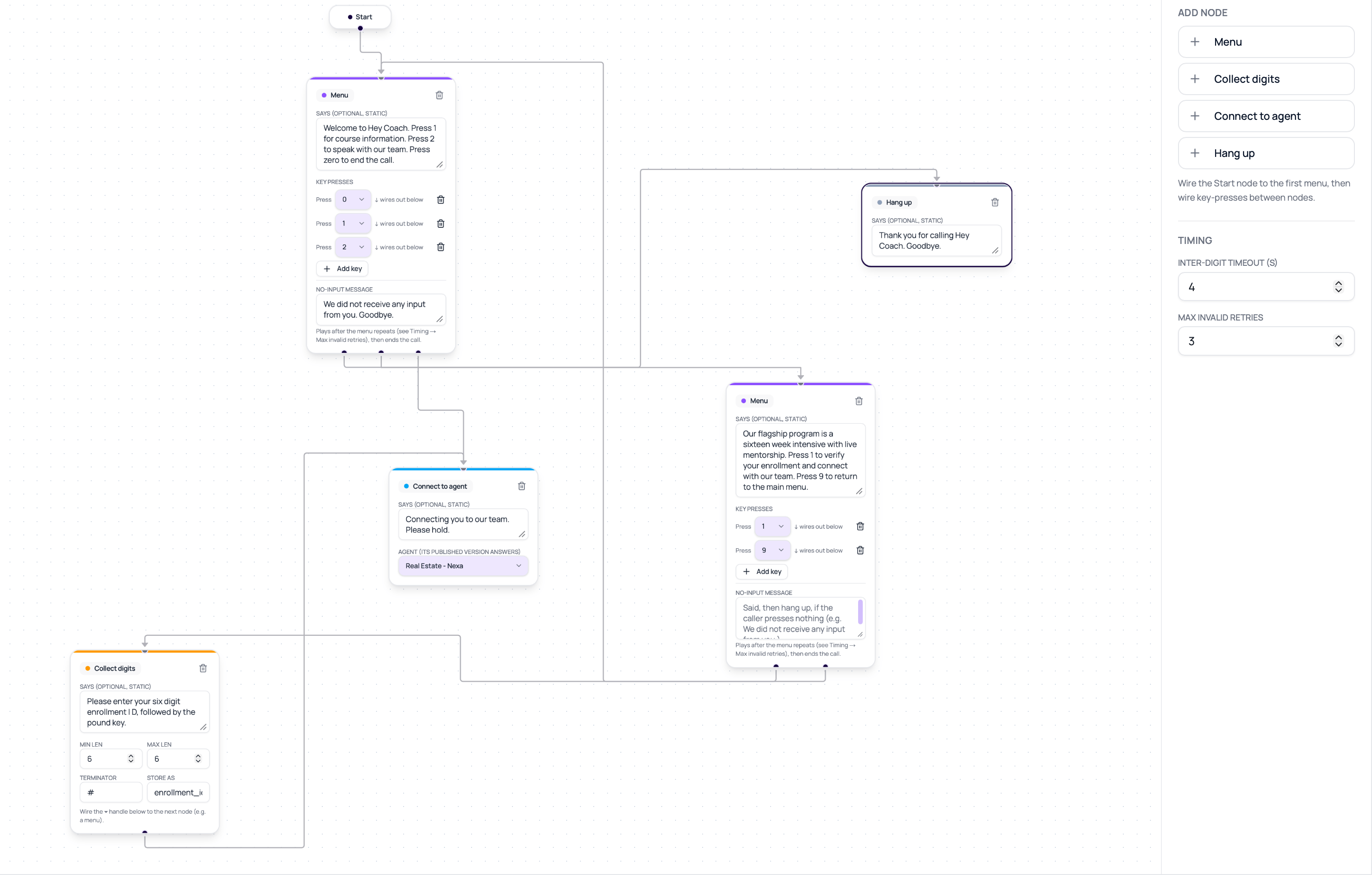
Open the full-screen IVR editor and connect the Start node to the first Menu node. Start must lead to a valid entry node before publishing.
Write a static prompt, then map each announced key to a Menu, Collect Digits, Connect To Agent, or Hang Up node. Do not announce a key that has no connected destination.
Set the minimum and maximum digit count, the variable name used to store the result, and an optional terminator. The default terminator is `#`.
In a Connect To Agent node, select a published non-IVR agent in the same workspace. This node is terminal for the IVR graph because control moves to the selected agent.
The default inter-digit timeout is 3 seconds, and the default maximum invalid attempts is 3. Tune these values only after testing with real callers.
Draft changes save automatically while the editor is open. Use **Save** or **Done** before leaving, then publish through the normal agent publish action.
## Publish Requirements
Publishing validates the complete graph and renders prompt audio before the version becomes available. Publish fails when any of these conditions apply:
* Start does not lead to a valid entry node.
* An edge points to a missing node.
* A menu key has no valid destination.
* A Collect Digits node has invalid length or routing settings.
* A Connect To Agent node points to an unavailable, unpublished, or IVR agent.
* Prompt audio cannot be rendered and cached.
* Static prompt text contains a dynamic variable placeholder.
Published IVR versions are view-only. Create or edit a draft to change the graph.
## Verify The IVR Agent
Assign the published version to a phone route and place a test call. Test every key, invalid input, no-input behavior, digit terminator, handoff, and hang-up path. After an agent handoff, confirm the target agent uses its current published behavior.
## Billing Behavior
IVR prompt playback and keypad routing do not start the conversational AI stack. AI stack charges begin only after the IVR hands the call to a conversational agent. Telephony charges can still apply throughout the call. Use the dashboard billing breakdown as the source of truth for the workspace plan and call route.
## Troubleshooting
IVR Agents are currently limited to pilot workspaces. Contact DialNexa support to confirm availability.
Check every Menu and Hang Up prompt. Remove dynamic variables, confirm the selected voice is available, and publish again.
Confirm the Connect To Agent node selects a non-IVR agent in the same workspace and that the target has a published version.
Compare the spoken prompt with the configured DTMF edges. Every announced key must connect to an existing node.
## Related Pages
Compare IVR with conversational agent types.
Manage drafts and published versions.
Assign a published agent to a phone route.
Review the result of each test call.
## Who Should Use DialNexa IVR Agents
Use an IVR Agent when the first part of a call should be predictable and driven by key presses. Common examples include department routing, language selection, account-number collection, and a menu that hands the caller to a conversational agent.
Do not use an IVR Agent when callers need open-ended conversation before routing. IVR Agents do not use an LLM, transcriber, knowledge base, functions, or fallback model while the caller is in the IVR menu.
## Before You Begin
* Confirm that the IVR agent type appears in the Create Agent dialog for your workspace.
* Publish every non-IVR agent that the menu should connect to.
* Write static menu prompts. IVR prompts cannot contain dynamic variables such as `{{customer_name}}`.
* Plan a valid path from Start to a Menu node and from each key option to a real node.
* Use a phone call for testing. Web tests are not available for IVR Agents.
## IVR Node Types
| Node | What it does | Required configuration |
| ---------------- | ----------------------------------------------------------- | ----------------------------------------------------------------------------------------------- |
| Menu | Speaks a static prompt and waits for one DTMF key. | Prompt text, one or more key routes using `0` to `9`, `*`, or `#`, and valid destination nodes. |
| Collect Digits | Collects a sequence such as an account or extension number. | Minimum and maximum length, storage key, terminator when used, and next node. |
| Connect To Agent | Hands the same call leg to another DialNexa agent. | A published non-IVR agent from the same workspace. |
| Hang Up | Ends the call after an optional static farewell. | Optional farewell text. |
The Connect To Agent node uses the target agent's current published version when the call reaches the node. It does not create a second phone leg. The target agent can use its own call-transfer settings after the handoff, but the IVR menu itself does not transfer directly to a human number.
## Build An IVR Menu
Open **Agents**, select **Create Agent**, and choose **IVR Agent**. If the option is missing, the workspace is not currently in the IVR pilot.
Open the full-screen IVR editor and connect the Start node to the first Menu node. Start must lead to a valid entry node before publishing.
Write a static prompt, then map each announced key to a Menu, Collect Digits, Connect To Agent, or Hang Up node. Do not announce a key that has no connected destination.
Set the minimum and maximum digit count, the variable name used to store the result, and an optional terminator. The default terminator is `#`.
In a Connect To Agent node, select a published non-IVR agent in the same workspace. This node is terminal for the IVR graph because control moves to the selected agent.
The default inter-digit timeout is 3 seconds, and the default maximum invalid attempts is 3. Tune these values only after testing with real callers.
Draft changes save automatically while the editor is open. Use **Save** or **Done** before leaving, then publish through the normal agent publish action.
## Publish Requirements
Publishing validates the complete graph and renders prompt audio before the version becomes available. Publish fails when any of these conditions apply:
* Start does not lead to a valid entry node.
* An edge points to a missing node.
* A menu key has no valid destination.
* A Collect Digits node has invalid length or routing settings.
* A Connect To Agent node points to an unavailable, unpublished, or IVR agent.
* Prompt audio cannot be rendered and cached.
* Static prompt text contains a dynamic variable placeholder.
Published IVR versions are view-only. Create or edit a draft to change the graph.
## Verify The IVR Agent
Assign the published version to a phone route and place a test call. Test every key, invalid input, no-input behavior, digit terminator, handoff, and hang-up path. After an agent handoff, confirm the target agent uses its current published behavior.
## Billing Behavior
IVR prompt playback and keypad routing do not start the conversational AI stack. AI stack charges begin only after the IVR hands the call to a conversational agent. Telephony charges can still apply throughout the call. Use the dashboard billing breakdown as the source of truth for the workspace plan and call route.
## Troubleshooting
IVR Agents are currently limited to pilot workspaces. Contact DialNexa support to confirm availability.
Check every Menu and Hang Up prompt. Remove dynamic variables, confirm the selected voice is available, and publish again.
Confirm the Connect To Agent node selects a non-IVR agent in the same workspace and that the target has a published version.
Compare the spoken prompt with the configured DTMF edges. Every announced key must connect to an existing node.
## Related Pages
Compare IVR with conversational agent types.
Manage drafts and published versions.
Assign a published agent to a phone route.
Review the result of each test call.