> ## Documentation Index
> Fetch the complete documentation index at: https://dialnexa.com/docs/llms.txt
> Use this file to discover all available pages before exploring further.
# DialNexa Speech Settings
> Tune DialNexa speech settings for Response Eagerness, Audio Cache, Denoising Mode, Hinglish Map, transcriber behavior, and voice latency.
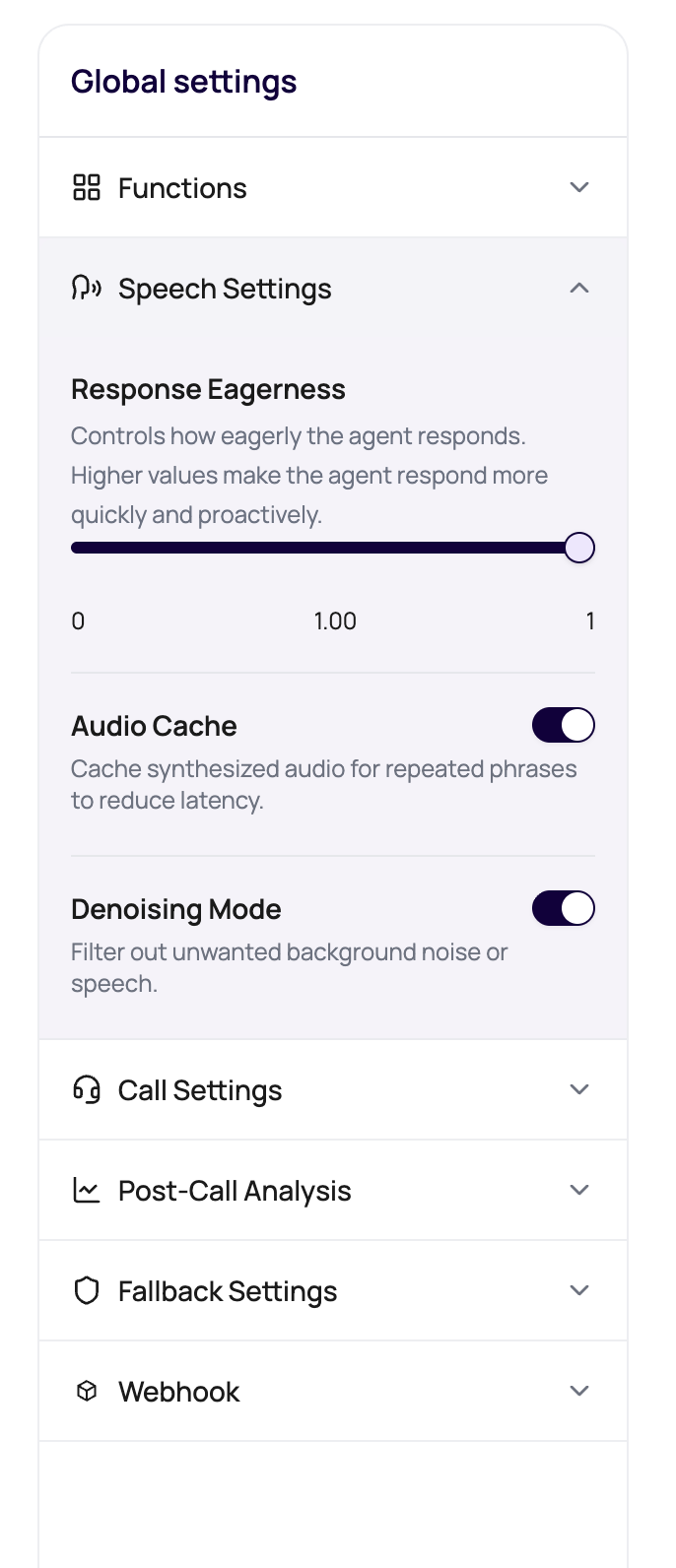
DialNexa Speech Settings control how an agent listens and speaks during a live call. The visible controls are intentionally focused: Response Eagerness for supported Soniox paths, Audio Cache for repeated speech, Denoising Mode for noisy audio, and Hinglish Map for Hindi-English wording.
 Speech settings are where milliseconds, noise, and phrasing argue quietly. Let them argue in test calls, not during your biggest campaign.
## Visible Controls
| Control | When it appears | What it changes |
| ------------------ | -------------------------------------------- | ------------------------------------------------------------------------------------ |
| Response Eagerness | When the selected transcriber is Soniox. | How patient or eager the agent is before replying to caller speech. |
| Audio Cache | Speech Settings for the agent version. | Whether repeated synthesized audio can be reused for faster playback. |
| Denoising Mode | Speech Settings for the agent version. | Whether background noise cleanup is applied. |
| Hinglish Map | When the selected language is Hindi-English. | Formal Hindi word substitutions used to make Hindi-English calls sound more natural. |
## Response Eagerness
Response Eagerness runs from patient to eager. It is not a quality slider. It is a timing choice.
| Direction | Caller experience | Use when |
| ------------ | ------------------------------------------ | ------------------------------------------------------------------------------------------- |
| More patient | Agent waits longer before responding. | Callers pause, think aloud, speak in longer sentences, or switch between Hindi and English. |
| More eager | Agent replies sooner after shorter pauses. | Callers answer briefly and the script benefits from quick back-and-forth. |
If the agent interrupts callers, do not raise LLM temperature and hope for manners. Check transcript boundaries, greeting length, and Response Eagerness first.
## Audio Cache
Audio Cache helps repeated text-to-speech output start faster. DialNexa tracks cache lookups, hits, misses, and new cache entries in call evidence when data is available.
| Good candidate | Why it works |
| ------------------------ | -------------------------------------------------- |
| Fixed welcome message. | Same text and same voice configuration repeat. |
| Compliance disclosure. | Usually identical across many calls. |
| Short confirmation line. | Repeats often and is heard immediately by callers. |
| Poor candidate | Why it misses |
| ------------------------------------------------ | ------------------------------------------------------- |
| `Hi {{first_name}}, your payment is {{amount}}.` | Variables change the generated text. |
| Long model-generated replies. | The model can say the same idea with different wording. |
| Fresh external API responses. | Data changes from call to call. |
## Denoising Mode
Denoising Mode can help with background noise, but it should be tested with the actual phone path. Noise cleanup can improve recognition, but aggressive cleanup can also damage speech details.
Current outbound call processing keeps server-side denoising off unless DialNexa enables it for the route. Use recordings and transcripts to confirm whether a specific call path is receiving noise cleanup.
Open Call History, play the recording, and identify noise, echo, clipping, silence, or distance from microphone.
Keep transcriber, voice, prompt, and phone route the same for the next test.
Use the same caller, route, and script if possible.
Keep denoising only if it improves recognition without making speech sound unnatural.
## Hinglish Map
Hinglish Map appears for Hindi-English setup. Use it when the agent uses formal Hindi words that callers would not use in a real conversation.
| Add a mapping when | Avoid mapping when |
| ------------------------------------------------------------------- | -------------------------------------------------------------------------- |
| Callers consistently use a simpler mixed-language phrase. | The original term is required for legal, medical, or compliance precision. |
| The replacement is shorter and easier to understand over the phone. | The replacement could confuse post-call reporting. |
| You verified the phrase in recordings or real user language. | You are guessing from written Hindi without listening to calls. |
## Troubleshoot By Symptom
Use a more patient Response Eagerness setting where available, shorten the welcome message, and inspect live transcript boundaries.
Check whether the text repeats exactly. Names, amounts, dates, and model rewording create new phrases.
Compare recording and transcript, try Denoising Mode, then compare transcribers through the same route.
Use Hinglish Map, add prompt examples, and test the selected voice on mixed-language phrases.
## Related Reading
Understand transcribers and transcript evidence.
Tune voices and Audio Cache.
Diagnose response timing.
Read cache metrics after calls.
Speech settings are where milliseconds, noise, and phrasing argue quietly. Let them argue in test calls, not during your biggest campaign.
## Visible Controls
| Control | When it appears | What it changes |
| ------------------ | -------------------------------------------- | ------------------------------------------------------------------------------------ |
| Response Eagerness | When the selected transcriber is Soniox. | How patient or eager the agent is before replying to caller speech. |
| Audio Cache | Speech Settings for the agent version. | Whether repeated synthesized audio can be reused for faster playback. |
| Denoising Mode | Speech Settings for the agent version. | Whether background noise cleanup is applied. |
| Hinglish Map | When the selected language is Hindi-English. | Formal Hindi word substitutions used to make Hindi-English calls sound more natural. |
## Response Eagerness
Response Eagerness runs from patient to eager. It is not a quality slider. It is a timing choice.
| Direction | Caller experience | Use when |
| ------------ | ------------------------------------------ | ------------------------------------------------------------------------------------------- |
| More patient | Agent waits longer before responding. | Callers pause, think aloud, speak in longer sentences, or switch between Hindi and English. |
| More eager | Agent replies sooner after shorter pauses. | Callers answer briefly and the script benefits from quick back-and-forth. |
If the agent interrupts callers, do not raise LLM temperature and hope for manners. Check transcript boundaries, greeting length, and Response Eagerness first.
## Audio Cache
Audio Cache helps repeated text-to-speech output start faster. DialNexa tracks cache lookups, hits, misses, and new cache entries in call evidence when data is available.
| Good candidate | Why it works |
| ------------------------ | -------------------------------------------------- |
| Fixed welcome message. | Same text and same voice configuration repeat. |
| Compliance disclosure. | Usually identical across many calls. |
| Short confirmation line. | Repeats often and is heard immediately by callers. |
| Poor candidate | Why it misses |
| ------------------------------------------------ | ------------------------------------------------------- |
| `Hi {{first_name}}, your payment is {{amount}}.` | Variables change the generated text. |
| Long model-generated replies. | The model can say the same idea with different wording. |
| Fresh external API responses. | Data changes from call to call. |
## Denoising Mode
Denoising Mode can help with background noise, but it should be tested with the actual phone path. Noise cleanup can improve recognition, but aggressive cleanup can also damage speech details.
Current outbound call processing keeps server-side denoising off unless DialNexa enables it for the route. Use recordings and transcripts to confirm whether a specific call path is receiving noise cleanup.
Open Call History, play the recording, and identify noise, echo, clipping, silence, or distance from microphone.
Keep transcriber, voice, prompt, and phone route the same for the next test.
Use the same caller, route, and script if possible.
Keep denoising only if it improves recognition without making speech sound unnatural.
## Hinglish Map
Hinglish Map appears for Hindi-English setup. Use it when the agent uses formal Hindi words that callers would not use in a real conversation.
| Add a mapping when | Avoid mapping when |
| ------------------------------------------------------------------- | -------------------------------------------------------------------------- |
| Callers consistently use a simpler mixed-language phrase. | The original term is required for legal, medical, or compliance precision. |
| The replacement is shorter and easier to understand over the phone. | The replacement could confuse post-call reporting. |
| You verified the phrase in recordings or real user language. | You are guessing from written Hindi without listening to calls. |
## Troubleshoot By Symptom
Use a more patient Response Eagerness setting where available, shorten the welcome message, and inspect live transcript boundaries.
Check whether the text repeats exactly. Names, amounts, dates, and model rewording create new phrases.
Compare recording and transcript, try Denoising Mode, then compare transcribers through the same route.
Use Hinglish Map, add prompt examples, and test the selected voice on mixed-language phrases.
## Related Reading
Understand transcribers and transcript evidence.
Tune voices and Audio Cache.
Diagnose response timing.
Read cache metrics after calls.