> ## Documentation Index
> Fetch the complete documentation index at: https://dialnexa.com/docs/llms.txt
> Use this file to discover all available pages before exploring further.
# DialNexa Agent Functions
> Understand DialNexa agent functions such as End Call, calendar booking, custom API functions, function descriptions, and version-specific tool behavior.
DialNexa agent functions are tools the agent can use during a live conversation. Use them when the caller expects the agent to do something, not only say something: end the call, book time, check or update data, or call your own API.
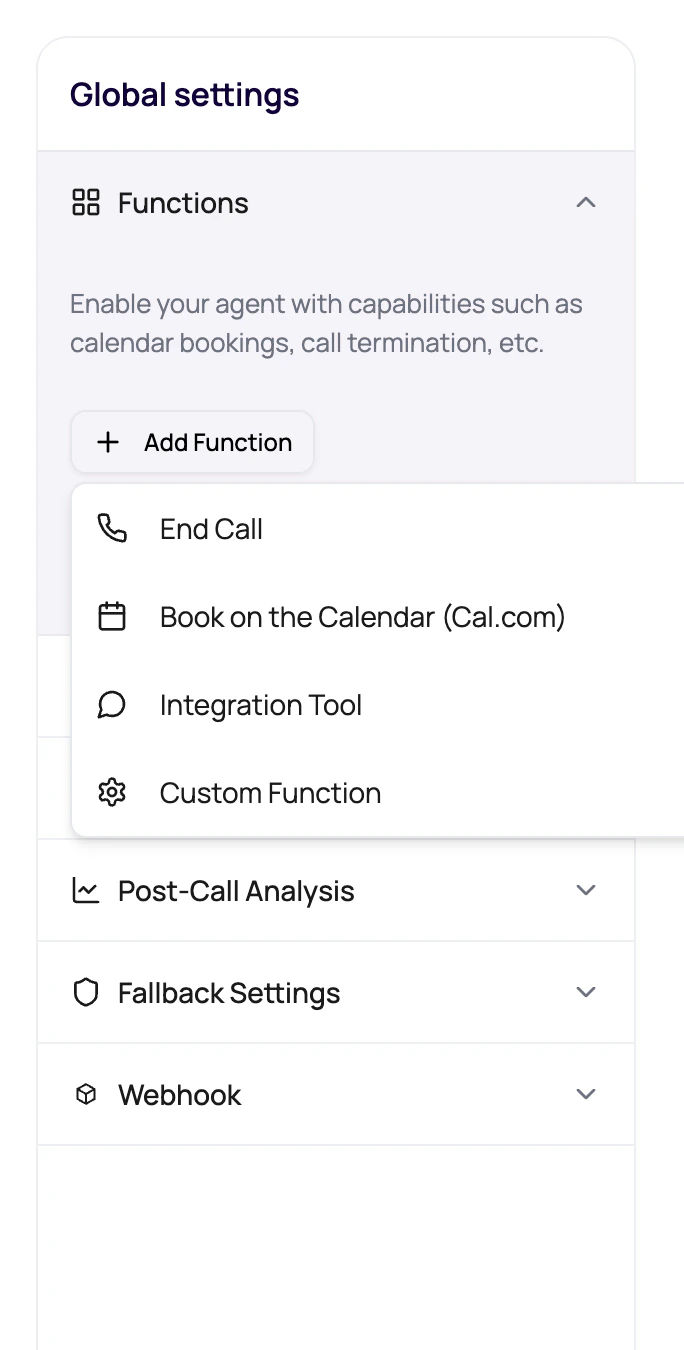 Give the agent tools like you would give a person tools: only the ones needed for the job, with labels that make misuse unlikely.
## Function Types In The Builder
The visible function menu includes production actions users can configure.
| Function | Typical use |
| -------------------- | ------------------------------------------------------------------------------------------------------- |
| End Call | Let the model end the call when the goal is complete or the caller should no longer continue. |
| Book on the Calendar | Create an appointment using configured calendar credentials and event settings. |
| Custom Function | Call an external API with method, endpoint, headers, query params, JSON schema, and response variables. |
If the action is a dashboard-managed provider such as WhatsApp or email, also read [using integrations in agents](/dashboard-integrations/using-integrations-in-agents). If the action should run after a workflow branch rather than during the live call, use [workflow Application nodes](/workflows/application-nodes).
## Function Descriptions Matter
The model relies on descriptions to decide when to call a function.
Use a short function display name that describes the action.
Write a description that tells the agent the exact moment the tool is appropriate.
Use dynamic variables or schema fields for required arguments.
Custom functions can use a holding message when the API takes time.
## Add A Function Safely
Pick built-in function or custom function based on the job.
Tell the model when to use it and what outcome it creates.
Add credentials, endpoint fields, event type, timezone, or API schema as needed.
Ask the caller something that should trigger the function and confirm the result.
Check transcript and function-related evidence after the call.
## Function Mistakes
The dashboard rejects duplicate function names. Use clear unique names.
The model may call the tool too early, too late, or never.
A working API can still create awkward silence. Use timeout and holding messages wisely.
Check version state before assuming an edit changed live behavior.
## Related Reading
Configure external API calls.
Extract results after tools run.
Trigger tools in realistic calls.
Connect provider actions when the agent needs a managed integration.
Give the agent tools like you would give a person tools: only the ones needed for the job, with labels that make misuse unlikely.
## Function Types In The Builder
The visible function menu includes production actions users can configure.
| Function | Typical use |
| -------------------- | ------------------------------------------------------------------------------------------------------- |
| End Call | Let the model end the call when the goal is complete or the caller should no longer continue. |
| Book on the Calendar | Create an appointment using configured calendar credentials and event settings. |
| Custom Function | Call an external API with method, endpoint, headers, query params, JSON schema, and response variables. |
If the action is a dashboard-managed provider such as WhatsApp or email, also read [using integrations in agents](/dashboard-integrations/using-integrations-in-agents). If the action should run after a workflow branch rather than during the live call, use [workflow Application nodes](/workflows/application-nodes).
## Function Descriptions Matter
The model relies on descriptions to decide when to call a function.
Use a short function display name that describes the action.
Write a description that tells the agent the exact moment the tool is appropriate.
Use dynamic variables or schema fields for required arguments.
Custom functions can use a holding message when the API takes time.
## Add A Function Safely
Pick built-in function or custom function based on the job.
Tell the model when to use it and what outcome it creates.
Add credentials, endpoint fields, event type, timezone, or API schema as needed.
Ask the caller something that should trigger the function and confirm the result.
Check transcript and function-related evidence after the call.
## Function Mistakes
The dashboard rejects duplicate function names. Use clear unique names.
The model may call the tool too early, too late, or never.
A working API can still create awkward silence. Use timeout and holding messages wisely.
Check version state before assuming an edit changed live behavior.
## Related Reading
Configure external API calls.
Extract results after tools run.
Trigger tools in realistic calls.
Connect provider actions when the agent needs a managed integration.