> ## Documentation Index
> Fetch the complete documentation index at: https://dialnexa.com/docs/llms.txt
> Use this file to discover all available pages before exploring further.
# DialNexa Custom Functions
> Configure DialNexa custom functions with API endpoint, HTTP method, token, timeout, headers, query parameters, response variables, JSON schema, and speech behavior.
DialNexa custom functions let an agent call your external API during a conversation. Use a custom function when the agent needs live data or needs to create something in a system that is not already handled by a dashboard integration.
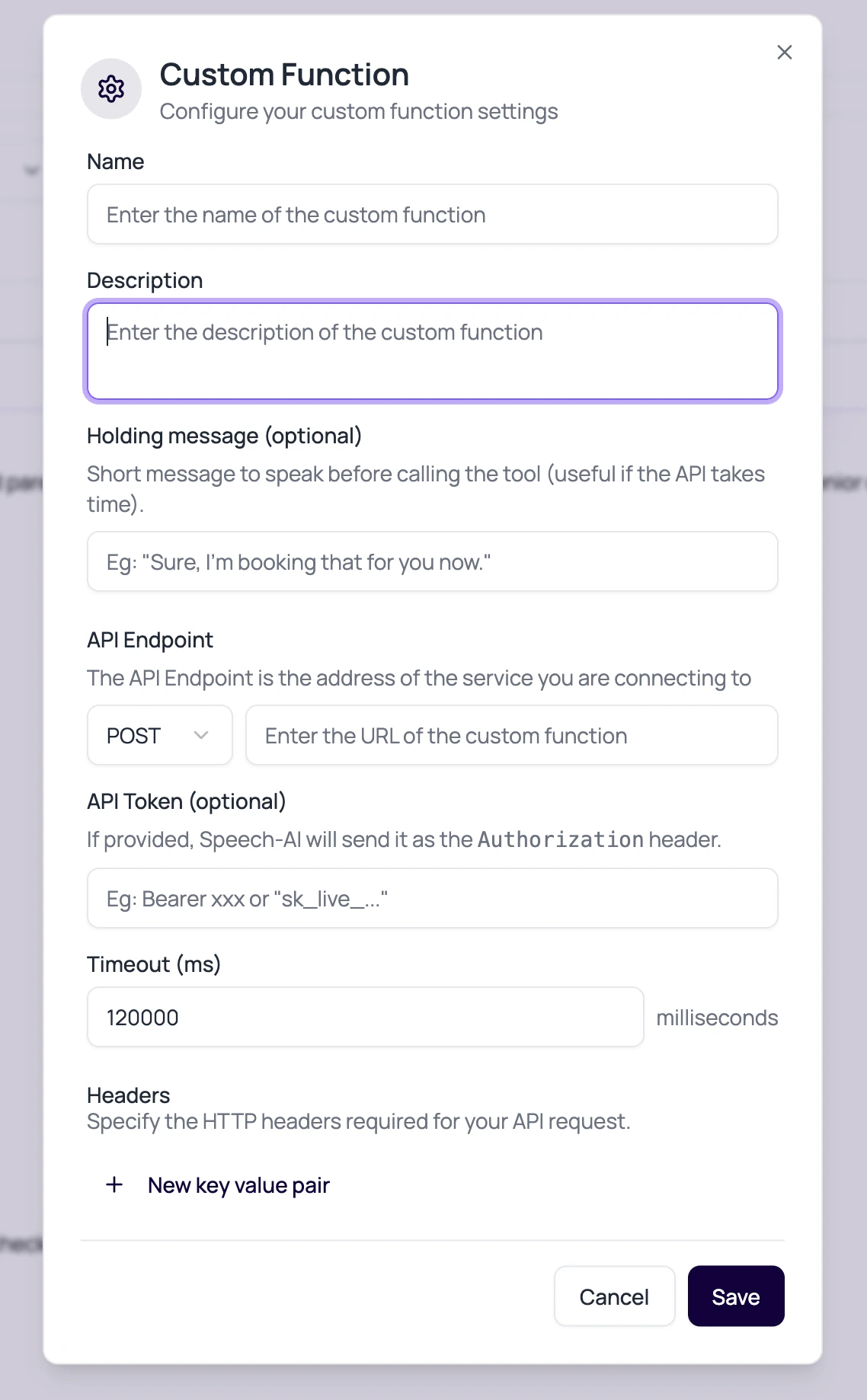 A custom function turns a conversation into an integration. That is useful, and also a reason to test like you mean it.
## Custom Function Fields
Each field changes how the agent calls the external service.
| Field | Purpose |
| ------------------ | ------------------------------------------------------------------------- |
| Description | Tells the model when and why to use the function. |
| API Endpoint | The URL of the service the function calls. |
| HTTP Method | The request method used by the function. |
| API Token | Optional bearer-style credential for the target API. |
| Timeout | Maximum wait time in milliseconds. The default reducer value is `120000`. |
| Headers | Additional key-value headers. |
| Query Parameters | Key-value values appended to the URL. |
| Response Variables | Named values the agent can use after the API response. |
| JSON Schema | Defines the format the model should return for function arguments. |
Use [dashboard integrations](/dashboard-integrations/overview) when the action is available as a managed provider connection. Use a custom function when you own the API contract, need custom authentication, or need response variables from your own service during the call.
## Dynamic Authorization For Chained API Calls
Custom function authentication can use values returned or supplied during the same tool call flow. This is useful when one function obtains a token and a later function must send that token to another API.
| Pattern | Behavior |
| ---------------- | ----------------------------------------------------------------------------------------------------------------------- |
| Static API token | Saved token is sent as `Authorization` when no custom header already sets it. |
| Token argument | Arguments named `access_token`, `auth_token`, `api_token`, or `authorization` can be used for the Authorization header. |
| Template token | API token values such as `Bearer %(access_token)s` are filled from function arguments. |
| Template headers | Custom headers can also use `%(key)s` substitutions from function arguments. |
Bare token values are normalized to `Bearer ` when they come from token argument fields. If the argument is named `authorization`, DialNexa sends the value as provided.
## Example JSON Schema Pattern
```json theme={null}
{
"type": "object",
"properties": {
"customer_id": { "type": "string" },
"requested_slot": { "type": "string" }
},
"required": ["customer_id"]
}
```
## Speech Behavior While A Function Runs
Callers should not sit in silence without context.
Short message spoken before calling the tool, useful when the API may take time.
Allows the agent to keep the caller informed while the tool runs.
Lets the agent explain the result after the tool returns.
Expose API result values that the agent can mention or use in the next turn.
## Custom Function Review Questions
Write prompt instructions for API errors, missing data, and timeouts.
A very long timeout may keep a caller waiting. A very short one may fail healthy APIs.
Use the API token or connection fields, not dynamic variables in prompts.
Keep JSON schema simple and test edge cases.
## Related Reading
See all function types.
Configure event delivery separately.
Use managed provider actions when they fit the job.
Test function calls in real calls.
A custom function turns a conversation into an integration. That is useful, and also a reason to test like you mean it.
## Custom Function Fields
Each field changes how the agent calls the external service.
| Field | Purpose |
| ------------------ | ------------------------------------------------------------------------- |
| Description | Tells the model when and why to use the function. |
| API Endpoint | The URL of the service the function calls. |
| HTTP Method | The request method used by the function. |
| API Token | Optional bearer-style credential for the target API. |
| Timeout | Maximum wait time in milliseconds. The default reducer value is `120000`. |
| Headers | Additional key-value headers. |
| Query Parameters | Key-value values appended to the URL. |
| Response Variables | Named values the agent can use after the API response. |
| JSON Schema | Defines the format the model should return for function arguments. |
Use [dashboard integrations](/dashboard-integrations/overview) when the action is available as a managed provider connection. Use a custom function when you own the API contract, need custom authentication, or need response variables from your own service during the call.
## Dynamic Authorization For Chained API Calls
Custom function authentication can use values returned or supplied during the same tool call flow. This is useful when one function obtains a token and a later function must send that token to another API.
| Pattern | Behavior |
| ---------------- | ----------------------------------------------------------------------------------------------------------------------- |
| Static API token | Saved token is sent as `Authorization` when no custom header already sets it. |
| Token argument | Arguments named `access_token`, `auth_token`, `api_token`, or `authorization` can be used for the Authorization header. |
| Template token | API token values such as `Bearer %(access_token)s` are filled from function arguments. |
| Template headers | Custom headers can also use `%(key)s` substitutions from function arguments. |
Bare token values are normalized to `Bearer ` when they come from token argument fields. If the argument is named `authorization`, DialNexa sends the value as provided.
## Example JSON Schema Pattern
```json theme={null}
{
"type": "object",
"properties": {
"customer_id": { "type": "string" },
"requested_slot": { "type": "string" }
},
"required": ["customer_id"]
}
```
## Speech Behavior While A Function Runs
Callers should not sit in silence without context.
Short message spoken before calling the tool, useful when the API may take time.
Allows the agent to keep the caller informed while the tool runs.
Lets the agent explain the result after the tool returns.
Expose API result values that the agent can mention or use in the next turn.
## Custom Function Review Questions
Write prompt instructions for API errors, missing data, and timeouts.
A very long timeout may keep a caller waiting. A very short one may fail healthy APIs.
Use the API token or connection fields, not dynamic variables in prompts.
Keep JSON schema simple and test edge cases.
## Related Reading
See all function types.
Configure event delivery separately.
Use managed provider actions when they fit the job.
Test function calls in real calls.