> ## Documentation Index
> Fetch the complete documentation index at: https://dialnexa.com/docs/llms.txt
> Use this file to discover all available pages before exploring further.
# DialNexa Call Settings
> Understand DialNexa call settings, including voicemail detection, voicemail messages, ambient noise, silence timeout, maximum call duration, phone routes, and published-version locking.
DialNexa call settings control phone-call behavior around voicemail, silence, ambient noise, and maximum duration. These settings decide what happens when nobody answers, the caller goes quiet, or the conversation runs too long.
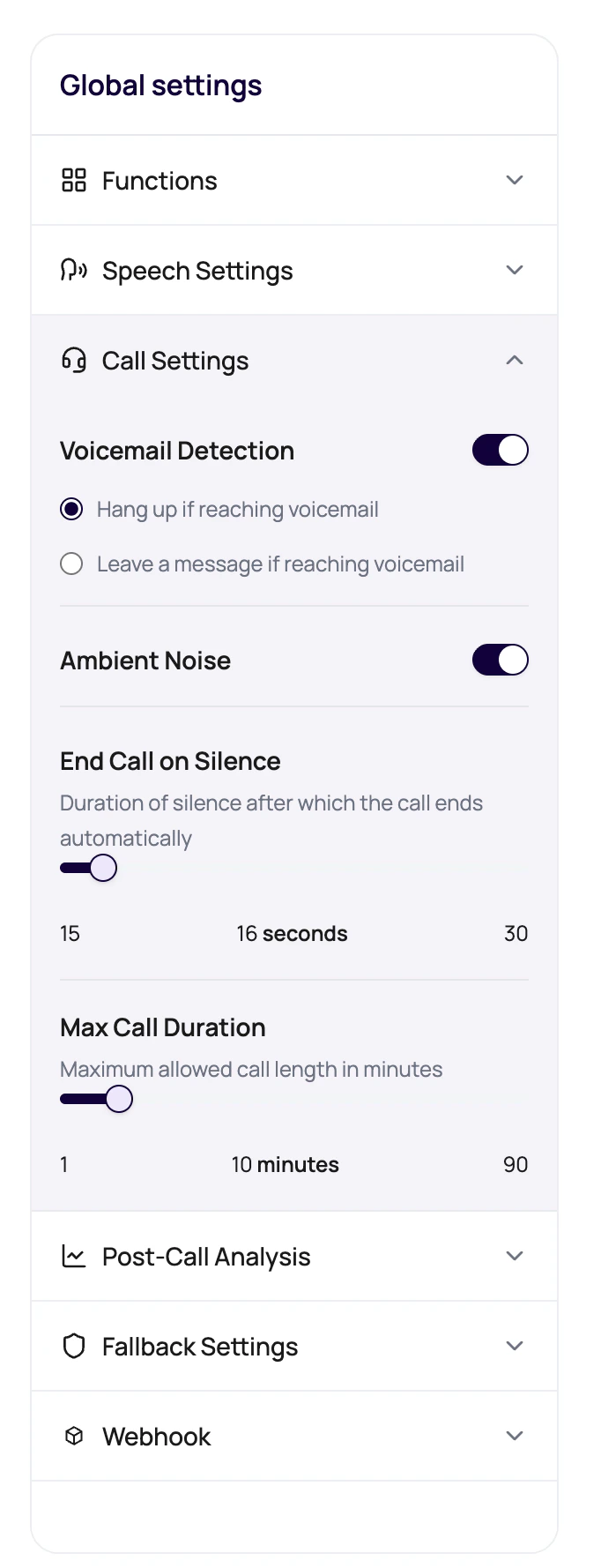 Call settings are guardrails. If they are too loose, calls wander. If they are too tight, callers get cut off mid-thought.
## Call Controls Users See
| Control | Behavior | Provider effect |
| --------------------- | ---------------------------------------------------------------------------------------------------------- | ------------------------------------------------------------------------ |
| Voicemail Detection | Detects voicemail and lets the user choose whether to hang up or leave a message. | Most relevant for outbound phone calls through Plivo or SIP routes. |
| Voicemail Message | Message content used when voicemail detection is set to leave a message. It can include dynamic variables. | Uses the selected voice and voice model, so pronunciation still matters. |
| Ambient Noise | Controls whether ambient sound is used in the call experience. | Test on actual phone calls, not only web calls. |
| End Call On Silence | Ends the call after a silence window. The UI guards against values too close to reminder timing. | Short timeouts can conflict with patient transcriber settings. |
| Maximum Call Duration | Caps the total call length. The UI expresses this in minutes and sends seconds to the API. | Longer calls increase cost and can expose more provider latency. |
## Set Call Limits Intentionally
For campaigns, choose whether voicemail should end the call or receive a short message.
Keep it short, include only safe dynamic variables, and test how the selected voice reads it.
Use enough silence time for real callers to think, find information, or respond.
A reminder call and a support intake call should not have the same limit by accident.
Let the test caller go quiet, hit voicemail, and talk longer than expected.
## Call Settings And Voice AI Providers
| If you see | Check |
| --------------------------------------- | ----------------------------------------------------------------------------------------- |
| Caller is cut off while thinking | End Call On Silence, Response Eagerness, and transcriber endpoint timing. |
| Voicemail sounds strange | Voice, voice model, speed, and dynamic variables in the voicemail message. |
| Calls run too long | Maximum Call Duration, prompt close conditions, End Call function, and transfer behavior. |
| Inbound and outbound behave differently | Phone number direction assignment, Plivo or SIP path, and voicemail behavior. |
## Call Setting Failure Modes
Add defaults for any `{{variable}}` used in the voicemail message.
Increase the timeout or adjust reminder timing. People pause, look up details, and ask someone nearby.
Review maximum duration, transfer handling, campaign retry settings, and whether the prompt ends calls clearly.
You may be viewing a published version. Create or select an editable draft for changes.
## Related Reading
Understand voicemail behavior.
Tune Response Eagerness and Denoising Mode.
Understand route assignments.
Plan for call duration.
Call settings are guardrails. If they are too loose, calls wander. If they are too tight, callers get cut off mid-thought.
## Call Controls Users See
| Control | Behavior | Provider effect |
| --------------------- | ---------------------------------------------------------------------------------------------------------- | ------------------------------------------------------------------------ |
| Voicemail Detection | Detects voicemail and lets the user choose whether to hang up or leave a message. | Most relevant for outbound phone calls through Plivo or SIP routes. |
| Voicemail Message | Message content used when voicemail detection is set to leave a message. It can include dynamic variables. | Uses the selected voice and voice model, so pronunciation still matters. |
| Ambient Noise | Controls whether ambient sound is used in the call experience. | Test on actual phone calls, not only web calls. |
| End Call On Silence | Ends the call after a silence window. The UI guards against values too close to reminder timing. | Short timeouts can conflict with patient transcriber settings. |
| Maximum Call Duration | Caps the total call length. The UI expresses this in minutes and sends seconds to the API. | Longer calls increase cost and can expose more provider latency. |
## Set Call Limits Intentionally
For campaigns, choose whether voicemail should end the call or receive a short message.
Keep it short, include only safe dynamic variables, and test how the selected voice reads it.
Use enough silence time for real callers to think, find information, or respond.
A reminder call and a support intake call should not have the same limit by accident.
Let the test caller go quiet, hit voicemail, and talk longer than expected.
## Call Settings And Voice AI Providers
| If you see | Check |
| --------------------------------------- | ----------------------------------------------------------------------------------------- |
| Caller is cut off while thinking | End Call On Silence, Response Eagerness, and transcriber endpoint timing. |
| Voicemail sounds strange | Voice, voice model, speed, and dynamic variables in the voicemail message. |
| Calls run too long | Maximum Call Duration, prompt close conditions, End Call function, and transfer behavior. |
| Inbound and outbound behave differently | Phone number direction assignment, Plivo or SIP path, and voicemail behavior. |
## Call Setting Failure Modes
Add defaults for any `{{variable}}` used in the voicemail message.
Increase the timeout or adjust reminder timing. People pause, look up details, and ask someone nearby.
Review maximum duration, transfer handling, campaign retry settings, and whether the prompt ends calls clearly.
You may be viewing a published version. Create or select an editable draft for changes.
## Related Reading
Understand voicemail behavior.
Tune Response Eagerness and Denoising Mode.
Understand route assignments.
Plan for call duration.