> ## Documentation Index
> Fetch the complete documentation index at: https://dialnexa.com/docs/llms.txt
> Use this file to discover all available pages before exploring further.
# DialNexa Agent Webhooks
> Understand DialNexa agent webhooks, the Enable Webhook toggle, save-first behavior, webhook IDs, and workspace external webhook requirements.
DialNexa agent webhooks let an agent participate in real-time event delivery. In the agent settings panel, users can enable or disable the webhook toggle for a saved agent. This page covers the per-agent toggle only; the workspace webhook URL, secret, and delivery behavior live in [External Webhooks](/api-access/external-webhooks) and [Webhook Secrets](/api-access/webhook-secrets).
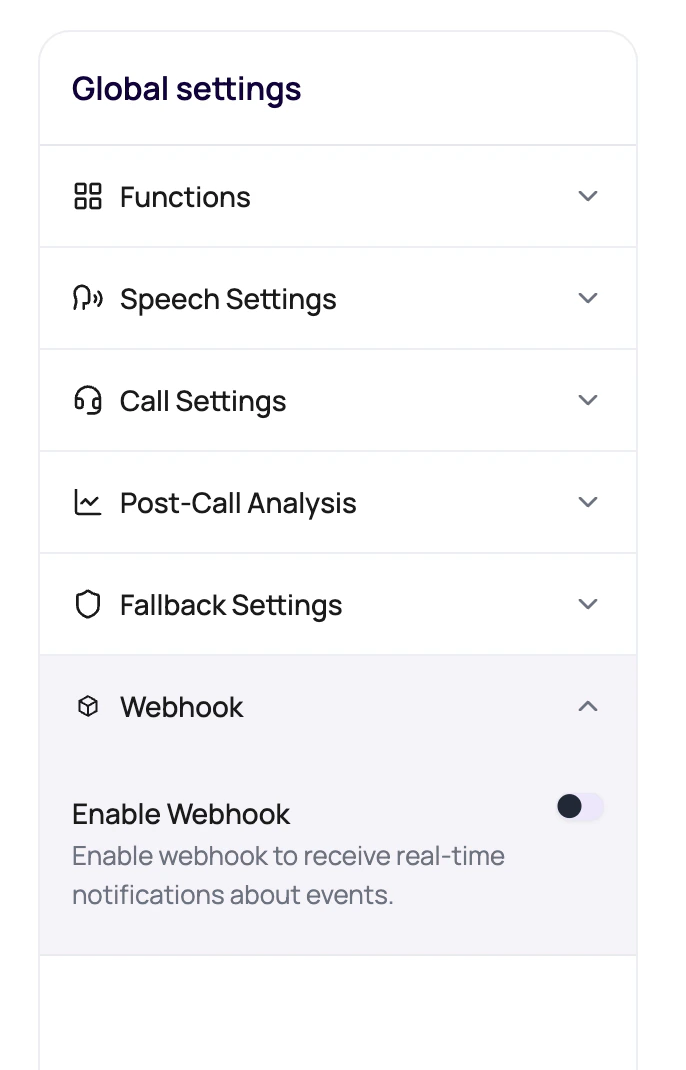 Agent webhook is the switch on the agent. External webhook is the address and verification setup. Both matter if you want events to arrive somewhere useful.
## Agent Webhook Behavior
The toggle updates webhook state for the selected agent.
| Action | Behavior |
| ---------------------- | -------------------------------------------------------------------------------------------------- |
| Enable Webhook | Creates or assigns webhook state for the agent and stores the webhook id. |
| Disable Webhook | Removes the agent webhook association. |
| Save first requirement | If the agent has not been saved yet, the dashboard asks the user to save before enabling webhooks. |
| Failure handling | If the update fails, the toggle does not stay enabled. |
## What Else Must Be Configured
Agent webhooks are only one part of event delivery.
The workspace endpoint receives events and must use HTTPS.
The receiver should verify events with the workspace webhook secret.
Workspace webhook settings decide retry count and timeout.
Call History confirms what happened even if a receiver failed.
## Enable Agent Events Safely
Configure the external webhook endpoint and secret.
The agent must exist before the toggle can update webhook state.
Turn on the agent-level webhook.
Confirm the receiver sees the event and Call History shows the same call.
## Related Reading
Configure the receiver endpoint.
Verify events safely.
Debug delivery issues.
Agent webhook is the switch on the agent. External webhook is the address and verification setup. Both matter if you want events to arrive somewhere useful.
## Agent Webhook Behavior
The toggle updates webhook state for the selected agent.
| Action | Behavior |
| ---------------------- | -------------------------------------------------------------------------------------------------- |
| Enable Webhook | Creates or assigns webhook state for the agent and stores the webhook id. |
| Disable Webhook | Removes the agent webhook association. |
| Save first requirement | If the agent has not been saved yet, the dashboard asks the user to save before enabling webhooks. |
| Failure handling | If the update fails, the toggle does not stay enabled. |
## What Else Must Be Configured
Agent webhooks are only one part of event delivery.
The workspace endpoint receives events and must use HTTPS.
The receiver should verify events with the workspace webhook secret.
Workspace webhook settings decide retry count and timeout.
Call History confirms what happened even if a receiver failed.
## Enable Agent Events Safely
Configure the external webhook endpoint and secret.
The agent must exist before the toggle can update webhook state.
Turn on the agent-level webhook.
Confirm the receiver sees the event and Call History shows the same call.
## Related Reading
Configure the receiver endpoint.
Verify events safely.
Debug delivery issues.